
The 12VHPWR and 12V-2×6 PCIe power connectors have raised deep concern among graphics card users due to melting issues. The 16-pin 12VHPWR connector is the successor of the older 6-pin/8-pin PCIe power connectors and is rated for up to 600W of power delivery. The connector uses 12+4 pins, where 12 pins are for power delivery, while the 4 pins are sense pins to check and negotiate power delivery between the graphics card and power supply. The sense pins communicate with the PSU for the maximum allowable power draw. The 16-pin 12VHPWR connector was first introduced on GeForce RTX 40 series graphics cards, including the RTX 4090, RTX 4080, RTX 4070 Ti SUPER, RTX 4070 Ti, RTX 4070 SUPER, and RTX 4070.
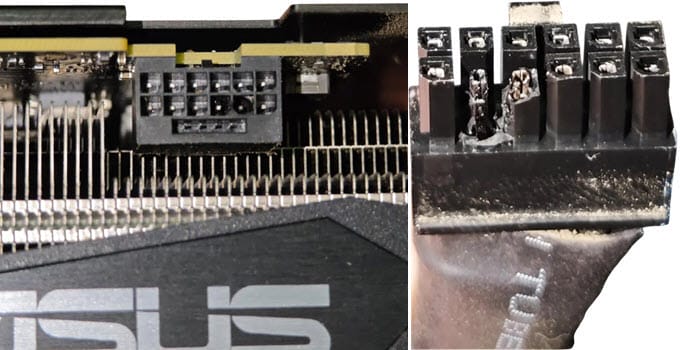
The 12VHPWR / 12V-2×6 connector on the graphics card is the socket (female), and the connector on the cable is the plug (male). Below you can see the melted 12VHPWR / 12V-2×6 connectors on the graphics card and cable end.
The 12V-2×6 connector is a minor revision of the 12VHPWR connector, with slightly shorter sense pins and slightly longer voltage pins. The lengths of the pins were adjusted to ensure the 12VHPWR cable is fully seated in the 12V-2×6 connector, preventing melting of the connector or cable. The GeForce RTX 50 Series Graphics Cards use the newer 12V-2×6 connector, which is used by the GeForce RTX 5090, RTX 5080, RTX 5070 Ti, and RTX 5070. Even with the minor changes and improvements to the 12V-2×6 connector, the problem of the connector melting down persists and appears on some cards that include GeForce RTX 5090 and Radeon RX 9070 XT. Generally, the melting issue happens with high-end graphics cards with higher power consumption (TDP), but the issue can also be seen in mid-range graphics cards.
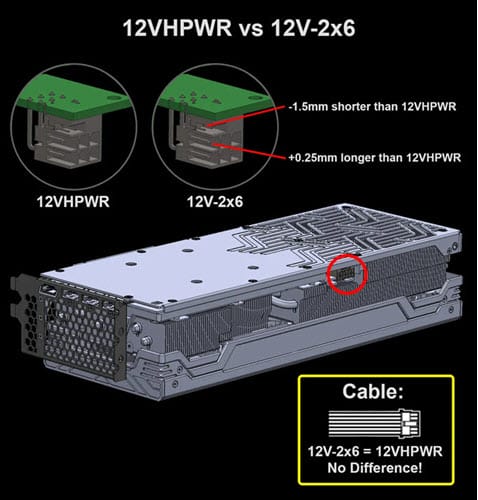
Important Note: The 12V connector on high-end RTX 30 series cards (RTX 3090, RTX 3080, etc.) is a 12-pin connector but lacks the four sense pins. Physically, the connector looks almost identical to the 12VHPWR/12V-2×6 connector.
Graphics Cards with Melted 12VHPWR / 12V-2×6 Connectors
Below is the list of graphics cards reported to suffered from melting of 12VHPWR/12V-2×6 connectors.
12VHPWR Melted Connectors Graphics Cards
- GeForce RTX 4090
- GeForce RTX 4080
12V-2×6 Melted Connectors Graphics Cards
- GeForce RTX 5090
- GeForce RTX 5080
- GeForce RTX 5070 Ti
- GeForce RTX 5070
- Radeon RX 9070 XT (Sapphire Model)
12VHPWR or 12V-2×6 connector pinout
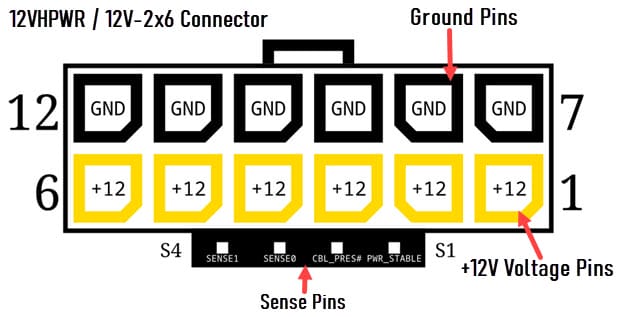
Below is the pinout for the 12VHPWR (12V-2×6) connector. The main connector has six 12V pins and six ground pins. Below the main connector, there are four small sense pins.
What causes the melting of the 12VHPWR or 12V-2×6 connector?
The primary cause of melting in the 12VHPWR or 12V-2×6 connector is its poor design and implementation, both internal and external. In the previous 6-pin/8-pin PCIe connectors, and even the 12-pin 12V connectors, there is proper load balancing among the connectors. For example, in a 6-pin or 8-pin connector, there is a separate current sensor or resistor per pin. Even with the 12-pin 12V connector, proper load balancing is achieved with three balancing resistors or a current sensor per pin pair. However, in the 12VHPWR or 12V-2×6 connector, all six pins are internally connected, so there is no way for the GPU to tell which pins are making good contact and which are not. For example, if only one or two pins make good contact, all current will flow through those pins, causing overload, overheating, and melting of the connector.
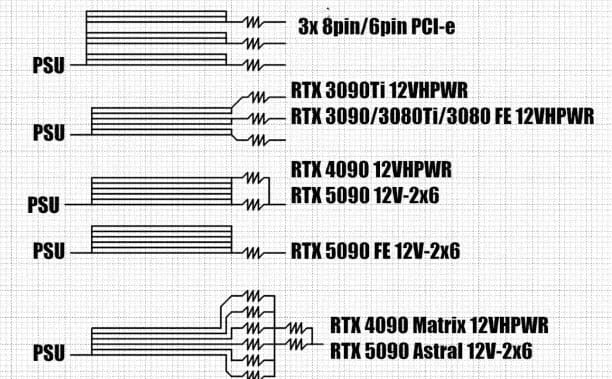
Also, these connectors are rated for 600W, which is too high for the wires on the 12VHPWR/12V-2×6 connector cable to handle. A slightly loose contact between the graphics card’s connector pins and the 12VHPWR cable connector, even when the cable is fully inserted, can lead to higher resistance and cause more current to flow through the wires, which they cannot handle. This will lead to overheating under heavy load and result in the connectors melting at both the cable and graphics card ends. Melting of the 12VHPWR or 12V-2×6 connector is a serious issue and should not be ignored, as it can cause significant damage to your graphics card, motherboard, PSU, or even other components. It’s always better to take preventive measures to prevent the connector from overheating and melting.
Measures to Prevent 12VHPWR / 12V-2×6 Connector from Melting
Below are some tips, a checklist, and measures you can follow to prevent the melting of the 12VHPWR or 12V-2×6 connector.
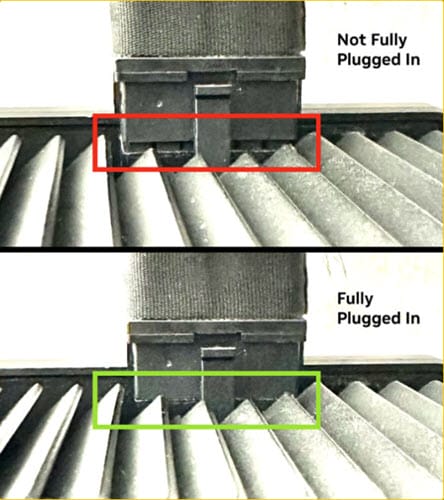
Ensure Connector is Fully Inserted
Make sure the 12VHPWR connector (male plug) on the cable end is fully inserted into the 12VHPWR/12V-2×6 connector socket at the graphics card and PSU ends. When the cable connector is properly seated, it should lock into the latch on the 12VHPWR/12V-2×6 connector socket. You should hear a click when you fully insert the connector into the socket. After insertion, visually check whether the connector is properly seated in the socket.
Avoid Sharp Bends and Stress on Cable
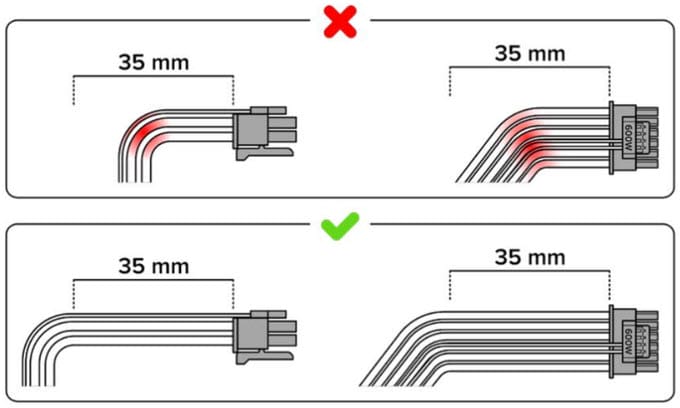
Avoid bending the cable immediately after the connector, as a tight bend may cause the pins to loosen slightly internally and prevent proper contact. This can cause the connector to melt or burn. For bending, maintain a minimum distance of 35mm from the connector, as shown in the figure below. Also, the 12VHPWR cable should be free to move, and no stress should be placed on it by other cables, components, panels, or the internal structure of the PC Case.
Avoid Third-party 12VHPWR Adapters or cables.
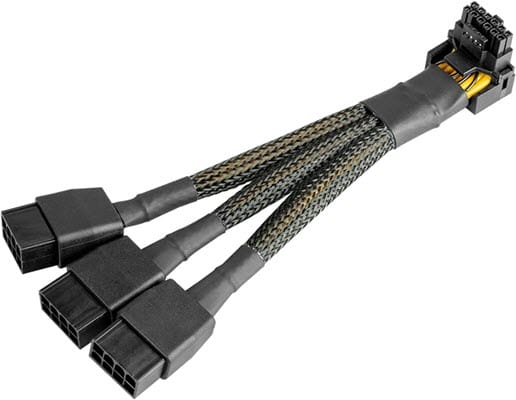
Avoid using third-party or low-quality 12VHPWR Adapters and Cables, including the 12VHPWR Adapter and the 8-pin to 16-pin 12VHPWR Cable. It is recommended to use the native 12VHPWR Cable that comes with the ATX 3.0 or ATX 3.1 PSU. If your PSU does not have a native 12VHPWR/12V-2×6 Cable, it is better to use a high-quality 3x 8-pin-to-16-pin 12VHPWR Cable or the adapter cable. For graphics cards with higher power consumption, avoid the dual 2x 8-pin to 16-pin 12VHPWR Cable and get the triple 3x 8-pin to 16-pin 12VHPWR Cable. Moreover, using a 90-degree cable at the graphics card end can be preferable to a straight one. Below is a high-quality 90-degree 3-pin 8-pin to 16-pin 12VHPWR connector cable.
Avoid PSU Extension Cables
Avoid using a PSU extension cable for a 12VHPWR connector. The more contact points and the longer the overall cable, the greater the contact resistance, which can lead to overheating of the wires and the connector. If you really have to use a 12VHPWR/12V-2×6 connector extension cable, look for a high-quality one. Below is a high-quality 12V-2×6 PCIE 5.1 GPU Extension Cable from EZDIY-FAB.
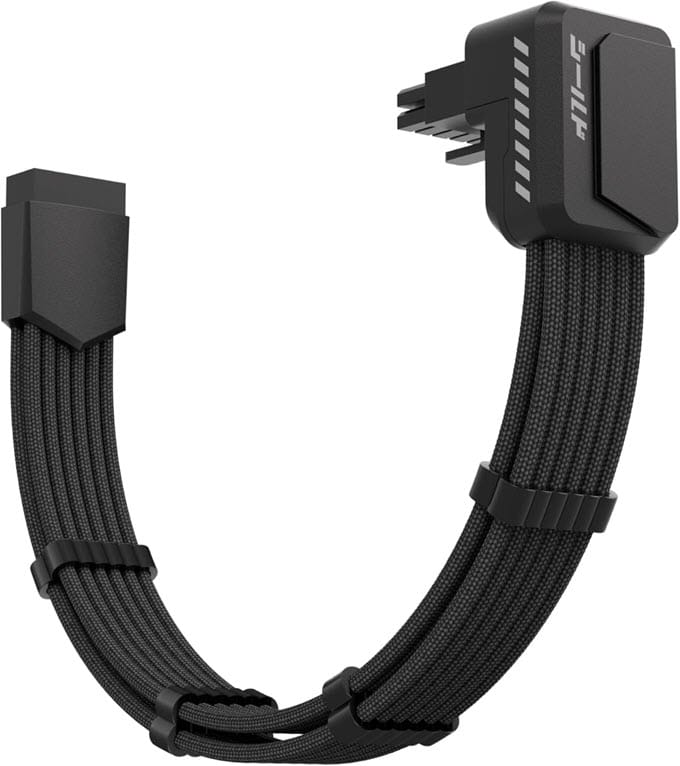
- Buy EZDIY-FAB Shield PCIE 5.1 GPU Extension Cable with 90 Degree 12V-2×6 Angle Adapter (Standard)
- Buy EZDIY-FAB Shield PCIE 5.1 GPU Extension Cable with 90 Degree 12V-2×6 Angle Adapter (Reverse)
Note: This extension cable is not recommended for use with RTX 5090 due to extreme power spikes.
Avoid Frequent Unplugging of the Connector
The 12VHPWR/12V-2×6 connector is officially rated for only 30–40 mating cycles. Frequent unplugging and plugging the connector can loosen the contact pins or wear them out structurally, leading to overheating and melting at the graphics card and cable ends.
Regular Inspection
Regularly inspecting the 12VHPWR/12V-2×6 connector visually, without unplugging it, can help you determine whether it is OK. If you notice any slight disfiguration or deformation of the connector, it may indicate melting.
Avoid GPU Overclocking
Avoid overclocking your graphics card, especially if it’s high-end. Overclocking can draw more current from the GPU, placing additional load on the 12VHPWR connector and cable, which can melt them under heavy GPU load.
Power Limit the Graphics Card
If your graphics card has high power consumption or a power limit higher than the official rated limit, lowering the power limit can reduce the power draw through the 12VHPWR/12V-2×6 connector. You can use a good GPU overclocking tool like MSI Afterburner to lower the GPU’s power limit.
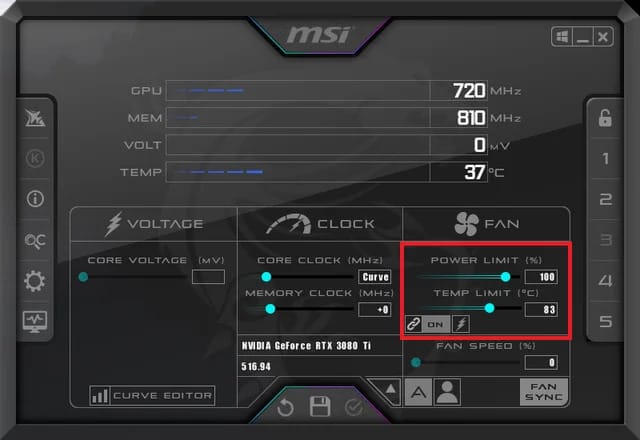
Must Read: GPU Power Limiting vs Undervolting vs Underclocking Difference
Use WireView Pro II
WireView Pro II is a 12VHPWR/12V-2×6 connector monitoring and safety device from Thermal Grizzly. The device monitors current, power, and temperature at the 12VHPWR/12V-2×6 connector and can alert the user or shut down power if any abnormality or load imbalance is detected. The device housing is made of aluminum and features a TFT-IPS display that shows critical parameters (current, power, temperature, and fan speed) in real time. A small fan is also integrated into the device to keep it cool under high GPU load. The device also serves as a 90-degree adapter to avoid cable bending.
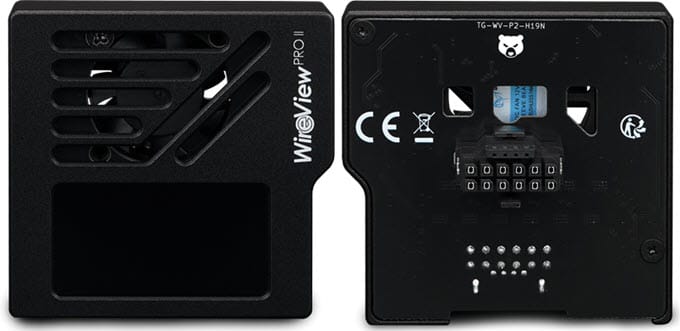
The WireView Pro II continuously monitors current (A), voltage (V), temperature (°C), and power consumption (W). WireView Pro II can monitor current values with precision per connector pin. If a threshold is exceeded, a visual warning appears on the display and an audible alarm is triggered. If required, the included splitter cable can be used to configure an automatic system shutdown. Threshold values can be adjusted through the configuration menu. 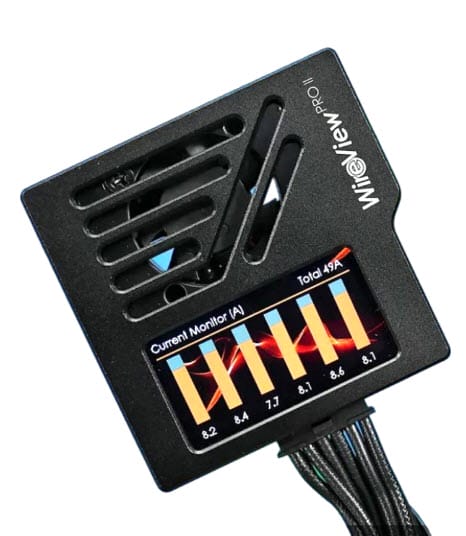
The device’s built-in memory stores operating data, such as per-pin current, total power, and PCB temperature, at 60-second intervals. The storage capacity allows up to 340 days of continuous operation or several years of typical gaming usage before older entries are overwritten. The collected data support both failure analysis and the continued development of safer plug connections within the community. WireView Pro II is available in “Normal” (N) and “Reverse” (R) versions depending on the orientation of the connector present on your graphics card.
Get an ATX 3.1 PSU
If you have a graphics card with higher power consumption but an older power supply without a native 12VHPWR/12V-2×6 connector, an ATX 3.1 PSU with a 12V-2×6 connector will help your graphics card run smoothly and avoid issues with Power Excursion or transient power spikes. Below is the list of ATX 3.1 power supplies.
Get a PSU with Thermal Monitoring
Some power supplies include additional safety features for the 12VHPWR/12V-2×6 connector. If they detect a significantly higher temperature at the 12VHPWR/12V-2×6 connector, they disconnect power to the connector to prevent melting or burning. The ASRock PG series PSUs come with a temperature sensor on the 12V-2×6 connector at the graphics card to detect overheating of the connector. If the temperature reaches 105 degrees, the PSU cuts power to the graphics card, preventing melting or burning of the 12VHPWR/12V-2×6 connector and protecting the card from damage.
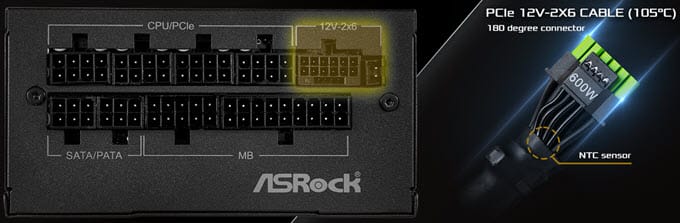
ASRock PSUs with Native 12V-2×6 Connector Dual Color Design with TempGuard
- ASRock PG-1600G Power Supply
- ASRock PG-1300G Power Supply
- ASRock PG-1000G Power Supply
- ASRock PG-850G Power Supply
- ASRock PG-750G Power Supply
- ASRock PG-1000PSF Power Supply
- ASRock PG-850PSF Power Supply
Buy a Graphics Card Model with Built-in Current Monitoring
Graphics cards from some AIB partners or manufacturers include separate shunt resistors for each pin (or pin pair) on the 12HPWR/12V-2×6 connector to monitor current or load imbalances and alert the user via supported software if any imbalance is detected. Some Asus RTX graphics card models, such as the RTX 5090 Astral and ASUS TUF Gaming 5090, employ these safety measures. Also, some Zotac RTX graphics cards have a red LED indicator and refuse to power on if they detect that the 12V-2×6 connector is not fully inserted or seated.
Get a Graphics Card with an 8-pin PCIe Connector.
If you want to avoid the trouble with 12VHPWR and 12V-2×6 connectors entirely, you can get a graphics card that still uses 8-pin PCIe power connectors. Currently, all AMD Radeon graphics cards come with 8-pin PCI connectors. Also, some of the latest mid-range Nvidia graphics cards, including the GeForce RTX 5060 Ti and RTX 5060, use 8-pin PCIe connectors.
How to Repair Melted 12VHPWR / 12V-2×6 Connector
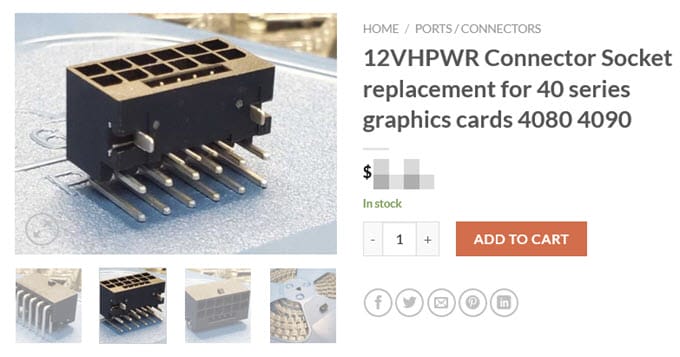
Even if you have followed the guidelines and taken the necessary precautions, a minor manufacturing defect in the cable or connector can cause the connector to melt. The melted connector can be easily replaced by desoldering it and soldering a new 12HPWR/12V-2×6 connector. You can have it repaired by a good graphics card technician, or do it yourself if you know how to solder. You can buy replacement 12VHPWR/12V-2×6 Connectors online if you want to do a DIY repair.
Need more help?
If you have any questions or are still experiencing melting issues with the 12VHPWR/12V-2×6 connector, please post them in the comments section below.
(*This post may contain affiliate links, which means I may receive a small commission if you choose to purchase through the links I provide (at no extra cost to you). Thank you for supporting the work I put into this site!)
![Failing Power Supply Symptoms [Top Signs of PSU Failure]](https://graphicscardhub.com/wp-content/uploads/2023/02/psu-failure-signs-211x150.jpg "Failing Power Supply Symptoms [Top Signs of PSU Failure]")
![Symptoms of Bad RAM [Faulty Memory Sign, Causes and Fixes]](https://graphicscardhub.com/wp-content/uploads/2026/03/faulty-RAM-symptoms-211x150.jpg "Symptoms of Bad RAM [Faulty Memory Sign, Causes and Fixes]")
![What PSU do I Need? [Complete Guide for Beginners]](https://graphicscardhub.com/wp-content/uploads/2020/04/what-psu-do-i-need-211x150.jpg "What PSU do I Need? [Complete Guide for Beginners]")

Why can’t they just put set screws with a single black and a single yellow wire? Give it a torque rating… a set of 6awg copper would be the size though. 600w at 12v would be 50a which is 6awg in the nec USA electrical code. Alternatively put a thermistor on the port.
Alternatively, a slightly larger connector, thicker wires, and a dual-latch mechanism would have been successful.