
The melting issue associated with 12VHPWR and 12V-2×6 connectors is still a concern for high-end graphics cards. The newer 12V-2×6 connector has improved the original 12VHPWR design, but connector melting has not completely disappeared. This is especially concerning with powerful graphics cards such as the GeForce RTX 5090, where the GPU can draw a very high amount of power through a single 16-pin connector. Even with a good ATX 3.1 PSU and a properly connected cable, excessive heat at the connector is still possible under certain conditions.
Fortunately, protection devices and cables are now available to help reduce the risk of the 12V-2×6 connector melting. Some of them monitor the connector’s temperature and current in real time, while others use higher-current wires, temperature sensors, improved terminals, or a 90-degree connector design. In this article, we will look at some of the best 12V-2×6 protection devices, monitoring adapters, protection cables, and 90-degree cables that can help prevent or reduce the risk of connector melting.
What Causes 12V-2×6 Connector Melting?
There is no single reason behind every melted 12VHPWR or 12V-2×6 connector. However, several factors can increase the risk of overheating and cause melting.
Improper Connection – The most important thing is to make sure that the 12V-2×6 connector is fully inserted into the graphics card. A connector that is not completely seated can have poor contact between some of the terminals. This increases contact resistance and can cause the affected contacts to run hotter when the GPU draws a large amount of power. The connector should be inserted firmly until it is completely seated and locked into the latch. After connecting the cable, visually inspect the connector and make sure there is no visible gap between the plug and the graphics card socket. The same applies to the PSU side when using a modular power supply. Make sure the cable is properly inserted into the PSU connector as well. The newer 12V-2×6 connector improves the insertion detection mechanism compared with 12VHPWR, but proper installation is still important.
Sharp Cable Bending – Avoid bending the 12V-2×6 cable immediately after the connector. A sharp bend can put mechanical stress on the connector and cable, causing an improper connection. A minimum distance of around 35mm from the connector before bending is recommended. The cable should come straight out of the connector before gradually changing direction.
High GPU Power Consumption – High power consumption is another factor that should not be ignored. A 600W-rated 12V-2×6 connection can carry a very large amount of power. When a high-end graphics card operates close to the upper limit for an extended period, the cable and connector are under considerably more electrical and thermal stress. This can cause overheating at the connector end and may melt the connector.
Check out: Top Ways to Prevent 12VHPWR / 12V-2×6 Connector Melting
Active 12V-2×6 Protection Devices
Active protection devices are different from conventional power cables because they monitor the connector while the graphics card is operating. Depending on the product, they can monitor temperature, current, voltage, power consumption, or current on individual pins. If the measured value exceeds a specified threshold, the device can warn the user. Some products can also reduce power or shut down the graphics card.
Thermal Grizzly WireView Pro II
The Thermal Grizzly WireView Pro II is one of the most advanced 12VHPWR and 12V-2×6 monitoring devices on the market. It is designed for graphics cards that use a 16-pin power connector and can monitor several important parameters, including current, voltage, temperature, and power consumption. The most important feature of the WireView Pro II is its ability to monitor current on individual power pins. This is important because the total power consumption alone does not tell you whether the current is being distributed evenly across the connector.
The device has a 320 × 170-pixel TFT-IPS color display that shows the monitored information in real time. You can see parameters such as GPU power consumption, current on individual pins, temperature, and voltage directly on the display. If a configured threshold is exceeded, the device can display a visual warning and activate an audible alarm. You can also adjust the threshold values through the configuration menu.
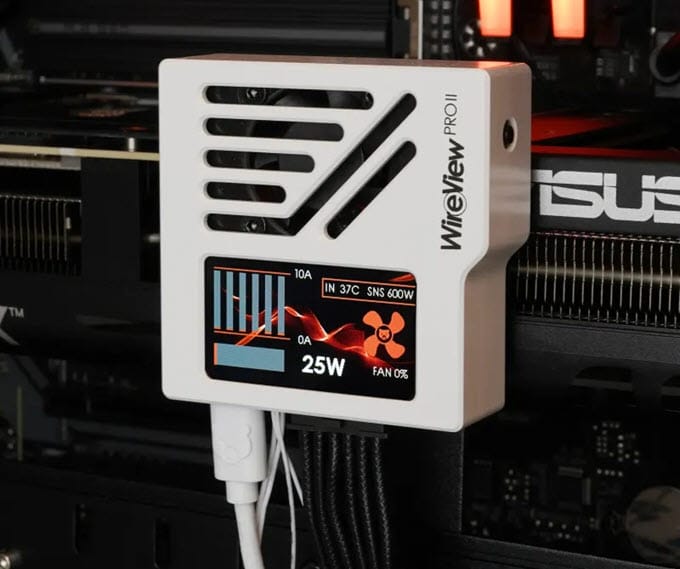
Another useful feature is automatic system shutdown. The included splitter cable lets you configure the WireView Pro II to shut down the system when it detects a critical condition. The device also supports software integration. The WireView Pro II software lets you access logged data and adjust settings. The WireView Pro II uses an aluminum housing and has a small 30mm semi-passive fan for cooling.
The device comes in three versions: Normal, Reverse, and Wired. The Normal and Reverse versions have a built-in 12V-2×6 connector and also function as 90-degree adapters. The difference between them is the connector orientation. This matters because the 16-pin connector isn’t positioned the same way on every graphics card.
The Wired version uses a cable between the graphics card and the monitoring unit. This lets you mount the monitoring unit on the graphics card or place it elsewhere inside the PC case. The Wired version is compatible with all graphics cards, while the Normal and Reverse versions can have clearance problems with some graphics cards. The Normal and Reverse versions are not compatible with some graphics card models, so check the compatibility list before purchasing the Normal or Reverse version. The WireView Pro II is available in black and white color options.
Incompatible Graphics Cards
ASUS GeForce RTX 5080 Noctua OC Edition, ASUS ROG Matrix GeForce RTX 4090, ASUS TUF Gaming GeForce RTX 4090 OG OC, EK-Quantum Vector² FE RTX 4080 Waterblock, GIGABYTE AORUS GeForce RTX 5070 Ti Master 16G, GIGABYTE AORUS GeForce RTX 5080 Master 16G, GIGABYTE AORUS GeForce RTX 5080 Master ICE 16G, GIGABYTE GeForce RTX 5070 Ti Gaming OC 16G, GIGABYTE GeForce RTX 5080 Gaming OC 16G, INNO3D GeForce RTX 5090 iCHILL Frostbite, MSI GeForce RTX 5090 Suprim/Vanguard/Gaming Trio PCB with AC waterblock, NVIDIA GeForce RTX 5080 Founders Edition, NVIDIA GeForce RTX 5090 Founders Edition, Palit GeForce RTX 5080 GamingPro, Watercool HEATKILLER V for ASUS TUF Gaming GeForce RTX 5090, and Zotac Gaming RTX 5090 ArcticStorm AIO.
| Thermal Grizzly WireView Pro II Specifications | |
| Device Type | GPU Power Monitoring Device / 12V-2×6 Adapter |
| Protection Type | Active Protection |
| Connector | 12VHPWR / 12V-2×6 |
| Monitoring | Per-pin current, total current, power consumption, voltage and temperature |
| Display | 320 × 170 pixel TFT-IPS color display |
| Alarm | Visual warning and audible alarm |
| Automatic Shutdown | Yes, via included splitter cable |
| Threshold Settings | Adjustable |
| Software | WireView Pro II software for logged data and configuration |
| Cooling | 30 mm semi-passive fan |
| Body Material | Aluminum |
| Versions | Normal, Reversed and Wired |
| Compatibility | Wired version compatible with all graphics cards; Normal/Reversed versions have clearance limitations |
| Colors | Black and White |
Buy Thermal Grizzly WireView Pro II
EZDIY-FAB Alpha TS13 GPU Power Adapter
The EZDIY-FAB Alpha TS13 GPU Power Adapter is a more affordable alternative to the WireView Pro II. It also monitors the GPU power connection, but it does not provide per-pin current monitoring. The device has a TFT display that shows real-time information, including connector temperature, current, and GPU power consumption. It monitors the temperature of both the male and female connector sides. The Alpha TS13 also has an audible alarm. When the GPU power connector temperature reaches 85°C / 185°F, the built-in 75dB alarm activates. This warns you before the connector reaches an even higher temperature. However, the Alpha TS13 does not automatically shut down the system when the connector becomes too hot.
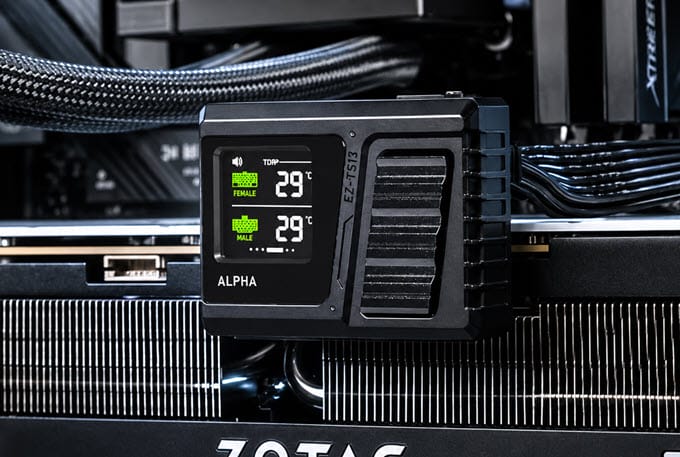
Another limitation is that the 85°C temperature threshold is fixed. You cannot change it through software. The device does not support PC software integration and works through its built-in firmware. The Alpha TS13 uses a U-shaped or 180-degree design and is available in Standard and Reverse orientations. It is not compatible with Nvidia’s Founder Edition cards. For the full compatibility list, click here. The device housing is made of aluminum and is available in black and white colors.
| EZDIY-FAB Alpha TS13 GPU Power Adapter Specification | |
| Device Type | GPU Power Monitoring Device / 12V-2×6 Adapter |
| Protection Type | Active Monitoring |
| Connector | 12V-2×6 / 12VHPWR |
| Monitoring | Current, voltage, GPU power consumption, and connector temperature |
| Temperature Monitoring | Male and female connector temperature |
| Display | TFT color display |
| Alarm | 75 dB audible alarm |
| Alarm Temperature | 85°C / 185°F |
| Automatic Shutdown | No |
| Software | No; firmware-based |
| Threshold Settings | Fixed at 85°C |
| Design | U-shaped / 180-degree adapter |
| Orientation | Standard and Reverse |
| Body Material | Aluminum |
| Compatibility | Not compatible with NVIDIA Founders Edition cards with 16-pin connector |
| Colors | Black and White |
Buy EZDIY-FAB Alpha TS13 GPU Adapter
Cooler Master GPU Shield Adapter
The Cooler Master GPU Shield Adapter takes a simpler approach. Instead of using a display, it uses a multicolor LED ring to indicate the condition of the GPU power connection. The adapter provides per-pin current monitoring and can alert the user using both the LED indicator and an audible alarm. It can also reduce system power consumption during a critical condition or when the current on an individual pin becomes excessively high.
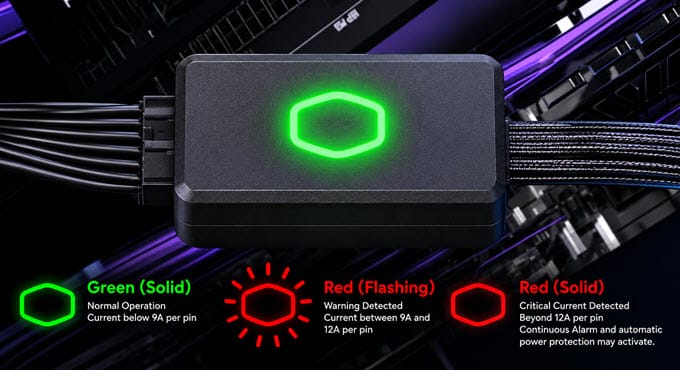
The LED indicator provides three basic operating states.
- A solid green light indicates normal operation below 9A per pin.
- A flashing red light indicates current between 9A and 12A per pin.
- If current exceeds 12A per pin, the LED turns solid red and a continuous alarm activates. Automatic power protection may also be triggered.
Another useful feature is the dual-color 12+4-pin connector. The black and purple colors make it easier to check whether the 16-pin connector is properly inserted. Cooler Master GPU Shield Adapter is compatible with all graphics cards with a 16-pin power connector and is cheaper than the GPU monitoring devices mentioned above.
| Cooler Master GPU Shield Adapter Specifications | |
| Device Type | GPU Power Protection Adapter |
| Protection Type | Active Protection |
| Connector | 12VHPWR / 12V-2×6 |
| Monitoring | Per-pin current monitoring |
| Display | Multi-color LED ring |
| Display Screen | No |
| Normal Operation | Green below 9A per pin |
| Warning | Flashing red at 9–12A per pin |
| Critical Level | Solid red above 12A per pin |
| Alarm | Continuous audible alarm above 12A per pin |
| Automatic Protection | Yes, automatic power protection may be triggered |
| Connector Indicator | Dual-color black/purple 12+4-pin connector |
| Compatibility | All Graphics cards with a 16-pin power connector |
Buy Cooler Master GPU Shield Adapter
12V-2×6 Protection Cables (Passive Devices)
You do not necessarily need a separate monitoring adapter to improve the safety of a 12V-2×6 connection. 12V-2×6 cables are now available with temperature sensors, higher-current conductors, improved terminals, or other protection features.
Corsair ThermalProtect PCIe 5.1 600W 12V-2×6 Cable
The Corsair ThermalProtect cable differs from a standard 12V-2×6 cable because it has built-in Over-Temperature Protection. The cable has a temperature sensor integrated into the cable comb, approximately 30mm from the GPU connector. The protection hardware is located near the GPU-side connector and connects to the Sense0 and Sense1 wires. When the temperature exceeds 65°C, the Over-Temperature Protection activates. The cable sends a signal through the sense pins to the GPU, instructing it to shut down. When this happens, the GPU loses power, and the display goes black, while the rest of the PC can continue operating.
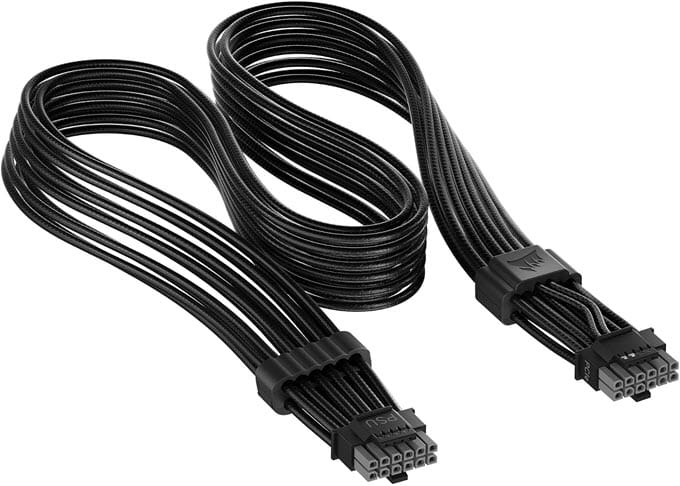
Once the cable cools down, normal operation can resume. The Corsair ThermalProtect cable is rated for up to 600W and is compatible with graphics cards that use a 16-pin power connector. It has a flexible design with low-profile cable combs. The connectors use two colors, making it easier to visually check whether the connector is fully inserted. The cable is available in black and white colors.
| Corsair ThermalProtect 12V-2×6 Cable Specifications | |
| Device Type | 12V-2×6 GPU Power Cable |
| Protection Type | Built-in Over-Temperature Protection (OTP) |
| Connector | 12V-2×6 |
| Maximum Power | 600W |
| Temperature Sensor | Yes |
| Sensor Location | Approximately 30 mm from GPU connector |
| OTP Trigger Temperature | Above 65°C |
| Protection Action | Sends shutdown signal to GPU through Sense0/Sense1 |
| Automatic GPU Shutdown | Yes |
| Connector Indicator | Dual-tone connector |
| Cable Design | Flexible debossed cable with low-profile combs |
| Compatibility | Graphics cards with 16-pin power connector |
| Colors | Black and White |
Buy Corsair ThermalProtect 12V-2×6 Cable
ASUS ROG Equalizer 12V-2×6 PCIe Cable
The ASUS ROG Equalizer Cable has no temperature sensor or current-monitoring circuit. Instead, ASUS increased the cable’s current-carrying capacity. A standard 12V-2×6 cable has a current capacity of 9.2A per wire, while the ROG Equalizer is rated for 17A per wire. This is a significant increase in current capacity. A cable with higher current capacity provides more headroom when the graphics card draws a large amount of power.
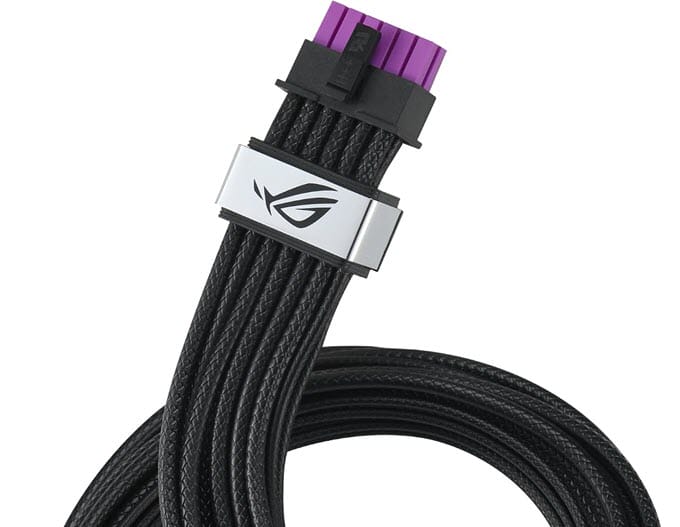
The cable is designed to handle a continuous 600W load, which is within the 12V-2×6 specification. ASUS uses tin-plated oxygen-free copper conductors in the ROG Equalizer cable. The design is intended to provide high conductivity, low resistance, lower heat generation, and good flexibility. The higher current capacity can also help when the current is not evenly distributed between the power pins.
The cable’s patented design helps keep the cable and graphics card connector below the 105°C safety limit under extreme conditions, including a sustained 600W load with only two active power pins. The connectors are purple and black, making it easier to check whether they are properly seated. It is compatible with graphics cards and power supplies from different brands. The cable is braided and is available in black and white.
| ASUS ROG Equalizer 12V-2×6 PCIe Cable Specifications | |
| Device Type | 12V-2×6 GPU Power Cable |
| Protection Type | High-Current / High-Quality Cable Design |
| Connector | 12V-2×6 |
| Maximum Power | 600W |
| Current Capacity | Up to 17A per wire |
| Standard Cable Capacity | 9.2A per wire |
| Temperature Sensor | No |
| Current Sensor | No |
| Cable Material | Tin-plated oxygen-free copper |
| Connector Indicator | Dual-color purple/black |
| Cable Design | Braided |
| Compatibility | Graphics cards and power supplies from any brand with a 16-pin connector |
| Colors | Black and White |
| Thermal Design | Designed to keep the cable and connector below the 105°C safety limit under stated extreme conditions |
Buy ASUS ROG Equalizer 12V-2×6 Cable
ASRock 12V-2×6 600W Power Cable
The ASRock 12V-2×6 600W Power Cable combines temperature protection with a 90-degree connector. The cable has an NTC temperature sensor near the graphics card connector. The sensor monitors connector temperature and sends a signal to the PSU when it gets too high. The Over-Temperature Protection does not work with every PSU. It requires a compatible ASRock power supply. The compatible PSUs include ASRock Taichi, Phantom Gaming, and Steel Legend Platinum Series models.
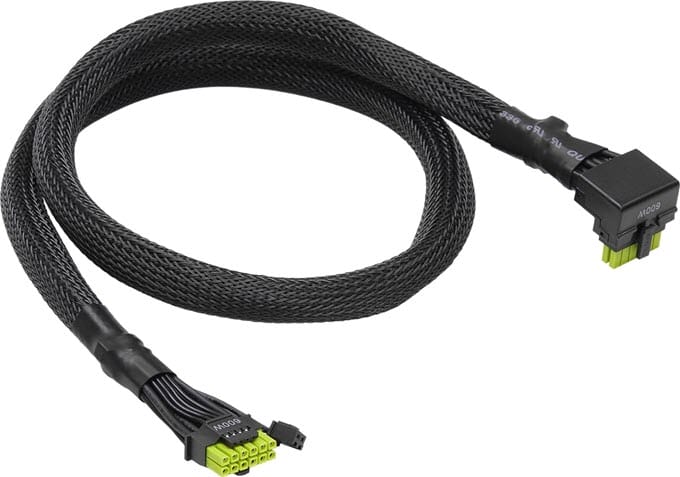
The graphics card side of the cable uses an L-shaped 90-degree connector. This means the cable doesn’t have to make a sharp bend immediately after leaving the graphics card. The connector uses HCS high-current terminals and a 94V-0 plastic housing for extra protection against overheating and melting. The cable is sleeved for added protection against accidental cuts and external damage. The connector uses fluorescent green and black colors, making it easier to check whether the cable is properly inserted. The cable supports a maximum rated power of 600W.
| ASRock 12V-2×6 600W Power Cable Specifications | |
| Device Type | 12V-2×6 GPU Power Cable |
| Protection Type | Built-in Cable Over-Temperature Protection |
| Connector | 12V-2×6 |
| Maximum Power | 600W |
| Temperature Sensor | NTC sensor |
| Sensor Location | GPU connector end |
| Protection System | Temperature signal sent to PSU |
| Required PSU for OTP | ASRock Taichi / Phantom Gaming / Steel Legend Platinum Series |
| GPU-Side Connector | L-shaped 90-degree |
| Connector Housing | 94V-0 plastic |
| Cable Protection | Sleeved |
| Connector Indicator | Fluorescent green/black dual-color |
| Compatibility | Requires compatible ASRock PSU for OTP function |
Buy ASRock 12V-2×6 600W Power Cable
12V-2×6 90-Degree Cables and Adapters
A 90-degree 12V-2×6 cable or adapter can still be useful, even if you don’t need active monitoring. It may not eliminate the risk of melting, but it can help prevent cable bending at the connector end of the graphics card. With a conventional straight connector, the cable normally has to change direction somewhere immediately outside the graphics card. In compact PC cases, this can result in an excessively tight bend. A right-angle cable or adapter changes the cable direction at the connector, making cable management easier without creating the same sharp bend in the cable.
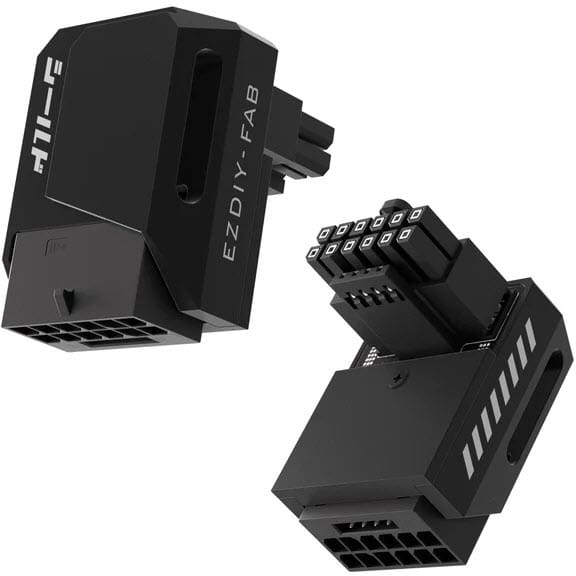
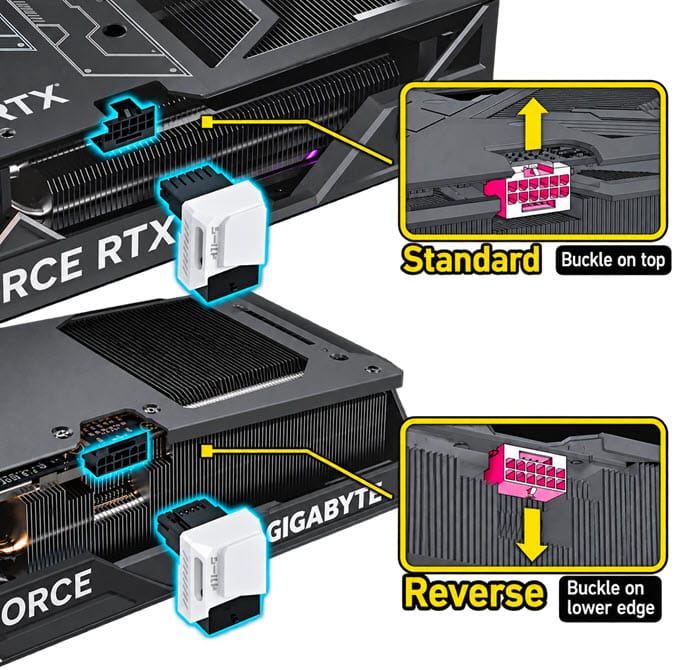
12V-2×6 90-degree adapters and cables come in two orientations: Standard and Reverse. To identify the required orientation, look at the position of the latch or buckle on the graphics card’s connector. You should also check the clearance around the connector. A 90-degree adapter that fits one graphics card may not fit another because graphics cards have different heatsink designs, connector positions, and PCB layouts. The image below shows the standard and reverse orientations of a 90-degree adapter.
Recommended 90-degree Cables and Adapters
- be quiet! 12V-2X6 /12VHPWR 90 Degree PCIe 5.0 Reversed Adapter Cable
- EZDIY-FAB 12V-2×6 90-degree Adapters (Standard/Reverse/Black/White)
Tips and Advice
Here are some useful tips and advice to minimize the risk of the 12V-2×6 connector melting.
Do Not Use 12V-2×6 Extension Cables Unless Necessary
I generally recommend avoiding 12V-2×6 extension cables unless there is a specific reason to use one. The longer the power path, the more resistance it introduces. An extension cable also adds another pair of connections, which means more contact points that can develop resistance. This becomes more important with high-power graphics cards. If you need additional cable length, a properly rated replacement cable is generally preferable to adding an extension.
Do Not Use Cheap 12V-2×6 Cables
Avoid using unknown-brand or low-quality 12V-2×6 cables, particularly when powering a high-end graphics card. A cable may look perfectly normal from the outside but still use lower-quality conductors or terminals. Thinner wires have higher resistance, which can generate extra heat when carrying high current. So, always use a cable from a reputable manufacturer and make sure it is properly rated for the graphics card.
Consider a Graphics Card Without 12V-2×6
If you want to avoid 12VHPWR and 12V-2×6 connector-related concerns altogether, consider a graphics card that uses conventional 8-pin PCIe power connectors. There are still excellent AMD and NVIDIA graphics cards available with traditional power connectors. Unless you need a flagship-class GPU, choosing one without a 16-pin connector can eliminate this potential risk from your build.
Check out: Best Graphics Cards without 12V-2×6 Connector [Nvidia and AMD]
A Suggestion for Graphics Card Manufacturers
For extremely powerful graphics cards, manufacturers could consider using two 12V-2×6 connectors instead of relying on a single connector for the entire GPU power requirement. Using two connectors would distribute the power load across more terminals and could reduce the current through each connection. This approach would also provide additional electrical headroom for GPUs operating under sustained heavy workloads. However, it would require more physical space on the graphics card and additional cabling from the PSU.
Which 12V-2×6 Protection Device Should You Buy?
If you want the most advanced monitoring, I would choose the Thermal Grizzly WireView Pro II. It provides the most information and has the most advanced monitoring features of the products covered here. The per-pin current monitoring is particularly useful because it can show when the current distribution becomes abnormal.
If you want something cheaper and mainly want a temperature warning, the EZDIY-FAB Alpha TS13 is worth considering.
If you want current monitoring and automatic protection without a display, the Cooler Master GPU Shield Adapter is the simpler choice.
If you want protection built into the cable, the Corsair ThermalProtect is one of the most interesting options because it can shut down the GPU when the cable temperature gets too high.
If you are more concerned about cable construction and current capacity, the ASUS ROG Equalizer is worth considering.
And if your main problem is cable routing, a good 90-degree 12V-2×6 cable can be the simplest solution.
What Should You Do If Your Connector Is Already Melted?
Do not continue using a melted 12VHPWR or 12V-2×6 connector. Disconnect the system and inspect both the cable connector and the graphics card socket. If the connector has melted or deformed, it should be replaced by a qualified graphics card technician.
Final Words
There is no single device that can guarantee that a 12VHPWR / 12V-2×6 connector will never melt. However, using a good cable, making a proper connection, avoiding sharp bends, providing sufficient clearance, and monitoring the connector can significantly reduce the risk. For an expensive high-end graphics card, spending a little more on an advanced monitoring device is a much better option than dealing with a melted connector and potentially damaged GPU later. If you have any queries, let me know in the comment section below.
(*This post may contain affiliate links, which means I may receive a small commission if you choose to purchase through the links I provide (at no extra cost to you). Thank you for supporting the work I put into this site!)
![Best Inverted PC Case in 2026 [ATX & Micro-ATX Computer Cases]](https://graphicscardhub.com/wp-content/uploads/2019/03/inverted-pc-case-atx-matx-211x150.jpg "Best Inverted PC Case in 2026 [ATX & Micro-ATX Computer Cases]")
![Best Gaming Monitor under 100 Dollars [1080p FHD]](https://graphicscardhub.com/wp-content/uploads/2018/06/HP-22cwa-IPS-LED-Monitor-211x150.jpg "Best Gaming Monitor under 100 Dollars [1080p FHD]")
![Budget Coffee Lake Motherboards [Intel H370, B360 & H310 Chipset]](https://graphicscardhub.com/wp-content/uploads/2018/04/Gigabyte-H370-AORUS-GAMING-3-WIFI-211x150.jpg "Budget Coffee Lake Motherboards [Intel H370, B360 & H310 Chipset]")
