HDMI and DisplayPort are the two most common ways to connect a graphics card or a gaming console to a monitor or TV. Most graphics cards and gaming monitors have both ports, so many gamers wonder which cable to use, especially when comparing HDMI 2.1 and DisplayPort 1.4, the versions found on most current hardware.
On paper, HDMI 2.1 has more bandwidth (48 Gbps vs 32.4 Gbps), but DisplayPort 1.4 uses Display Stream Compression (DSC) and can still drive 4K at up to 240Hz. In practice, both can deliver 1440p at 240Hz and 4K at 144Hz with variable refresh rate, so the better choice depends mostly on what you are connecting (a PC monitor or a console/TV) and on the ports your display and graphics card offer.
In this article, I have compared HDMI 2.1 and DisplayPort 1.4 cables for gaming in terms of bandwidth, resolution and refresh rate, features, cable length, and compatibility so that you can pick the right one for your PC, PS5, or Xbox.
What is HDMI 2.1?
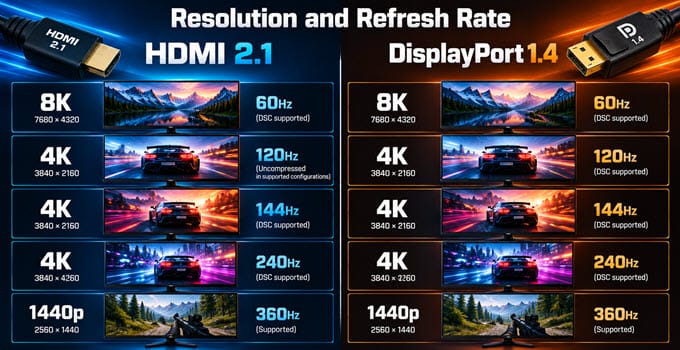
HDMI 2.1 is the HDMI version that added the bandwidth and features needed for high-refresh-rate 4K and 8K gaming. It supports up to 48 Gbps of bandwidth, although the usable data rate after encoding overhead is around 42 Gbps. This is enough for 4K at 120Hz and even 144Hz without compression, depending on color depth. With DSC, it can support 4K at 240Hz and 8K at 60Hz and higher.
HDMI 2.1 is also the standard used by the PS5, Xbox Series X|S, and most modern gaming TVs. Here are the features that matter for gaming:
- VRR (Variable Refresh Rate): Reduces screen tearing and works with AMD FreeSync- and Nvidia G-Sync-compatible displays.
- ALLM (Auto Low Latency Mode): Automatically switches a TV to game mode when it detects a console.
- eARC: Sends lossless audio like Dolby Atmos from your TV to a soundbar or AV receiver.
- Dynamic HDR: Scene-by-scene HDR metadata for better contrast and color.
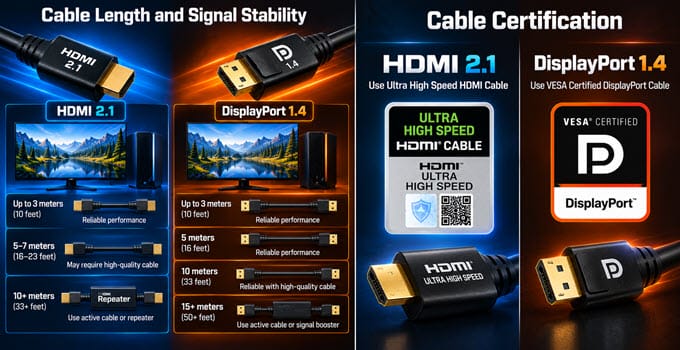
To use these features, you need an Ultra High Speed HDMI cable. These cables are tested under the official HDMI certification program and carry a label with a QR code that you can scan to verify them. The HDMI Licensing Administrator recommends labeling cables as “Ultra High Speed” instead of using version numbers, so don’t rely on a box that says “HDMI 2.1” or “8K”. You can check out the best HDMI 2.1 cables for PC, PS5, and TV that I have listed separately.
The latest version of HDMI is HDMI 2.2, which doubles the bandwidth to 96 Gbps, but it is overkill for most gamers as very few graphics cards, consoles, and displays support it right now.
What is DisplayPort 1.4?
DisplayPort is a royalty-free standard from VESA that was designed mainly for connecting PCs to monitors. DisplayPort 1.4 (HBR3) supports 32.4 Gbps of raw bandwidth, with a usable data rate of around 25.92 Gbps. Without compression, this is enough for 1440p at 240Hz and 4K at around 98Hz at standard 8-bit color.
DisplayPort 1.4 added support for Display Stream Compression (DSC 1.2a), which is the same compression used by HDMI 2.1. DSC is visually lossless in most cases and lets DisplayPort 1.4 handle 4K at up to 240Hz and 8K at 60Hz. That is why most high-refresh-rate gaming monitors still use DisplayPort 1.4 as their main input.
These are the main strengths of DisplayPort 1.4 for gaming:
- Adaptive-Sync: Supports AMD FreeSync and Nvidia G-Sync, and is the most common way to connect a G-Sync monitor to a PC.
- Multi-monitor support: MST (Multi-Stream Transport) lets you daisy-chain compatible monitors with a single cable from the graphics card.
- HDR10: Supports static HDR for modern HDR gaming monitors.
- Locking connector: The latching connector keeps the cable from coming loose, unlike a standard HDMI plug.
For DisplayPort 1.4 speeds, look for a VESA-certified DP8K cable. Newer graphics cards (Nvidia RTX 50 series and AMD Radeon RX 7000/9000 series) have DisplayPort 2.1 outputs that offer up to 80 Gbps, but DisplayPort 2.1 monitors are still uncommon, so most gamers use DisplayPort 1.4 today.
HDMI 2.1 vs DisplayPort 1.4 Comparison
The table below compares the HDMI 2.1 and DisplayPort 1.4 specifications and features that matter most for gaming.
| Specification | HDMI 2.1 | DisplayPort 1.4 |
| Max Bandwidth | 48 Gbps | 32.4 Gbps |
| Usable Data Rate | ~42 Gbps | ~25.92 Gbps |
| 4K Without DSC | 4K@120Hz (up to ~144Hz depending on color depth) | 4K@~98Hz (8-bit) |
| 4K and 8K With DSC | 4K@240Hz, 8K@60Hz and higher | 4K@240Hz, 8K@60Hz |
| 1440p | 1440p@240Hz and higher | 1440p@240Hz |
| Variable Refresh Rate | Yes (HDMI VRR, FreeSync, G-Sync Compatible) | Yes (Adaptive-Sync, FreeSync, G-Sync) |
| HDR | Dynamic HDR (HDR10+, Dolby Vision) | HDR10 (static) |
| ALLM (Auto Low Latency Mode) | Yes | No |
| eARC | Yes | No |
| Multi-Monitor Daisy Chain (MST) | No | Yes |
| PS5 and Xbox Series X|S | Yes | No |
| TV Support | Yes | Very rare |
| Cable Certification | Ultra High Speed HDMI (48 Gbps) | VESA-certified DP8K cable |
| Locking Connector | No | Yes |
| Best For | Consoles, TVs, and 4K high refresh rate monitors | PC gaming monitors and multi-monitor setups |
HDMI 2.1 vs DisplayPort 1.4 Key Differences for Gaming
Important differences between HDMI 2.1 and DisplayPort 1.4 for gaming.
Bandwidth and DSC
HDMI 2.1 has about 50% more raw bandwidth than DisplayPort 1.4, so it can carry high-resolution and high-refresh-rate signals without compression. DisplayPort 1.4 relies on DSC for anything beyond roughly 4K at 100Hz or 4K HDR at higher refresh rates. DSC is visually lossless for most people, and you are unlikely to notice a difference in games.
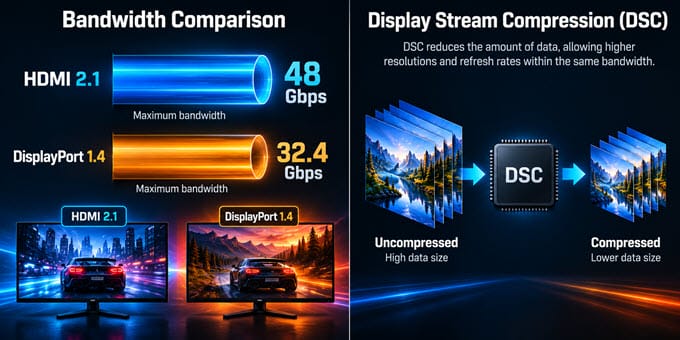
However, DSC support can be hit and miss, especially on older graphics cards and monitors. Some users report a brief black screen when switching between a fullscreen game and the desktop on DSC connections. If your graphics card and monitor both support HDMI 2.1, you can use it to avoid compression up to 4K at 144Hz.
Resolution and Refresh Rate
For 1080p and 1440p gaming, there is no practical difference. Both HDMI 2.1 and DisplayPort 1.4 can handle 1440p at 240Hz. The difference appears at 4K. HDMI 2.1 can drive 4K at 120Hz and 144Hz natively, while DisplayPort 1.4 needs DSC to go beyond about 98Hz at 4K. Both can reach 4K at 240Hz with DSC, but that requires a graphics card and monitor that both support DSC.
Variable Refresh Rate (G-Sync and FreeSync)
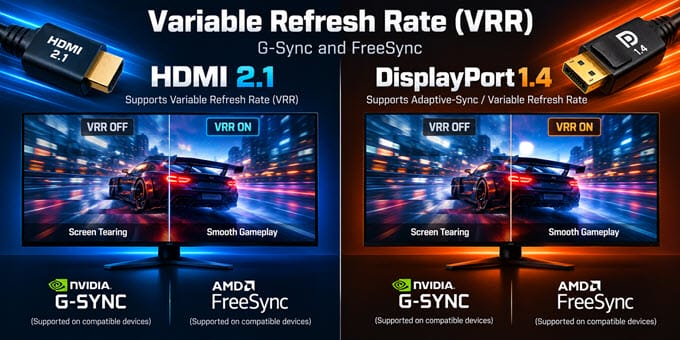
Both interfaces support variable refresh rate. DisplayPort 1.4 has long been the preferred connection for G-Sync and FreeSync on PC monitors because it is the most widely supported and tested option, and some older G-Sync monitors work only over DisplayPort. HDMI 2.1 also supports VRR and works with FreeSync and G-Sync Compatible displays, which is why it is the only option for consoles.
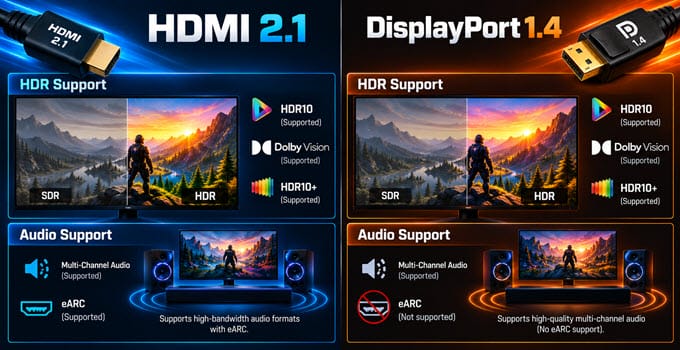
HDR and Audio
HDMI 2.1 supports dynamic HDR metadata, while DisplayPort 1.4 supports static HDR10. Both support multi-channel audio, but only HDMI supports eARC, which helps if you connect a TV to a soundbar or AV receiver. For a PC monitor with headphones or built-in speakers, this does not matter.
Cable Length and Certification
The cable matters more at high bandwidth. A 48 Gbps HDMI 2.1 signal over a long, low-quality cable can cause flickering, sparkles, or complete signal loss, so I recommend a certified Ultra High Speed cable that is 1 to 3 meters long. DisplayPort 1.4 at full speed has the same issue on long cables, so choose a certified DP8K cable and keep it short. Many cheap cables claim “8K” or “48 Gbps” on the box without being certified.
Adapters
Avoid converting between the two. A DisplayPort 1.4 to HDMI 2.1 adapter may not support the resolution and refresh rate you expect, and it can add compatibility issues. Use a native connection whenever possible. If you must convert, read my guide on display converter cables and adapters.
HDMI 2.1 or DisplayPort 1.4: Which One Should You Use?
Recommendations on what to use with your device.
PC Gaming Monitor
Use DisplayPort 1.4 by default. Most graphics cards have several DisplayPort outputs, but only one HDMI port, and many gaming monitors pair a DisplayPort 1.4 input with an older HDMI 2.0 input limited to lower refresh rates. Using DisplayPort also keeps the HDMI port free for a TV or VR headset.
The exception is a monitor with an HDMI 2.1 input and a graphics card that also supports HDMI 2.1. In that case, HDMI 2.1 can run 4K at 120Hz to 144Hz without DSC, which may be better if DSC causes screen blanking or compatibility issues in your setup. Check your monitor’s manual, as some monitors have different maximum refresh rates on each port.
PS5 and Xbox Series X|S
Use HDMI 2.1. Neither console has a DisplayPort output, so HDMI is the only option. To get 4K at 120Hz with VRR, you need a TV or monitor with an HDMI 2.1 input and an Ultra High Speed HDMI cable. The cable that comes in the box with the console works, but it is short, so buy a certified one if you need more length.
Gaming TV
Use HDMI 2.1. Almost no TV has a DisplayPort input, and HDMI 2.1 gives you 4K at 120Hz, VRR, ALLM, and eARC for a soundbar or AV receiver. Connect your PC to the TV’s HDMI 2.1 port if your graphics card supports it.
Multiple Monitors
Use DisplayPort. It supports daisy-chaining with MST (Multi-Stream Transport) on compatible monitors, and graphics cards usually have more DisplayPort outputs than HDMI outputs, so it is easier to connect two or three gaming monitors.
See also:
Final Words
HDMI 2.1 has more raw bandwidth, but DisplayPort 1.4 with DSC is good enough for almost every gaming monitor, which is why it remains the best choice for a PC. HDMI 2.1 is the right choice for consoles and TVs, and for a monitor with an HDMI 2.1 input if you want to avoid compression at 4K 120Hz to 144Hz. In short, you can either use an HDMI 2.1 or DisplayPort 1.4 cable for a PC monitor, and HDMI 2.1 for everything else.
Whichever you choose, buy a certified cable from a reputable brand. For HDMI 2.1, look for the Ultra High Speed label; for DisplayPort 1.4, look for a VESA-certified DP8K cable. Keep it short, ideally 1 to 2 meters, as shorter cables are more reliable at high bandwidth.
If you have any questions about HDMI or DisplayPort cables, let us know in the comments below.
(*This post may contain affiliate links, which means I may receive a small commission if you choose to purchase through the links I provide (at no extra cost to you). Thank you for supporting the work I put into this site!)
![Which is the Best FPS Limiter to Limit Frame Rate in Games? [Answered]](https://graphicscardhub.com/wp-content/uploads/2019/03/fps-limiter-211x150.jpg "Which is the Best FPS Limiter to Limit Frame Rate in Games? [Answered]")