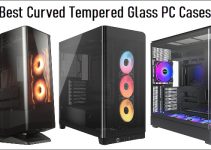
If you are running out of desk space or want to give your gaming PC, Office/Home PC, or workstation setup a cleaner, more professional appearance, wall-mounting your PC is an excellent solution. While mounting monitors on walls has been common for years, mounting desktop PCs on walls is a relatively new trend that has gained popularity among gamers, content creators, professionals, and even PC enthusiasts. Also, for small office setups, small workspaces, or limited-space gaming parlors, wall-mounting your PC Case is an excellent way to manage space and avoid clutter. You can wall-mount a PC Case using a computer wall-mount bracket. A good PC wall mount bracket securely holds your computer tower against the wall, freeing up valuable floor or desk space while protecting your expensive hardware from dust, accidental bumps, pets, and moisture.
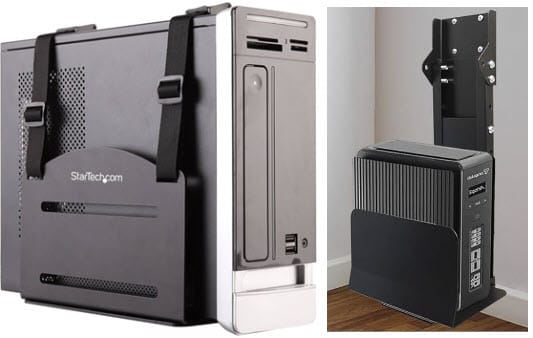
Besides improving aesthetics, a wall-mounted PC also offers practical advantages. Unlike systems placed under a desk or inside an enclosed cabinet, a properly mounted computer enjoys better airflow, making it easier for the cooling system to expel hot air. It also becomes much easier to clean around the workstation without having to move a heavy PC tower every time.
Whether you own a compact Mini Tower, a standard Mid Tower, or a large Full Tower gaming PC, several universal wall mount brackets can safely support your computer. Most modern brackets feature adjustable steel frames and offer impressive weight capacities suitable even for high-end gaming systems.
In this article, I have listed some of the best PC wall-mount brackets for tower computer cases. These CPU wall mounts have been selected based on their build quality, adjustability, compatibility, ease of installation, and overall value.
Benefits of Wall Mounting a PC Case
Although wall mounting a computer may seem like an aesthetic upgrade, it offers several practical advantages that make it worthwhile for both home and professional users.
Saves Valuable Space – One of the biggest advantages of a PC wall mount is the amount of space it saves. By moving your computer tower off the floor or desk, you gain extra room for peripherals, speakers, storage, or simply enjoy a cleaner workspace. This is especially beneficial in compact gaming rooms, home offices, dorm rooms, and studio apartments where every inch of space matters.
Keeps the PC Away from Dust – Desktop computers placed on the floor collect significantly more dust than those positioned higher. Dust accumulation inside the case can clog fan filters, heatsinks, restrict airflow, and increase operating temperatures. A wall-mounted PC stays much cleaner because it is positioned above floor-level dust, making maintenance easier and reducing the frequency of cleaning.
Better Airflow – Many users place their PCs inside enclosed desks or cabinets, which restrict airflow and trap hot air around the case, increasing internal temperatures. Mounting the computer on an open wall provides unrestricted airflow around the chassis, allowing intake and exhaust fans to operate more efficiently.
Protects Against Accidental Damage – Keeping a PC on the floor exposes it to accidental kicks, vacuum cleaners, pets, children, and spilled liquids. A wall mount keeps your computer safely out of the way, reducing the chances of accidental damage.
Easier Cable Management – Wall-mounted PCs make it easier to organize cables using cable raceways or wall-mounted cable channels. This creates a cleaner and more professional-looking setup.
Easier Cleaning – Without a bulky PC sitting underneath your desk, vacuuming or mopping becomes much easier.
Better Accessibility – A wall-mounted computer may provide easier access to USB ports, Audio jacks, the power button, Rear motherboard ports, and graphics card outputs. This is especially convenient for users who frequently connect external drives, VR headsets, or cameras.
Best PC Wall Mount Brackets for Tower Cases
Below are some of the best computer wall-mount brackets currently available for gaming PCs, standard desktops, and workstation towers.
StarTech Adjustable PC Wall Mount (CPUWALLMNT)
[Excellent Build Quality, Enterprise Grade, Adjustable Straps]
StarTech is a well-known manufacturer of professional computer accessories, networking equipment, docking stations, server hardware, and mounting solutions. Their products are widely used in offices, data centers, educational institutions, and commercial environments due to their competitive prices, high build quality, and long-term reliability. The StarTech Adjustable PC Wall Mount is one of the best universal computer wall mounts on the market. Designed with heavy-duty steel construction, it securely supports desktop computer towers while keeping them elevated off the floor.
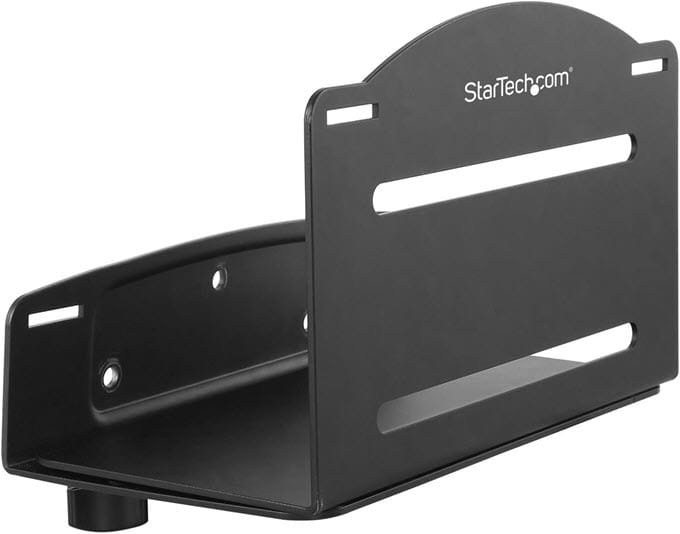
The mount features an adjustable frame that accommodates computer cases with widths from approximately 122 mm to 212 mm (4.8 to 8.3 inches) and heights from 6″ to 15.7″ (154 to 400 mm), making it compatible with most Mini Tower and Mid Tower cases. The wall mount can support fully loaded PC Cases up to 22lb (10kg). Using the included adjustable straps, you can fully secure the PC Case so it won’t topple or fall during an accidental shock or weight imbalance.
One of the biggest advantages of this bracket is its excellent stability. Once properly installed into a wall stud or masonry wall, it securely holds the computer without wobbling. The open-frame design also ensures unrestricted airflow around the chassis. Installation is relatively straightforward, and all required mounting hardware is included. However, due to the weight of modern gaming PCs, installing the bracket on a solid wall or wooden stud is strongly recommended. Overall, if you are looking for a premium-quality PC wall mount from a trusted brand, the StarTech Adjustable PC Wall Mount remains one of the best choices available.
| StarTech Adjustable PC Wall Mount Specifications | |
| Supported Width | 122–212 mm (4.8–8.3 in.) |
| Supported Height | (154 to 400 mm) 6″ to 15.7″ |
| Maximum Load | 10 kg (22 lbs) |
| Construction | Heavy-duty Steel |
| Adjustable Width | Yes |
| Installation | Wall Mounted |
| Applications | Office, business, commercial and institutional environments (Mini-Tower and Mid-Tower Cases) |
Buy StarTech Adjustable PC Wall Mount
VIVO Universal PC Wall Mount
[Excellent Value, Strong Steel Construction, Wide Compatibility, Adjustable Holding Straps]
VIVO is one of the most popular brands for monitor arms, TV mounts, standing desks, and ergonomic office accessories. Their products are known for offering excellent value for money without compromising build quality. The VIVO Universal PC Wall Mount is an adjustable steel bracket designed to support a wide range of desktop computer towers. Its adjustable frame accommodates a range of case sizes, making it suitable for both office computers and gaming PCs. Technically, it is a replica of the StarTech Adjustable Computer Wall Mount mentioned above.
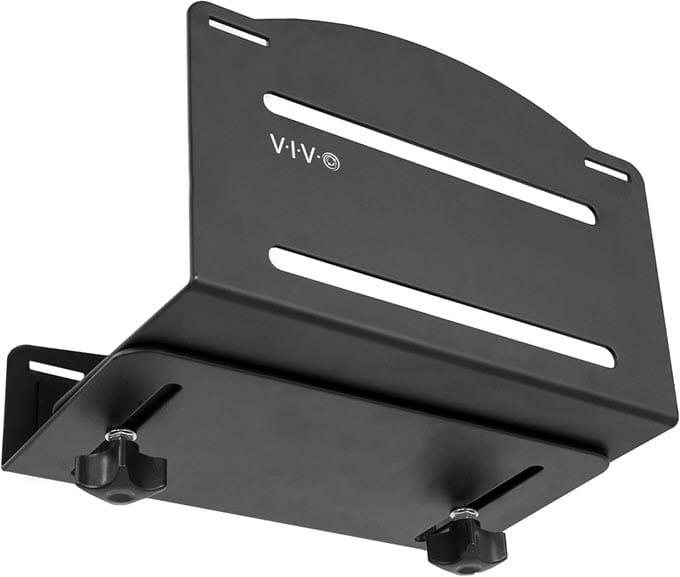
Constructed from high-strength steel, the mount provides excellent rigidity while remaining relatively lightweight. It has an adjustable width of 12.2 to 21.1 cm. It supports most Mini Tower and Mid Tower computer cases weighing up to 10KG (with components installed). Thick foam padding protects the PC Case from scratches and absorbs minor vibrations, and the adjustable straps fully secure it.
The open-frame design allows unrestricted airflow around the case, helping maintain lower operating temperatures than when the PC is placed inside a confined cabinet. Installation is simple, with all necessary hardware included. Once mounted properly, the bracket keeps the computer securely in place while allowing easy access to the front I/O ports, power button, and rear connectors. Considering its build quality, compatibility, and competitive pricing, the VIVO Universal PC Wall Mount offers excellent value and is one of the best choices for most users.
| VIVO Universal PC Wall Mount Specifications | |
| Supported Width | Adjustable (12.2 to 21.1 cm) |
| Maximum Load | 10 kg (22 lbs) |
| Construction | Steel (Powder-coated) |
| Adjustable Width | Yes |
| Installation | Wall Mounted |
| Applications | Home, Office and Budget Gaming PCs |
Buy VIVO Universal PC Wall Mount
TooCust Heavy Duty Under Desk & Wall PC Mount
[Heavy-Duty Construction, Supports Large Full Tower Cases, Dual Mounting Options (Wall/Under-Desk)]
TooCust may not be as well-known as StarTech or VIVO, but it has quickly gained popularity among PC enthusiasts for its heavy-duty PC mounting solutions. Unlike many universal PC wall mounts designed primarily for mid-tower systems, the TooCust Heavy Duty PC Mount is built specifically for larger, heavier desktop computers, making it one of the best choices for gaming rigs and workstation PCs. One of the biggest advantages of this mount is its dual-purpose design. It can be installed either under a desk or directly on a wall, giving users greater flexibility when designing their workspace. If you decide to rearrange your setup later, you can easily relocate the mount without purchasing another bracket.
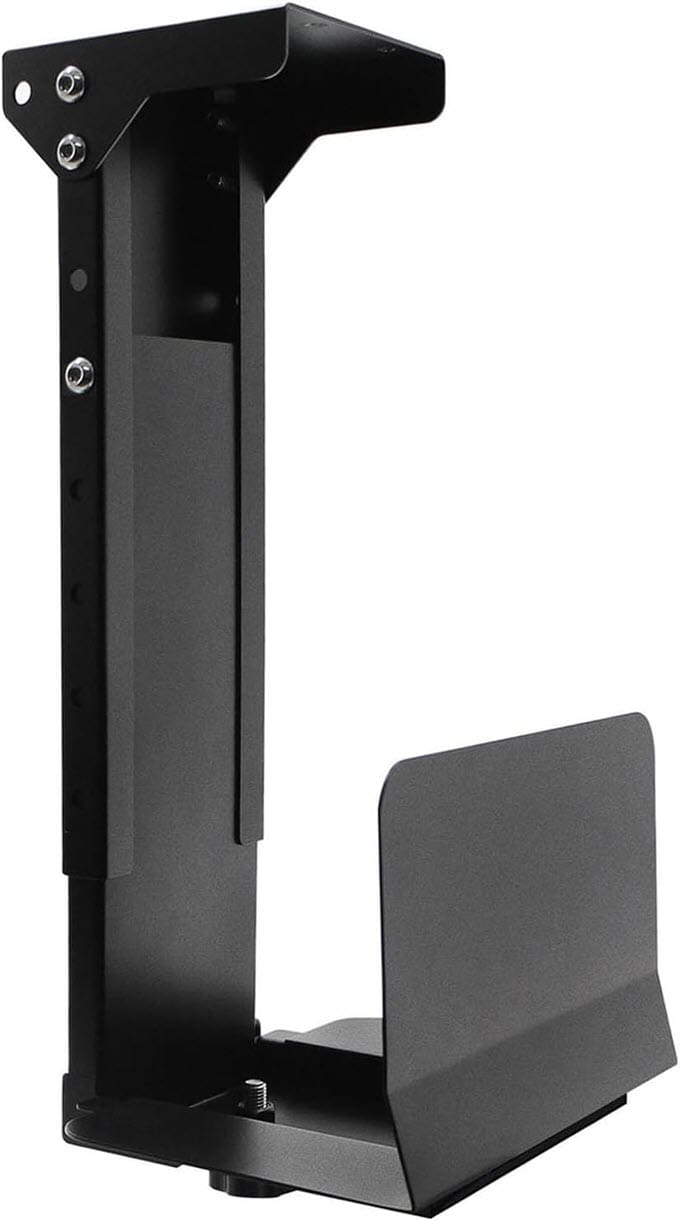
The frame is constructed from heavy-duty cold-rolled carbon steel and features adjustable support arms that accommodate a wide range of computer case widths and heights. The vertical arm adjusts in height from 12.5 to 20 inches, and the sliding base support adjusts from 5.9 to 9.8 inches, ensuring a snug fit for both under-desk and wall-mount options. The larger adjustment range and high load capacity make it suitable for many high-end gaming cases and workstations. If you own a heavy gaming PC with high-end components such as an RTX 5090 or Radeon RX 9070 XT, a large AIO cooler, multiple hard drives, and a high-capacity power supply, the TooCust Heavy Duty Mount is one of the safest options available.
| TooCust Heavy Duty PC Wall/Desk Mount Specifications | |
| Supported Width | Adjustable (5.9″ to 9.8″) |
| Supported Height | 12.5″ to 20″ |
| Maximum Load | Up to 25 kg (55 lbs) |
| Construction | Heavy-duty Steel (Powder-coated) |
| Adjustable Width | Yes |
| Mounting Options | Wall / Under Desk |
| Applications | PCs with Mid Tower and Full Tower Cases, Gaming PCs, Workstations |
Buy TooCust Under Desk & Wall PC Mount
Another good Wall and Under-Desk Mount
Mount-It! CPU Wall Mount
[Compact Design, High-strength Steel Construction, Ideal for Office PCs, Dual Mounting Options]
Mount-It! is another reputable manufacturer of office furniture and ergonomic mounting solutions. Its CPU Wall Mount is primarily targeted for office and commercial environments, but it also works well for home users with standard desktop towers.
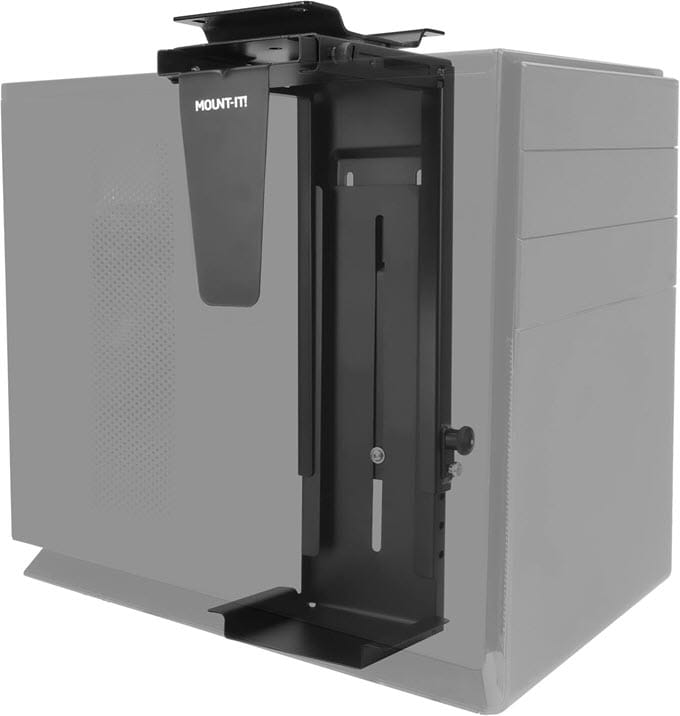
It is a 2-in-1 or dual PC mount that supports both wall and under-the-desk mounting. The PC mount features adjustable width ranging from 3.5″ to 8″ and a maximum height of 21″ for mini-tower and mid-tower computer cases. The mount supports up to 10 kg (22 lbs) and is made from high-strength steel. This CPU mount is best suited for office PCs and mainstream or home PCs. The installation is straightforward, and all mounting hardware is included with the computer mount bracket.
| Mount-It! CPU Wall Mount Specifications | |
| Supported Width | Adjustable (3.5″ to 8″) |
| Supported Height | 11.75″ to 21″ |
| Maximum Load | 10 kg (22 lbs) |
| Construction | Steel |
| Adjustable Width | Yes |
| Applications | Office PCs & Mid Tower Systems |
Things to Consider Before Buying a PC Wall Mount
Not every wall mount is suitable for every computer case. Before purchasing one, consider the following factors.
Weight Capacity – Always check the maximum supported weight. Most gaming PCs weigh between 8 and 18 kg, while heavily equipped full-tower workstations can exceed 20 kg. Choose a mount that offers a safety margin of at least 20–30% over your PC’s weight.
Adjustable Width – Universal PC wall mounts support different case widths. Before purchasing, measure your PC’s width and compare it with the bracket’s supported adjustment range.
Build Quality – Steel construction is highly recommended. Avoid thin aluminum or plastic brackets for heavy gaming systems. Powder-coated steel offers corrosion resistance and scratch resistance.
Installation Hardware – A good wall mount should include mounting screws, Wall anchors, and an installation guide.
Airflow Clearance – Leave at least 10–15 cm of clearance around all intake and exhaust fans to ensure unrestricted airflow.
Wall Type – Most brackets can be installed on concrete, brick, and wooden studs. Drywall installations require proper anchors or stud mounting.
Installation Tips
Although installing a PC wall mount is relatively straightforward, following a few best practices ensures maximum safety and stability.
- Locate wall studs using a stud finder whenever possible.
- Use the supplied mounting hardware or high-quality anchors suitable for your wall type.
- Leave at least 10–15 cm of clearance around all ventilation openings to maintain proper airflow.
- Route cables neatly using cable clips or raceways to reduce clutter and prevent accidental snagging.
- Double-check that all screws are tightened securely before placing the computer on the mount.
- Periodically inspect the bracket and mounting screws for any signs of loosening, especially if the PC is frequently moved or upgraded.
See also
Final Verdict
A PC wall-mount bracket is an excellent investment for anyone looking to save space, improve workstation organization, and protect their computer from dust and accidental damage. Modern wall mounts are significantly stronger and more versatile than earlier designs, making them suitable for everything from compact office desktops to gaming PCs. Before purchasing any wall mount, measure your computer case, verify its total weight, and ensure the bracket supports both. Installing the mount on a sturdy wall or wooden stud will provide the best long-term stability and safety. With the right wall mount, you can create a cleaner, more organized, and professional-looking PC setup while protecting your valuable hardware for years to come.
(*This post may contain affiliate links, which means I may receive a small commission if you choose to purchase through the links I provide (at no extra cost to you). Thank you for supporting the work I put into this site!)
![Best Gaming Hard Drive for Gaming PC [3.5 inch Internal HDD]](https://graphicscardhub.com/wp-content/uploads/2017/11/gaming-hard-drive-211x150.jpg "Best Gaming Hard Drive for Gaming PC [3.5 inch Internal HDD]")
![Best CPU Coolers with LCD Screen and RGB [AIO Liquid & Air Coolers]](https://graphicscardhub.com/wp-content/uploads/2023/12/CPU-Coolers-with-Screen-211x150.jpg "Best CPU Coolers with LCD Screen and RGB [AIO Liquid & Air Coolers]")