
If you have a graphics card and a monitor that support DisplayPort 2.1, you’ll need a proper DisplayPort 2.1 cable for a high-end setup if you want to push high resolutions at high refresh rates without video compression or Display Stream Compression (DSC). This matters especially for enthusiasts with a high-end graphics card and a high-resolution, high-refresh-rate monitor, such as a 4K 240Hz OLED, a 5K2K ultrawide, or even an 8K display. A cable is a small part of the setup, but it can be the weakest link. Even if your GPU and monitor support full DisplayPort 2.1 bandwidth, a cable that can’t handle it will force the connection to a lower link speed, leaving you with lower refresh rates, DSC, or an unstable signal.
DisplayPort 2.1 supports up to 80 Gbps of bandwidth using the UHBR20 (Ultra High Bit Rate) link rate, which is almost 2.5 times the 32.4 Gbps bandwidth of DisplayPort 1.4. However, not every cable sold as a “DisplayPort 2.1” cable can carry that much data. The DisplayPort 2.1 name covers three different speed tiers, and many cables simply put “DP 2.1”, “8K” or “16K” on the box without being certified for the full 80 Gbps. Only a VESA-certified DP80 cable guarantees UHBR20 speeds.
In this article, I have explained how DisplayPort 2.1 differs from DisplayPort 1.4, what the DP40, DP54, and DP80 certifications mean, and how cable length affects the signal. I have also listed the best VESA-certified DP80 DisplayPort 2.1 cables from reputed brands that you can buy for your gaming PC, graphics card, and monitor.
DisplayPort 2.1 vs DisplayPort 1.4
DisplayPort 1.4 has been the standard for gaming monitors and graphics cards for years. It uses the HBR3 link rate at 8.1 Gbps per lane, for a total bandwidth of 32.4 Gbps and an effective data rate of 25.92 Gbps. DisplayPort 2.1 is a big jump over DisplayPort 1.4, adding three new UHBR link rates (UHBR10, UHBR13.5, and UHBR20) and reaching 80 Gbps of total bandwidth, with an effective data rate of 77.37 Gbps.
DisplayPort 2.1 also uses a more efficient encoding (128b/132b), which wastes only about 3% of the bandwidth, compared with 20% for the 8b/10b encoding used by DisplayPort 1.4. This is why DisplayPort 2.1’s effective data rate is so much higher. DisplayPort 2.1 is backward compatible, so a DisplayPort 2.1 cable works with older DisplayPort 1.4 and 1.2 devices, but you only get the speed that the slowest part of the chain (GPU, cable, or monitor) can handle.
DisplayPort 2.1 vs DisplayPort 1.4 Comparison Table
| Feature / Specifications | DisplayPort 1.4 | DisplayPort 2.1 |
| Release Year | 2016 | 2022 |
| Highest Link Rate | HBR3 (8.1 Gbps per lane) | UHBR20 (20 Gbps per lane) |
| Total Bandwidth | 32.4 Gbps | Up to 80 Gbps |
| Effective Data Rate | 25.92 Gbps | Up to 77.37 Gbps |
| Encoding | 8b/10b (80% efficient) | 128b/132b (about 97% efficient) |
| Cable Certification | DP8K | DP40, DP54, DP80 |
| 4K Without DSC (10-bit HDR) | Up to 97Hz | Up to 267Hz |
| 8K Without DSC (8-bit) | Up to 31Hz | Up to 92Hz |
| Max. Resolution With DSC | 4K 240Hz, 8K 60Hz | 8K 240Hz, 16K 60Hz |
DisplayPort 2.1 vs DisplayPort 1.4 for PC Gaming
For 1080p and 1440p gaming, DisplayPort 1.4 is still enough. It can drive a 1440p monitor at over 240Hz without compression, so you don’t need to worry about DisplayPort 2.1 if you game at these resolutions on a regular monitor. The problem starts at 4K. DisplayPort 1.4 can do 4K 120Hz without compression with 8-bit color, but this drops to around 97Hz with 10-bit HDR. This means every 4K 144Hz, 165Hz, or 240Hz monitor connected through DisplayPort 1.4 has to use DSC (or lower the color quality) to reach its rated refresh rate.
DisplayPort 2.1 with UHBR20 solves this because it has enough bandwidth to run 4K at 240Hz with 10-bit HDR without compression, and it can also handle high-refresh 5K2K ultra-wide and 8K displays at much higher refresh rates than DisplayPort 1.4. The in-between UHBR13.5 (54 Gbps) tier supports 4K up to around 187Hz uncompressed, so it is a good fit for 4K 144Hz and 165Hz monitors, but not for 4K 240Hz ones.
You also need support on both ends. Most older graphics cards, including the RTX 40 series, are limited to DisplayPort 1.4a. GeForce RTX 50 series cards support UHBR20, while Radeon RX 7000 series cards are limited to UHBR13.5. Many monitors labeled “DisplayPort 2.1” also support only UHBR10 or UHBR13.5, so check your GPU and monitor’s exact UHBR rating before spending money on a cable.
Issues with DSC (Display Stream Compression)
DSC is a compression technology that reduces the bandwidth needed for a video signal by up to around 3:1. VESA calls it “visually lossless”, and in most cases you won’t see any difference. This is why DisplayPort 1.4 can drive 4K 240Hz and 8K monitors. However, it is still compression, and it comes with some drawbacks.
Not mathematically lossless – The image is compressed, so in rare cases you may notice slight artifacts around fine text or high-contrast edges, especially at high compression ratios.
Slow mode switching – Monitors using DSC can go black for a few seconds when you alt-tab out of a fullscreen game or change the resolution or refresh rate. This is because the GPU and monitor have to renegotiate the link.
Multi-monitor problems – Running several high-refresh monitors with DSC can cause handshake issues and flickering because the GPU can handle only a limited number of DSC displays at a time.
Compatibility limits – Some GPU features (like DSR/DLDSR downscaling on NVIDIA), KVM switches, docks, and capture devices may not work properly, or at all, when DSC is active.
With UHBR20, many monitors can run at full resolution and refresh rate without DSC, avoiding the issues above. This is why enthusiasts with 4K 240Hz monitors should look for a DP80 cable.
DisplayPort 2.1 Cables Speed Tiers
You must be very careful when choosing a DisplayPort 2.1 cable, as there are three types of DisplayPort 2.1 cables available based on the bandwidth supported. DisplayPort 2.1 cables are available in three speed tiers: UHBR10, UHBR13.5, and UHBR20.
DisplayPort VESA Certification
DisplayPort 2.1 cables are certified by VESA (Video Electronics Standards Association), the organization that developed the DisplayPort interface. A certified cable is tested to ensure it can reliably carry the advertised bandwidth and carries a DP40, DP54, or DP80 logo, depending on the speed tier. You can verify any DisplayPort cable’s certification on displayport.org, which lists all certified products.
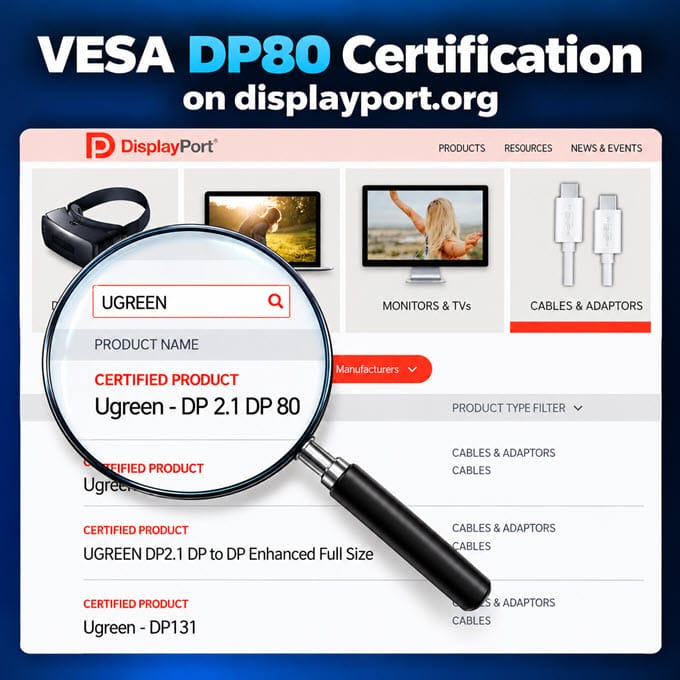
The “DisplayPort 2.1” label alone tells you nothing about cable speed, since the standard covers all three tiers; always look for DP40, DP54, or DP80 certification. Also, an uncertified cable may still work, but if it can’t reliably handle a given speed, the devices will fall back to a lower link rate during link training, and you won’t get the advertised UHBR speed.
| DP 2.1 Cable Certification | UHBR Transmission Mode | Bandwidth per Lane (x4) | Total Bandwidth | Total Data Rate (Effective) |
| DP40 | UHBR10 | 10 Gbps | 40 Gbps | 38.69 Gbps |
| DP54 | UHBR13.5 | 13.5 Gbps | 54 Gbps | 52.22 Gbps |
| DP80 | UHBR20 | 20 Gbps | 80 Gbps | 77.37 Gbps |
DP40: supports UHBR10 at 10 Gbps per lane, for 40 Gbps total bandwidth (38.69 Gbps effective). It is a decent upgrade over DisplayPort 1.4, but most high-refresh 4K HDR monitors will still need DSC.
DP54: supports UHBR13.5 at 13.5 Gbps per lane, for 54 Gbps total bandwidth (52.22 Gbps effective). It is enough for 4K at up to around 187Hz with HDR without compression, and it is a good match for UHBR13.5 graphics cards like the Radeon RX 7000 series.
DP80: supports UHBR20 at 20 Gbps per lane, delivering 80 Gbps of total bandwidth (77.37 Gbps effective). This is the top tier and the only one that can run 4K 240Hz with HDR without compression. A DP80 cable also supports the UHBR13.5 and UHBR10 modes, so it works with all DisplayPort 2.1 devices.
Effect of Length on Signal Transmission / Bandwidth
The higher the bandwidth, the harder it is for a copper cable to carry the signal over a long distance. For the full 80 Gbps bandwidth, the ideal length of a DisplayPort 2.1 cable is 1 meter / 3.3 feet, but some certified cables can go up to 2 meters / 6.6 feet while maintaining the full signal and bandwidth.
Longer passive cables (10 feet or more) may cause problems at UHBR20 speeds, such as a black screen, flickering, sparkles, or a link that falls back to UHBR13.5 or UHBR10 and forces DSC. Also, a brand may sell the same cable in many lengths, but not all the lengths are VESA certified, so check the certification for the exact length that you are buying. If you need a longer run, use an active cable, such as an active optical cable (AOC), instead of a long passive copper cable.
So, buy the shortest cable that works for your setup. For most desks, 3.3 feet to 6.6 feet is enough.
UHBR20 (80 Gbps): What You Need to Use It
UHBR20 is the fastest link rate DisplayPort 2.1 offers. Each of the four lanes runs at 20 Gbps, giving 80 Gbps of total bandwidth and a usable data rate of about 77.37 Gbps. This is the link rate that a DP80 cable is certified for, and it is the only one with enough bandwidth to run a 4K 240Hz monitor with 10-bit HDR without DSC, which needs roughly 62 to 68 Gbps. UHBR13.5, in comparison, tops out at around 4K 187Hz with HDR without compression. Below, GPU-Z shows the current DisplayPort link rate: 20 Gbps per lane across four lanes means UHBR20.
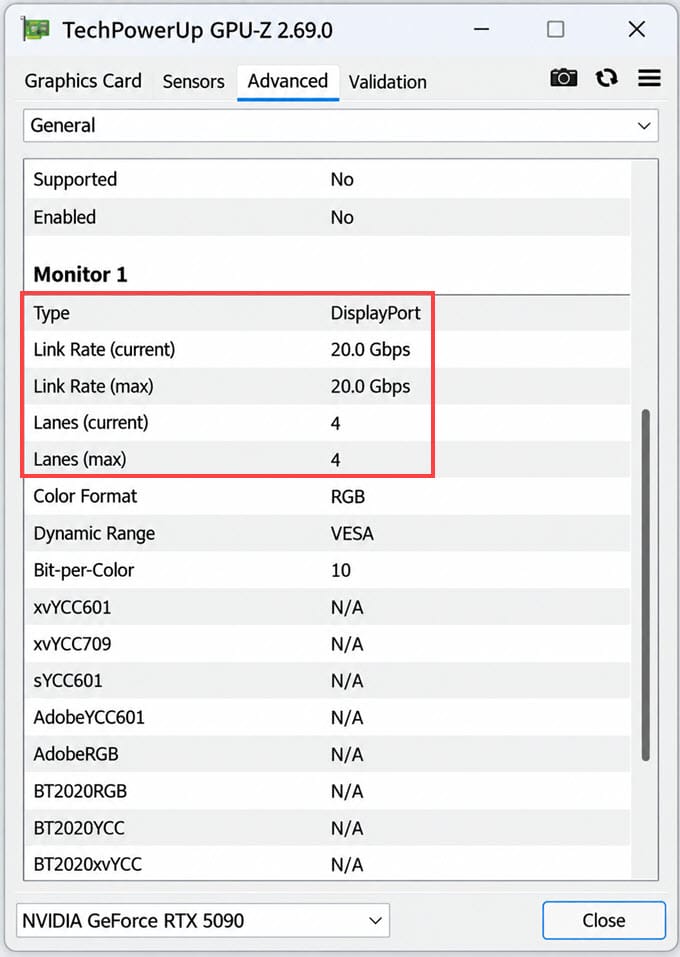
The important thing to understand is that UHBR20 works only when every part of the connection supports it. The graphics card, cable, and monitor negotiate the link speed when you connect them, and the connection runs at the highest speed all three can handle reliably.
UHBR20 Requirements
| Component | What You Need | If It Falls Short |
| Graphics Card | DisplayPort 2.1 with UHBR20 (for example, the RTX 50 series) | Link drops to UHBR13.5, UHBR10, or DisplayPort 1.4 with DSC |
| Cable | VESA-certified DP80 cable, ideally 1 m to 2 m long | Link drops to a lower speed, usually with DSC enabled |
| Monitor | DisplayPort 2.1 port rated for UHBR20 (not just “DP 2.1”) | Monitor runs at its own maximum, often UHBR13.5 or DSC |
Graphics Cards and Monitors with UHBR20
On the graphics card side, the NVIDIA RTX 50 series is the first GeForce generation to support DisplayPort 2.1 and UHBR20, while the RTX 40 series and older cards are limited to DisplayPort 1.4a. The Radeon RX 7000 series supports DisplayPort 2.1 but only up to UHBR13.5. If you own a Radeon RX 9000 series card or a custom model from a specific board partner, check the exact link rate on the card’s spec page, since the “DisplayPort 2.1” label alone doesn’t tell you if it is UHBR20.
UHBR20 monitors are still limited, and they are mostly 4K 240Hz OLED gaming monitors. Examples include the MSI MPG 272URX and MPG 322URX, which have a DisplayPort 2.1 port that supports UHBR20. Many other monitors that advertise DisplayPort 2.1 support only UHBR10 or UHBR13.5, so look for “UHBR20” or “80 Gbps” in the specifications.
How to Make Sure You Are Running at UHBR20
The problem is that a UHBR20 monitor connected with a lower-speed cable will still work, so you may never notice that you are running at a lower speed. The signal falls back silently, and the only signs are that DSC is enabled or that some refresh rate and color options are missing in the settings. To avoid this:
- Use a DP80 cable: DP40 and DP54 cables limit the link to a lower speed, so don’t reuse an old DisplayPort cable. Verify the cable in the certified products list on displayport.org.
- Keep it short: Passive DP80 cables work best up to 2 meters. Monitor-supplied DP80 cables are commonly 1 meter, and most certified cables you can buy are between 1 m and 2 m.
- Check the link rate: Tools like GPU-Z show the current DisplayPort link rate. 20 Gbps per lane across four lanes means UHBR20.
- Check the DSC setting: If the monitor’s menu lets you turn DSC off, and 4K 240Hz with 10-bit color still works, the link is running uncompressed.
Top DisplayPort 2.1 Cables [DP80 Certified, 80Gbps UHBR20]
Below are the best VESA-certified DP80 DisplayPort 2.1 cables that guarantee 80 Gbps bandwidth and support the UHBR20 link rate. All of these are standard DisplayPort male-to-male cables.
StarTech.com DisplayPort 2.1 Cable
StarTech.com is a well-known manufacturer of connectivity products, including cables, adapters, docking stations, and KVM switches. IT professionals and businesses value the brand for dependable, well-built products, and the DP80 cable is a solid choice if you want a DisplayPort 2.1 cable from a company that specializes in computer cables and accessories.
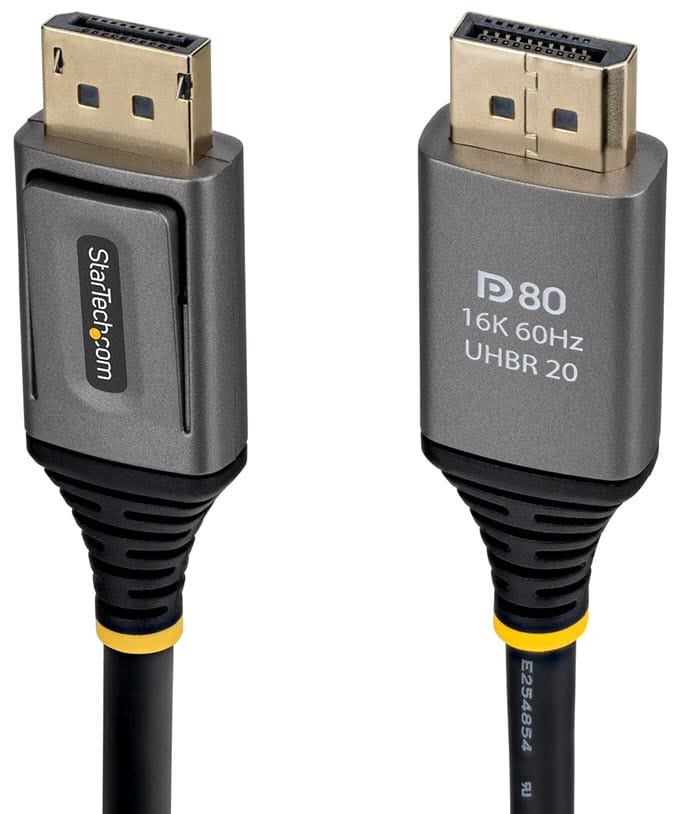
The cable is available in 3 ft, 5 ft, 6 ft, 1 m, and 2 m lengths, which is enough for most desk setups. It is a VESA-certified DP80 cable that supports UHBR20 with 80 Gbps of bandwidth, and the connectors have DP 2.1 (DP80) specs printed on each end for easy identification. It supports uncompressed 10K/8K at 60Hz and 4K at 240Hz, and up to 16K at 60Hz and 8K at 240Hz with DSC 1.2a. It also supports HDR10, HDCP 2.3, Multi-Stream Transport (MST), G-Sync, and FreeSync, and it is backward compatible with DisplayPort 2.0, 1.4, and 1.2.
The cable’s build quality is very good and feels premium. The cable has a flexible TPE jacket, aluminum-mylar foil with braided shielding to reduce EMI, strain relief at the connectors, and nickel-plated latching DP connectors rated for more than 10,000 insertions. The jacket is tested for 600 bending cycles, and the cable comes with a lifetime warranty.
| StarTech.com DisplayPort 2.1 Cable Specifications | |
| DisplayPort Version | 2.1 |
| Bandwidth | 80 Gbps (UHBR20) |
| Cable Length | 3 ft, 5 ft, 6 ft, 1 m, 2 m |
| Max. Resolution | 10K at 60Hz or 4K at 240Hz, 16K at 60Hz or 8K at 240Hz with DSC |
| Certified | Yes, VESA Certified DP80 |
| Features | HDR10, HDCP 2.3, DSC 1.2a, MST, G-Sync, FreeSync, 32-channel audio, TPE jacket, foil and braided EMI shielding, Nickel-plated DP connectors, Strain relief, Lifetime warranty |
Buy StarTech.com DisplayPort 2.1 Cable
UGREEN DisplayPort 2.1 Cable
UGREEN is one of the most trusted global brands for cables, chargers, hubs, and computer and smartphone accessories. The brand is known for well-built products at fair prices, and its DisplayPort 2.1 cable is a popular choice for gaming PCs and high-refresh-rate monitors. The cable features excellent build quality, with an aluminum alloy connector housing, nickel-plated connectors, and a nylon-braided jacket. It uses 28 AWG tinned copper conductors with triple shielding to protect the signal from EMI.
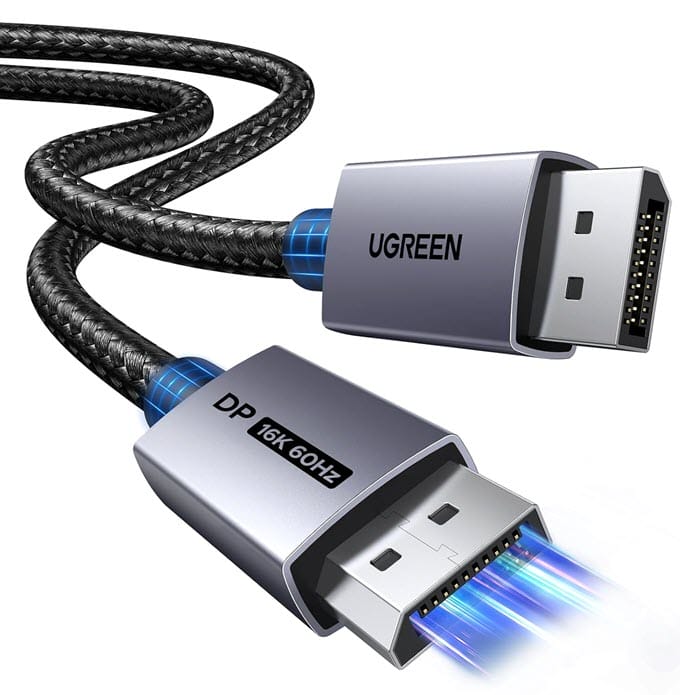
Although it doesn’t have the DP80 certification logo printed on it, the cable is DP80 certified, as listed on displayport.org. The cable is available in 3.3 ft, 6.6 ft, 10 ft, and 16 ft lengths. For full 80 Gbps bandwidth, I recommend the 3.3 ft or 6.6 ft version, as longer cables are more likely to have signal issues at UHBR20 speeds. The cable supports 16K at 60Hz, 8K at 240Hz, and 4K at 240Hz with DSC 1.2a, along with HDR, HDCP 2.3, VRR, ALLM, FreeSync, and G-Sync. It is also backward compatible with DisplayPort 1.4 and 1.2.
| UGREEN DisplayPort 2.1 Cable Specifications | |
| DisplayPort Version | 2.1 |
| Bandwidth | 80 Gbps (UHBR20) |
| Cable Length | 3.3 ft, 6.6 ft, 10 ft, 16 ft |
| Max. Resolution | 10K at 60Hz or 4K at 240Hz, 16K at 60Hz or 8K at 240Hz with DSC |
| Certified | Yes, VESA Certified DP80 |
| Features | HDR, HDCP 2.3, DSC 1.2a, VRR, ALLM, FreeSync, G-Sync, Nylon braided jacket, Nickel-plated connectors, Aluminum alloy shell, 28 AWG tinned copper, Triple shielding |
Buy UGREEN DisplayPort 2.1 Cable
Cable Matters DisplayPort 2.1 Cable
Cable Matters is a US company known for high-quality cables, adapters, and accessories. The brand is well respected and popular in America, and it was among the first to offer VESA-certified DisplayPort 2.1 cables in different speed tiers.
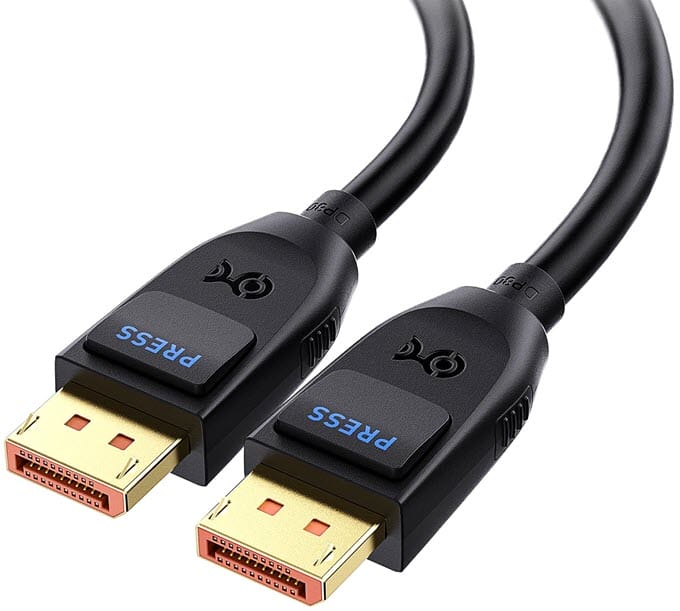
The cable is available in 3.3 ft (1 m) and 6.6 ft (2 m) lengths, where UHBR20 works most reliably. It is a VESA-certified DP80 cable with 80 Gbps of bandwidth (UHBR20). It supports 16K at 60Hz, 8K at 240Hz, and 4K at 240Hz with DSC, along with HDR with 10-bit and 12-bit color, FreeSync, G-Sync, and audio. It is also backward compatible with DisplayPort 2.0, 1.4, and 1.2.
For durability, the cable has gold-plated connectors, a locking latch that holds the connector firmly in the port, and shielding to protect the signal. Unlike most other cables on this list, it uses a standard, non-braided flexible PVC jacket, making it easy to route behind a desk.
| Cable Matters DisplayPort 2.1 Cable Specifications | |
| DisplayPort Version | 2.1 |
| Bandwidth | 80 Gbps (UHBR20) |
| Cable Length | 3.3 ft (1 m), 6.6 ft (2 m) |
| Max. Resolution | 10K at 60Hz or 4K at 240Hz, 16K at 60Hz or 8K at 240Hz with DSC |
| Certified | Yes, VESA Certified DP80 |
| Features | HDR (10-bit and 12-bit color), FreeSync, G-Sync, Audio support, Gold-plated connectors, Locking latch, Shielded, Backward compatible with DP 2.0, 1.4 and 1.2 |
Buy Cable Matters DisplayPort 2.1 Cable
Silkland DisplayPort 2.1 Cable
Silkland is a lesser-known cable brand that focuses on display cables, but it got a lot of attention when it launched its DP80 cable. The brand introduced the first 2m VESA-certified DP80 DisplayPort 2.1 cable on Amazon.
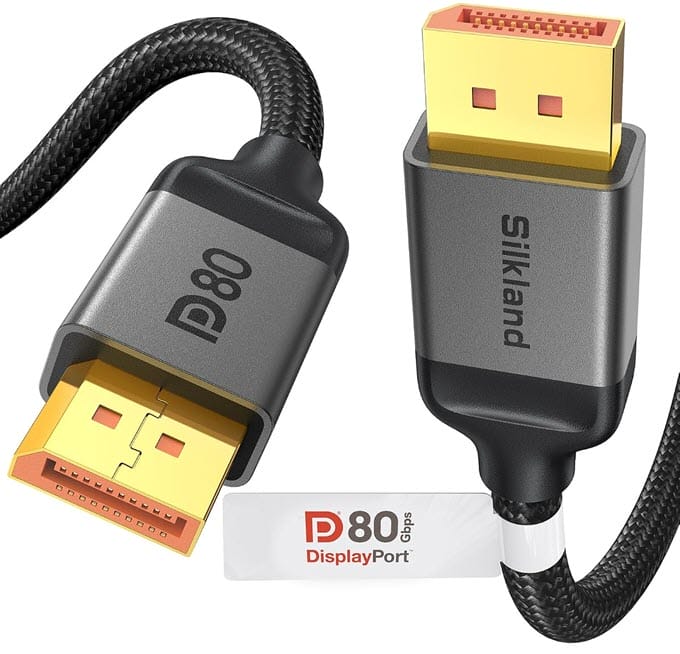
The cable is available in 1.6 ft, 3.3 ft, 5 ft, 6.6 ft, 10 ft, and 16.5 ft lengths. Only the 1.6 ft, 3.3 ft, 5 ft, and 6.6 ft versions are VESA Certified, so choose one of these lengths for guaranteed 80 Gbps UHBR20 bandwidth. It supports 4K at 240Hz and 8K at 60Hz without compression, and up to 16K at 60Hz with DSC 1.2a, plus HDR10+, VRR, G-Sync, and FreeSync. It is backward compatible with DisplayPort 2.0 and 1.4.
The build quality is good, with a durable nylon jacket, 24K gold-plated connectors, a secure latch, and 28 AWG tinned copper conductors with triple-layer shielding. The cable comes with a 24-month warranty. The only drawback is that the cable is a bit thick and stiff, so it may not be ideal for tight spaces.
| Silkland DisplayPort 2.1 Cable Specifications | |
| DisplayPort Version | 2.1 |
| Bandwidth | 80 Gbps (UHBR20) |
| Cable Length | 1.6 ft, 3.3 ft, 5 ft, 6.6 ft, 10 ft, 16.5 ft (VESA certified up to 6.6 ft) |
| Max. Resolution | 10K at 60Hz or 4K at 240Hz, 16K at 60Hz or 8K at 240Hz with DSC |
| Certified | Yes, VESA Certified DP80 |
| Features | HDR10+, DSC 1.2a, VRR, G-Sync, FreeSync, Nylon braided, 24K gold-plated connectors, Secure latch, 28 AWG tinned copper, Triple-layer shielding, 24-month warranty |
Buy Silkland DisplayPort 2.1 Cable
Ubluker DisplayPort 2.1 Cable
Ubluker is a lesser-known brand that sells affordable DisplayPort and HDMI cables. Its DisplayPort 2.1 cable is a good choice if you want a VESA-certified DP80 cable from a budget-friendly brand.
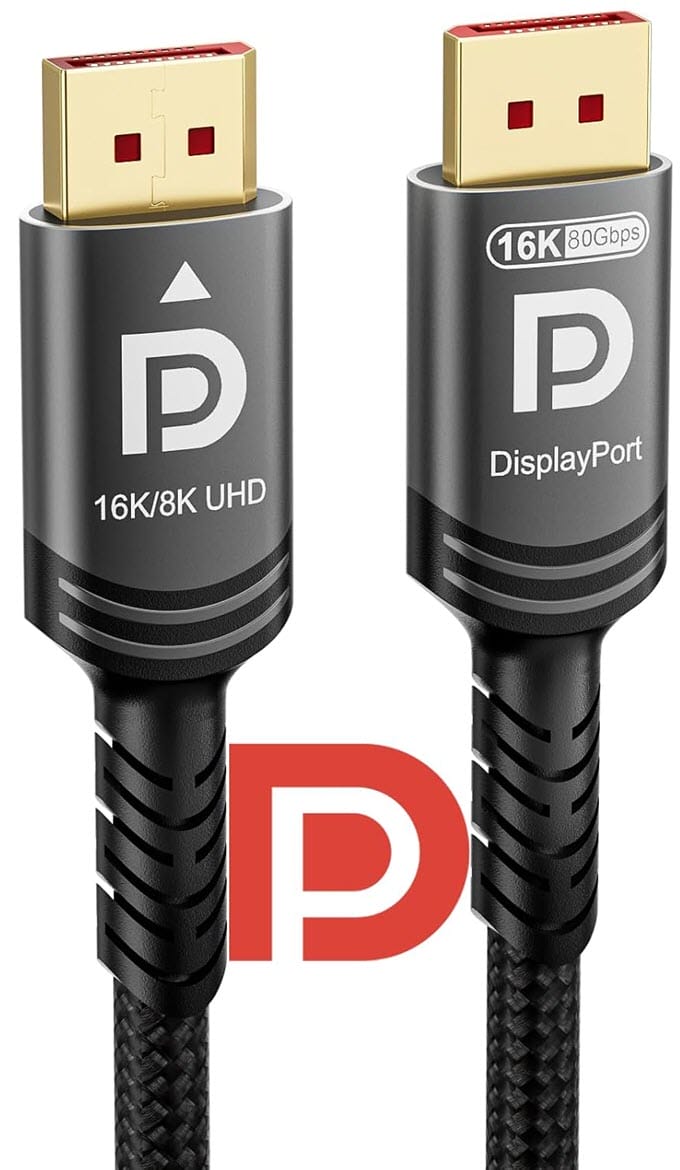
The cable is available in 3.3 ft (1 m), 5 ft, and 10 ft lengths. It is a VESA-certified cable that supports UHBR20 with 80 Gbps of bandwidth. For the most reliable signal at full speed, I recommend the 3.3 ft or 5 ft version over the 10 ft one. It supports 16K at 60Hz and 8K at 240Hz with DSC 1.2a, 4K at refresh rates up to 540Hz, HDR10+, FreeSync, and G-Sync. It also supports Dolby and DTS audio pass-through and is backward compatible with DisplayPort 2.0, 1.4, and 1.2.
The cable uses a premium braided jacket, making it more durable than a plain PVC cable and helping protect it from bending and tearing at weak points.
| Ubluker DisplayPort 2.1 Cable Specifications | |
| DisplayPort Version | 2.1 |
| Bandwidth | 80 Gbps (UHBR20) |
| Cable Length | 3.3 ft (1 m), 5 ft, 10 ft |
| Max. Resolution | 10K at 60Hz or 4K at 240Hz, 16K at 60Hz or 8K at 240Hz with DSC |
| Certified | Yes, VESA Certified DP80 |
| Features | HDR10+, DSC 1.2a, FreeSync, G-Sync, Dolby and DTS audio pass-through, Braided jacket, Backward compatible with DP 2.0, 1.4 and 1.2 |
Buy Ubluker DisplayPort 2.1 Cable
Highwings DisplayPort 2.1 Cable
Highwings is a budget-friendly brand known for its HDMI and DisplayPort cables. It is popular with gamers who want a well-built cable at a lower price, and the brand also offers quick customer support.
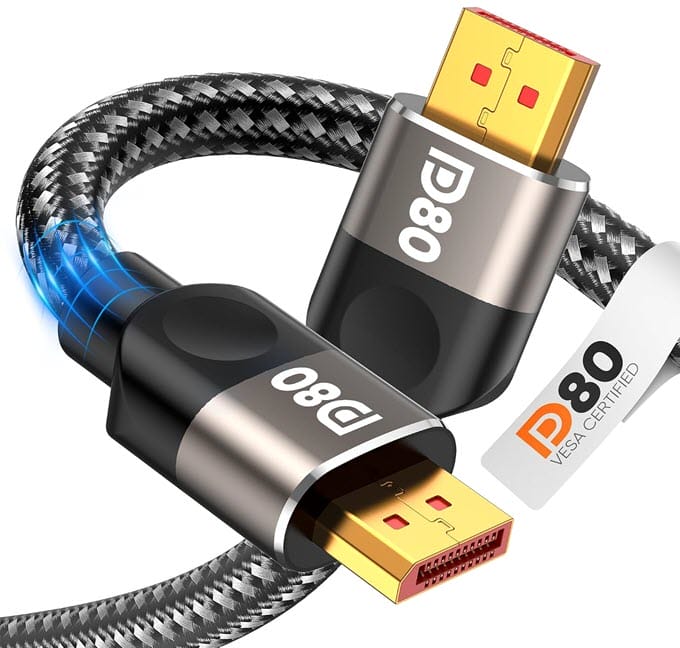
The cable is available in 3 ft, 6 ft, 6.6 ft, and 15 ft lengths. It is a VESA-certified DP80 cable with 80 Gbps of bandwidth, supporting 16K at 60Hz, 10K at 60Hz, 8K at 120Hz, and 4K at 240Hz, plus Dynamic HDR, HDR10, DSC 1.2a, FreeSync, G-Sync, and Adaptive-Sync. It also supports MST for multi-monitor setups and 32-bit audio. As with the other cables, I recommend the shorter versions for stable UHBR20 speeds.
The cable features a double-braided nylon jacket, 24K gold-plated connectors, 28 AWG tinned copper conductors, and triple-layer shielding. It also has a slip-resistant grip on the connectors, making it easy to plug in and remove. The braiding makes it a bit stiff, but it is very durable. The cable comes with a 1-year guarantee.
| Highwings DisplayPort 2.1 Cable Specifications | |
| DisplayPort Version | 2.1 |
| Bandwidth | 80 Gbps (UHBR20) |
| Cable Length | 3 ft, 6 ft, 6.6 ft, 15 ft |
| Max. Resolution | 10K at 60Hz or 4K at 240Hz, 16K at 60Hz or 8K at 240Hz with DSC |
| Certified | Yes, VESA Certified DP80 |
| Features | Dynamic HDR, HDR10, DSC 1.2a, FreeSync, G-Sync, Adaptive-Sync, MST, 32-bit audio, Double nylon braided jacket, 24K gold-plated connectors, 28 AWG tinned copper, Triple-layer shielding, Slip-resistant grip |
Buy Highwings DisplayPort 2.1 Cable
See also:
Final Words
A DisplayPort 2.1 cable is a small purchase, but the wrong one can keep your expensive graphics card and monitor from reaching their full potential. If your monitor and graphics card support UHBR20, you need a VESA-certified DP80 cable to get the full 80 Gbps bandwidth and run high resolutions and refresh rates without DSC.
When choosing a cable, look for DP80 certification rather than the “DisplayPort 2.1” label on the box, and verify it on displayport.org. Pick the shortest length that suits your setup (3.3 to 6.6 feet is ideal), since shorter cables are more reliable at 80 Gbps, and verify the certification for the exact length you are buying. Also check the UHBR mode or rating of your graphics card and monitor, because the connection will run at the speed of the slowest part. Finally, consider the build quality, such as braiding, shielding, and gold- or nickel-plated connectors. If you have any questions about DisplayPort 2.1 cables, let us know in the comments below.
(*This post may contain affiliate links, which means I may receive a small commission if you choose to purchase through the links I provide (at no extra cost to you). Thank you for supporting the work I put into this site!)
![Best Z370 Motherboards for Coffee Lake Processors [Budget & High-end]](https://graphicscardhub.com/wp-content/uploads/2017/10/MSI-Z370-GAMING-M5-Motherboard-211x150.jpg "Best Z370 Motherboards for Coffee Lake Processors [Budget & High-end]")
![Best X570 Motherboards for Gaming & OC [Budget, Mid & High-end]](https://graphicscardhub.com/wp-content/uploads/2019/07/MSI-MEG-X570-ACE-Motherboard-211x150.jpg "Best X570 Motherboards for Gaming & OC [Budget, Mid & High-end]")
