Many PC enthusiasts know that thermal pad thickness can affect cooling performance and that using the wrong thickness can cause overheating. However, thermal paste viscosity is another important factor that can influence cooling performance, application, and long-term reliability.
When choosing thermal paste, thermal conductivity has always been the primary consideration for most users. Other factors include electrical non-conductivity, operating temperature, durability, and price. However, enthusiasts and users who frequently repaste their CPUs and GPUs may also consider viscosity when selecting a thermal compound.
Thermal pastes come in different consistencies, from thin to thick and sticky. While thinner thermal pastes are generally easier to apply and spread, thicker compounds can better resist the pump-out effect in certain applications. This makes viscosity an important consideration for graphics cards, gaming laptops, and other components that operate at high temperatures.
Let’s look at the differences between thick and thin thermal paste, their advantages and disadvantages, and which type is better for CPUs, GPUs, and laptops.
What Is Thermal Paste Viscosity?
Viscosity refers to a fluid’s resistance to flow. In simple terms, it determines how thick or thin a thermal paste is and how easily it flows or spreads under pressure. Thermal paste viscosity is commonly expressed in Poise (P), a unit of dynamic viscosity in the centimeter-gram-second (CGS) system. Some manufacturers use Pa·s (pascal-second), the standard SI unit of dynamic viscosity.
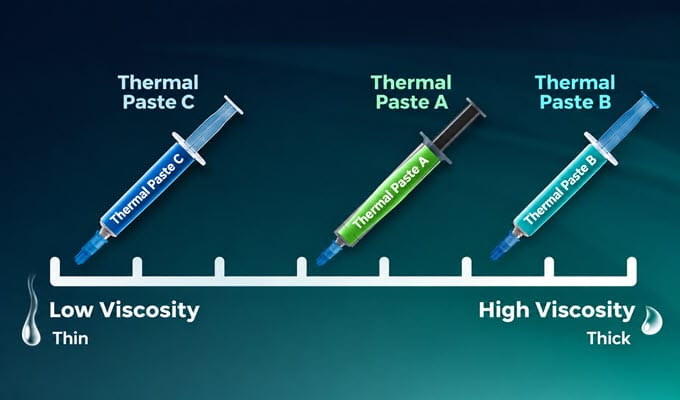
A higher viscosity value indicates a thicker thermal paste, while a lower value indicates a thinner compound. For example, a thermal paste with a viscosity of 50,000 Poise is thicker than one with 35,000 Poise. Similarly, a compound with a viscosity of 170 Pa·s is thicker than one rated at 130 Pa·s.
Thermal pastes are also shear-thinning, which means they flow more easily when pressure is applied. This is why even a thick paste spreads out under the mounting pressure of a heatsink, and why the viscosity number alone does not tell you how a paste will feel when you apply it. Many brands also do not publish the viscosity at all, so the figure is not always available.
Thermal Paste Pump-Out Effect
Thermal paste pump-out effect is the gradual displacement of thermal compound from the contact area between a processor and its heatsink. It occurs due to repeated thermal expansion and contraction, mechanical movement, and differences in the expansion characteristics of the contacting materials. During operation, the processor and heatsink heat up and cool down at different rates. This repeated thermal cycling can gradually push thermal paste away from the center of the contact area, reducing the thermal interface’s effectiveness.
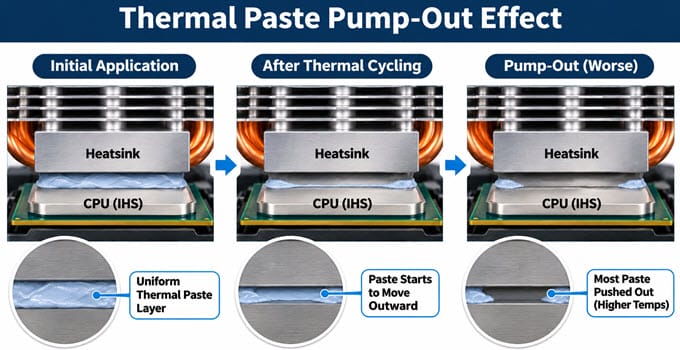
Pump-out occurs faster in graphics cards and laptops because their processors can experience frequent temperature changes and repeated thermal cycling. If enough thermal compound moves away from the contact area, reduced interface coverage can increase thermal resistance and operating temperatures.
Thicker thermal pastes are often better suited for applications where pump-out resistance matters. Their higher viscosity and mechanical consistency can help them maintain contact under repeated thermal cycling. However, viscosity alone does not determine pump-out resistance. The base material, filler composition, adhesion, and mechanical stability of the compound also play important roles. A high-viscosity compound that is not designed for long-term thermal cycling may still perform poorly, while a properly formulated medium-viscosity compound can offer excellent durability.
Thick vs Thin Thermal Paste: Cooling Performance
The cooling performance of thermal paste primarily depends on its formulation, thermal conductivity, thermal resistance, and the thickness of the applied layer rather than viscosity alone.
Thicker thermal paste does not necessarily provide better cooling than thinner paste. Both types can deliver excellent thermal performance when properly formulated and applied. However, many high-performance thermal compounds designed for demanding applications have relatively high viscosity. These compounds are particularly useful for applications where long-term stability and resistance to the pump-out effect are important, including graphics cards, gaming laptops, and direct-die cooling.
Thinner thermal pastes are generally easier to spread and can fill microscopic gaps between the processor and heatsink with less effort. They are commonly used with mainstream desktop CPUs and other applications where ease of application matters.
One important factor is bond-line thickness (BLT), which refers to the thickness of the thermal paste layer between the two contacting surfaces. A thinner, uniform layer generally provides lower thermal resistance, provided it adequately fills microscopic surface imperfections. An excessively thick layer may increase thermal resistance, while insufficient coverage can leave air gaps that reduce cooling performance. Therefore, the ideal thermal paste should have a formulation that provides good thermal conductivity, spreads properly under the heatsink’s mounting pressure, and maintains its properties over time.
Thick vs Thin Thermal Paste: Ease of Application and Longevity
Thinner thermal pastes are generally easier to apply and spread compared to thicker compounds. They flow more readily and can be distributed across the processor surface with relatively little pressure.
Thicker thermal pastes are usually denser, stickier, and more difficult to spread manually. Some compounds are particularly difficult to spread with a spatula and rely on the heatsink’s mounting pressure to distribute the paste evenly.
Although thicker compounds can be more difficult to apply, they are not necessarily dry. Reputable manufacturers formulate their thermal pastes to maintain their consistency and thermal properties within their specified operating conditions.
Thermal paste longevity also depends on its formulation. Some high-viscosity compounds offer excellent resistance to the pump-out effect and maintain their thermal performance for longer periods. However, it is incorrect to assume that every thick thermal paste will last longer than every thin thermal paste.
Thinner compounds may be more susceptible to displacement or separation in demanding applications, but their actual lifespan depends on their chemical composition, operating temperature, and thermal cycling.
For this reason, users should consider the manufacturer’s durability specifications and independent long-term testing instead of relying on viscosity alone.
Thermal Paste Application Methods: Dot, Line, Cross and Manual Spreading
Thermal paste application is another factor that can influence cooling performance. The goal is to create a thin, uniform layer between the processor and heatsink without leaving air gaps or applying too much compound. Common application methods include the dot, line, cross, and manual spreading.
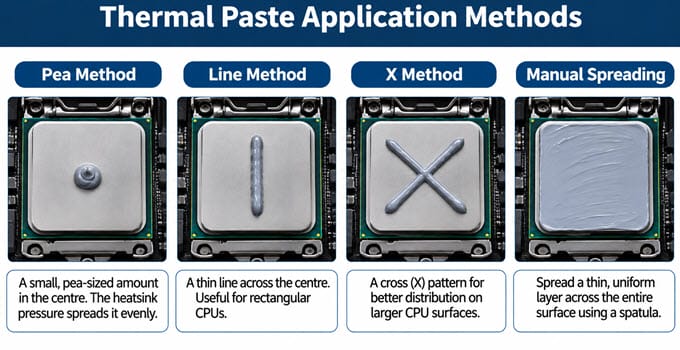
Dot (Pea) Method: A small amount (pea-sized) of thermal paste is applied at the center of the processor. The mounting pressure of the heatsink spreads the compound across the contact surface. This is one of the easiest methods and works well with smaller desktop CPUs with a square IHS (Integrated Heat Spreader).
Line Method: Thermal paste is applied as a thin line across the center of the processor. This method can help distribute the compound along the length of rectangular processor heat spreaders.
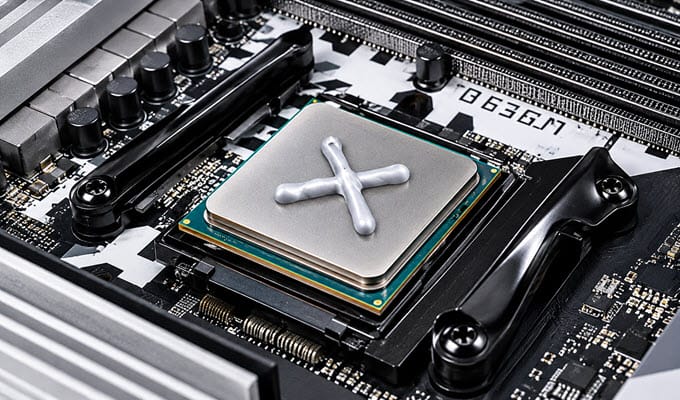
Cross Method: Thermal paste is applied in a cross pattern. It can help distribute the compound across larger processor surfaces, although the final coverage depends on the paste’s flow characteristics and mounting pressure.
Manual Spreading Method: Thermal paste is spread manually across the entire processor surface using a spatula or applicator. This method provides direct control over coverage and is particularly useful for compounds that do not spread easily under heatsink mounting pressure.
Thinner thermal pastes generally work well with the dot, line, and cross methods because they spread more easily under mounting pressure. Thicker compounds may require manual spreading, depending on their consistency and the processor’s contact surface.
How mounting pressure affects paste distribution
The heatsink mounting pressure is what finally spreads the paste. A thin paste flows under a low pressure and fills the microscopic gaps quickly. A thick paste needs more force and more time, so it relies on a strong, even mounting pressure to spread.
Uneven pressure leaves thick patches on one side and thin or empty patches on the other. This is why you should tighten the screws gradually in a cross pattern (a little at a time), and not fully tighten one screw before the other. Too little pressure leaves the paste layer too thick (poor performance), while too much pressure can squeeze out the paste faster and may even bend the PCB or damage the die. After the first few heat cycles, a thick paste will keep settling, so it is common to see temperatures improve slightly after a few days of use.
Thick vs Thin Thermal Paste: Key Differences
| Parameters | Thick Thermal Paste | Thin Thermal Paste |
| Viscosity | High | Low |
| Consistency | Dense and sticky | Soft and fluid |
| Application | Harder to spread | Easier to spread |
| Pump-out resistance | Often better, depending on formulation | Can be lower, depending on formulation |
| Spread under pressure | Requires more pressure | Spreads more easily |
| Thermal conductivity | Depends on formulation | Depends on formulation |
| Thermal resistance | Depends on formulation and applied layer | Depends on formulation and applied layer |
| Long-term stability | Formulation dependent; some offer excellent durability | Formulation dependent |
| Ease of cleaning | Can be more difficult | Generally easier |
| Best applications | GPUs, gaming laptops, and direct-die cooling, overclocking | Mainstream desktop CPUs and general-purpose applications |
Thick Thermal Paste: Advantages and Disadvantages
Thicker thermal pastes are generally preferred for applications where resistance to pump-out and long-term stability are important. Their dense consistency can make them more difficult to apply, but they offer certain advantages over thinner compounds.
Thick Thermal Paste Advantages
Better Pump-Out Resistance: High-viscosity thermal pastes resist displacement from repeated thermal expansion and contraction. This makes them useful for graphics cards and laptops that experience frequent thermal cycling.
Potentially Longer Lifespan: Some thicker thermal compounds maintain their consistency and thermal performance for longer periods. They can be particularly useful in applications where frequent repasting is inconvenient.
Suitable for Direct-Die Cooling: Thicker compounds designed for direct-die applications can maintain good contact between the silicon die and heatsink. This is particularly important for graphics cards, where the GPU die makes direct contact with the cooler.
Thick Thermal Paste Disadvantages
Difficult to Apply and Spread: High-viscosity thermal pastes can be difficult to spread manually. Some require considerable pressure to distribute evenly across the processor surface.
Difficult to Clean: Sticky, dense compounds can be harder to remove during repasting, requiring extra cleaning effort.
Not Always Suitable for Every Application: Some thick compounds are designed for specific operating conditions and may not perform best with every CPU cooler, GPU heatsink, or contact surface.
Thin Thermal Paste: Advantages and Disadvantages
Thin thermal pastes are commonly used in mainstream desktop computers because they are easy to apply and spread. Their fluid consistency allows them to distribute across the processor surface with relatively little mounting pressure.
Thin Thermal Paste Advantages
Easy to Apply and Spread: Thinner compounds are easier to dispense from a syringe and spread across the processor surface. They are particularly convenient for beginners and users who frequently install or replace CPU coolers.
Fills Microscopic Gaps Easily: Their fluid consistency allows them to spread readily under heatsink mounting pressure and fill small surface imperfections.
Easy to Clean: Thin thermal pastes are generally easier to remove during repasting compared to sticky, high-viscosity compounds.
Thin Thermal Paste Disadvantages
Potentially Lower Pump-Out Resistance: Some thinner thermal compounds are more susceptible to displacement during repeated thermal cycling. This can become a concern in GPUs and laptops that operate under demanding conditions.
Potentially Shorter Service Life: Certain thinner compounds can experience oil separation, drying, or performance degradation over time. However, this depends on the formulation and should not be generalized to all low-viscosity thermal pastes.
May Require More Frequent Repasting: If a compound suffers from pump-out or loses its thermal properties, it may require replacement sooner. A properly formulated thin thermal paste, however, can still provide good long-term durability.
Thick or Thin Thermal Paste for CPU, GPU and Laptop?
The choice between thick and thin thermal paste depends on the processor type, cooler design, mounting pressure, operating temperature, and expected service life.
Thick vs Thin Thermal Paste for Desktop CPU
Both thick and thin thermal pastes can work well on desktop CPUs. Mainstream desktop processors generally have an integrated heat spreader (IHS), which provides a relatively large contact surface for the CPU cooler.
Thinner thermal pastes are convenient for desktop CPUs because they spread easily under heatsink mounting pressure. They also suit beginners who want a straightforward application process.
However, thicker compounds can also be used on desktop CPUs without issues, as long as they are applied properly and match the cooler’s mounting pressure.
For delidded processors, where the heatsink or cooling solution makes direct contact with the exposed silicon die, a thermal compound specifically suited to direct-die applications is preferable.
Ultimately, there is no universal requirement to use thin thermal paste for desktop CPUs and thick thermal paste for GPUs. The formulation and intended application should always be considered.
Thick vs Thin Thermal Paste for GPU
Graphics cards generally benefit from thermal compounds that resist pump-out and offer long-term thermal stability. Unlike desktop CPUs, most graphics cards use direct-die cooling, where the heatsink makes direct contact with the GPU silicon die.
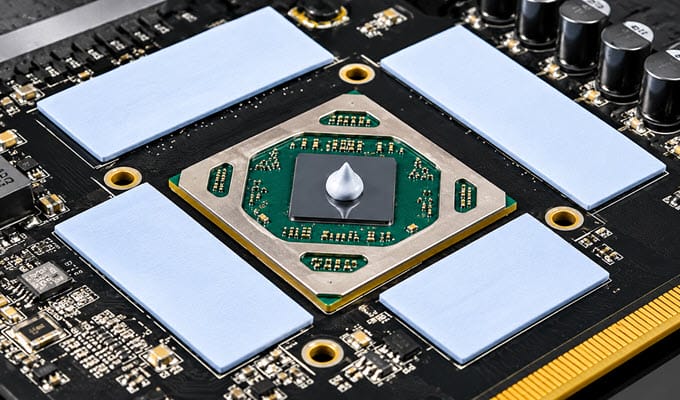
Graphics cards can also experience considerable temperature variations during gaming and other GPU-intensive workloads. Repeated thermal cycling can gradually displace thermal paste, particularly when the compound is not designed for such applications.
A high-viscosity thermal paste with good pump-out resistance is therefore a suitable choice for GPU repasting. However, the compound must also be compatible with the GPU cooler’s mounting pressure and contact surface. Thermal Grizzly Duronaut, Thermalright TFX, and Maxtor CTG10 are examples of relatively viscous compounds worth considering for GPU applications.
Thick vs Thin Thermal Paste for Laptop
Gaming laptops can benefit from thermal compounds designed for long-term stability and resistance to pump-out. Their cooling systems are compact, and the CPU and GPU can operate at relatively high temperatures under sustained workloads.
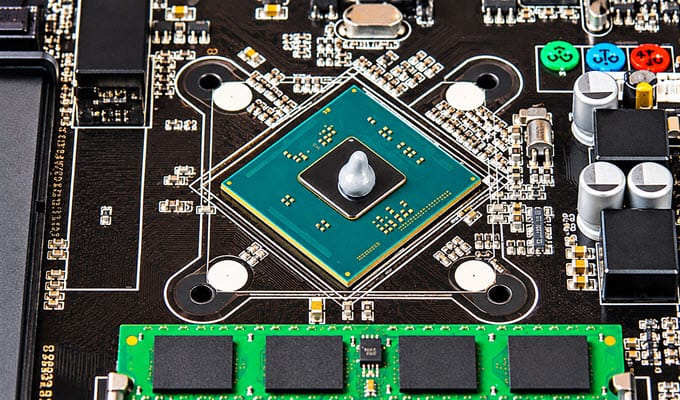
A suitable high-viscosity thermal paste can help maintain thermal contact during repeated heating and cooling cycles. However, laptop cooling systems vary considerably, and the correct thermal interface material depends on the manufacturer’s original design.
For laptops that originally use conventional thermal paste, a compound with good pump-out resistance and suitable application characteristics is generally preferable to choosing a paste based solely on its thermal conductivity rating.
Best Thick and Thin Thermal Pastes
The following thermal compounds are examples of products with different consistency characteristics. Their classifications are based on independent testing and available product information rather than thermal conductivity ratings alone.
Thinner Thermal Pastes [ Low Viscosity]
Below are the popular thermal pastes with low to medium viscosity.
ARCTIC MX-4: A widely used and popular thermal compound used worldwide. It has a relatively easy-to-apply consistency and suits general-purpose cooling applications.
Corsair TM30: A conventional thermal compound with a thin consistency. It is suitable for budget and mainstream PC builds and routine repasting.
Corsair XTM70: A high-performance thermal compound with medium viscosity and is intended for demanding cooling applications and is suitable for both CPU and GPU.
GELID Solutions GC-4: A very good thermal paste with optimal viscosity. Can be used with CPUs, GPUs, and Laptops.
Noctua NT-H1: A popular thermal compound designed for easy application and reliable cooling performance. It suits desktop CPUs and other conventional cooling applications.
Noctua NT-H2: An improved thermal compound over NT-H1 in Noctua’s product range. It is another option for general-purpose CPU cooling.
Thermal Grizzly Kryonaut: A high-performance thermal compound commonly used in enthusiast PC builds. It suits CPUs and is designed for overclocking.
Thicker Thermal Pastes [High Viscosity]
Below are the popular thermal pastes with medium to high viscosity.
ARCTIC MX-6: A relatively viscous thermal compound designed for CPU and GPU cooling. Its consistency makes it less fluid than many mainstream thermal pastes.
ARCTIC MX-7: A newer thermal compound in the ARCTIC MX series. It is thinner than Arctic MX-6 but delivers better thermal performance. Can be used with CPU, GPU, and Laptop.
Corsair XTM50: An above-average thermal compound designed for CPU cooling. Can be used with GPUs.
GELID Solutions GC-Extreme: A high-performance, non-electrically conductive thermal compound engineered to maximize heat transfer for CPUs, GPUs, and chipsets.
Thermalright TFX: A high-viscosity thermal compound designed for demanding cooling applications. It is relatively thick and can be difficult to spread manually. Better suited for GPUs and Laptops.
Thermal Grizzly Kryonaut Extreme: A premium thermal compound designed primarily for extreme overclocking applications, including cryogenic cooling. Can be used with CPUs, GPUs, and Laptops.
Thermal Grizzly Duronaut: A high-performance thermal compound designed with long-term durability in mind. It offers a relatively viscous consistency and is suitable for CPU and GPU applications.
Thermal Grizzly Duronaut Pro: A thermal compound with a relatively viscous consistency, designed for demanding cooling applications. Best suited for CPU, GPU, and laptops.
Cooler Master CryoFuze: A thermal compound designed for high-performance cooling applications. Better suited for budget builds.
Cooler Master CryoFuze 5: A very thick paste that uses nano-diamond technology and comes in multiple color options. Best suited for mainstream to mid-level builds.
Note: Thermal paste consistency may also vary slightly between batches. Manufacturing tolerances, raw material quality, mixing, storage conditions, temperature, and product age can influence the consistency of a thermal compound. Therefore, small differences in viscosity between samples of the same product are possible.
Final Words
Both thick and thin thermal pastes have their advantages and disadvantages. Thinner compounds are generally easier to apply and suit mainstream desktop CPUs and general-purpose PC cooling. Thicker compounds can resist pump-out better and are worth considering for graphics cards, gaming laptops, and other demanding applications.
However, viscosity alone should not determine your thermal paste purchase. Thermal conductivity, thermal resistance, bond-line thickness, mechanical stability, and long-term durability are equally important factors.
For GPU and laptop repasting, choosing a compound with good pump-out resistance and proven long-term stability is particularly important. For desktop CPUs, both thick and thin thermal pastes can deliver excellent cooling performance when properly applied.
The best thermal paste is ultimately the one that offers the right balance of cooling performance, application characteristics, and long-term reliability for your particular hardware. If you need help choosing the right thermal paste for your specific application, component, or device, let me know in the comment section below.
(*This post may contain affiliate links, which means I may receive a small commission if you choose to purchase through the links I provide (at no extra cost to you). Thank you for supporting the work I put into this site!)