
If you do not have budget constraints and are looking for a small-form-factor, compact, or portable NAS for home or professional data storage but do not want to compromise on performance, an NAS with NVMe SSDs only is worth considering. An all-SSD NAS, also called an All-Flash NAS or Full-SSD NAS, uses M.2 NVMe or other PCIe-based solid-state drives instead of traditional SATA hard drives. Unlike conventional NAS servers with large drive bays, compact all-flash NAS devices can be as small as a set-top box. Some models are small enough to fit in a briefcase or carry bag, making them particularly attractive for photographers, video editors, content creators, and professionals who need fast storage without a large desktop enclosure. All-SSD NAS devices are still a niche product because NVMe SSDs are considerably more expensive than hard drives at high capacities. However, the combination of very low latency, high transfer speeds, silent operation, low power consumption, and compact size makes them an excellent choice for certain applications.
Applications or Uses of All-SSD NAS
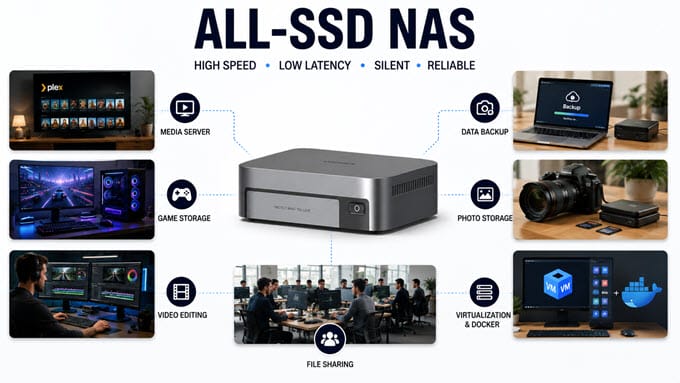
All-SSD NAS servers are best suited for Plex and media servers, media and game storage, data backup, professional photography and video editing studios, and small enterprise data centers, basically anywhere speed and silence matter more than raw capacity. They can be used in homes, offices, small businesses, creative studios, and professional environments where low latency and fast file access are more important than achieving the lowest possible cost per terabyte.
Advantages of All-SSD or All-Flash NAS
The biggest advantage of an all-SSD NAS is speed. NVMe SSDs provide substantially lower latency and much higher I/O performance than mechanical hard drives. When combined with 2.5GbE, 5GbE, 10GbE, or Thunderbolt connectivity, an all-flash NAS can provide a very responsive storage environment for large files and demanding workloads.
Another major advantage is the compact size. Since there are no 3.5-inch hard-drive bays, manufacturers can build all-flash NAS devices that are significantly smaller than traditional NAS servers.
SSDs also have no spinning platters or mechanical heads, which makes an all-SSD NAS much quieter. The NAS may still use cooling fans, especially with several NVMe drives installed, but it does not produce the mechanical noise associated with hard drives.
Power consumption can also be lower, particularly with compact NVMe NAS systems using power-efficient Intel processors. SSDs are also resistant to physical shock and vibration, which is useful for portable storage systems.
Disadvantages of All-SSD NAS
The main disadvantage is cost. A set of high-capacity NVMe SSDs can cost considerably more than an equivalent hard-drive array. Upgrading storage capacity is therefore more expensive.
The second limitation is scalability. Traditional NAS devices can accommodate very large-capacity hard drives, while compact all-flash NAS systems generally have fewer drive slots and lower maximum supported capacity.
Network speed can also become a bottleneck. Installing four extremely fast PCIe 4.0 NVMe SSDs does not automatically mean you will transfer files at NVMe speeds over the network. A 1GbE connection, for example, is nowhere near fast enough to exploit the performance of a modern NVMe array. For an all-flash NAS, 10GbE, Thunderbolt 4, or at least 5GbE/2.5GbE connectivity makes much more sense.
Best All-SSD NAS with Intel Core Processors
The following all-flash NAS systems are aimed at users who want considerably more performance than entry-level Intel Celeron or N-series systems can provide.
UGREEN NASync DXP480T Plus All-SSD NAS
[Dual Thunderbolt 4, Wi-Fi 6, 10G LAN, 12th Gen Intel Core i5, Expandable Memory, Metal Body (Aluminum Alloy), Excellent Performance, Friendly UI]
The UGREEN NASync DXP480T Plus is one of the most powerful compact all-flash NAS systems for home users, enthusiasts, and content creators. The DXP480T Plus uses an Intel Core i5-1235U 10-core/12-thread processor and comes with 8GB DDR5 RAM. The memory is expandable to 64GB, giving the NAS considerably more flexibility for Docker containers, virtualization, and demanding applications. UGREEN also supports ODECC memory technology on this model.
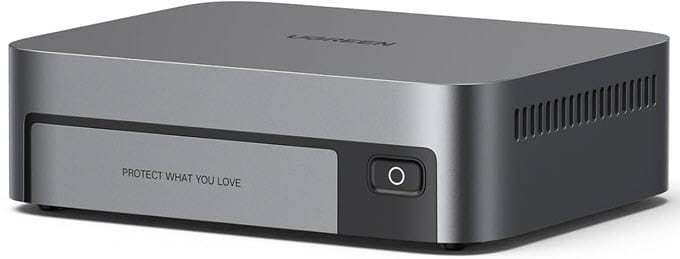
For storage, there are four M.2 NVMe slots supporting up to 32TB using four 8TB SSDs. The four slots use PCIe Gen 4 x4 interfaces. There is also a built-in 128GB M.2 2230 SSD for the operating system, separate from the four storage drives. Connectivity is one of its strongest features. The NAS provides one 10GbE RJ45 network port and two Thunderbolt 4 ports. There is also a USB-A 10Gbps port, while the Thunderbolt ports provide high-speed connectivity with compatible computers and devices. HDMI output supports up to 8K, making it useful for multimedia applications. Wi-Fi 6 is also built in for seamless connectivity.
UGREEN’s UGOS Pro operating system provides storage management, file sharing, backup, photo management, security features, and applications from a unified interface. The system also supports third-party drives from manufacturers such as Western Digital, Seagate, and Toshiba. RAID support includes JBOD, Basic, RAID 0, RAID 1, RAID 5, RAID 6, and RAID 10. With four SSDs, RAID 5 or RAID 10 can provide a good balance between performance and redundancy, while RAID 0 is better suited to users who prioritize maximum performance and can maintain separate backups.
The aluminum alloy enclosure ensures strong build and better heat dissipation. Its compact construction, high-speed networking, Thunderbolt 4 connectivity, and expandable RAM make it a particularly capable all-flash NAS.The DXP480T Plus is best suited for video editors, photographers, content creators, Plex/media servers, professionals, Docker users, and enthusiasts who want a compact high-performance NAS.
| UGREEN NASync DXP480T Plus NAS Specifications | |
| CPU | Intel Core i5-1235U, 10 Cores / 12 Threads, up to 4.4 GHz |
| RAM | 8GB DDR5, expandable up to 64GB, ODECC supported |
| SSD Support | M.2 2280 PCIe Gen4 NVMe SSD |
| M.2 Drive Slots | 4 × M.2 2280 NVMe |
| Maximum Storage | 32TB (4 × 8TB) |
| Ethernet Port | 1 × 10GbE RJ45 |
| USB Ports | 1 × USB-A 3.2 Gen 2 (10Gbps) |
| Thunderbolt Port | 2 × Thunderbolt 4 (40Gbps) |
| HDMI | 8K 60Hz |
| Wi-Fi | Built-in Wi-Fi 6 |
| RAID Support | JBOD, Basic, RAID 0, RAID 1, RAID 5, RAID 6, RAID 10 |
| Cooling Fan | Dual cooling fans |
| NAS Operating System | UGOS Pro |
| Supported OS | Windows, macOS, Android, iOS |
| Other Features | 128GB system SSD, aluminum-alloy construction, expandable RAM, third-party SSD support, compact design |
Buy UGREEN NASync DXP480T Plus NAS
QNAP TBS-h574TX-i5U-16G all-flash NASbook
[5-Bay E1.S/M.2 NVMe NASbook with Hot-Swappable Support, Dual LAN, Fast Performance]
The QNAP TBS-h574TX-i5U-16G is another excellent choice for professional users, especially video editors and small production teams. It has a compact set-top-box form factor but offers five SSD positions, Thunderbolt 4, and 10GbE networking. The NAS uses an Intel Core i5-1235U 10-core/12-thread processor with Intel Iris Xe graphics and 16GB of onboard RAM. Unlike the UGREEN model, the 16GB memory is non-expandable.
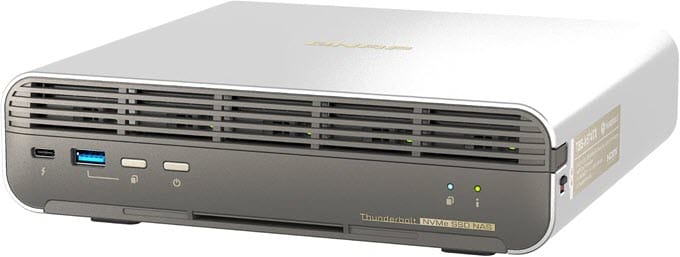
The TBS-h574TX supports five E1.S SSDs up to 15mm and also supports M.2 2280 PCIe NVMe SSDs through the included adapters. An optional E1.S to M.2 SSD adapter enables hot-swappable M.2 SSDs, which is a standout feature of this NAS. The NAS includes five M.2 2280 PCIe Gen 3 slots via the adapters and can support up to 40TB using five 8TB SSDs. Regarding connectivity, it has one 10GbE RJ45 port, one 2.5GbE RJ45 port, two Thunderbolt 4 ports, two USB 3.2 Gen 2 10Gbps ports, a USB 2.0 port, and HDMI output. HDMI is useful for displaying video directly on a compatible screen.
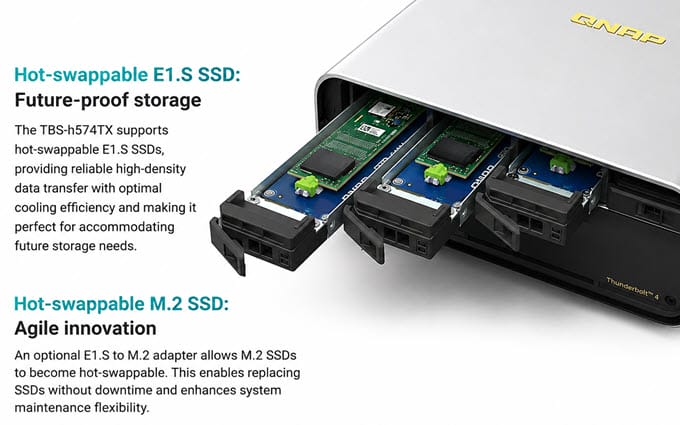
QNAP ships the TBS-h574TX with QuTS hero, a ZFS-based NAS operating system designed around data integrity, snapshots, and advanced storage management. The platform also provides SSD optimization features such as SSD over-provisioning and QNAP’s QSAL technology. RAID options include RAID 0, 1, 5, 6, and 10, along with additional QuTS hero configurations such as Triple Mirror and RAID-TP. Hot-swappable SSDs and automated replacement features are particularly useful in professional environments where downtime is undesirable. It uses two 40mm fans for cooling, and they are pretty silent in operation. The TBS-h574TX is best suited for professional video production, on-location shoots, small studios, VFX, content creators, photographers, Mac and Windows workflows, and SOHO users who need Thunderbolt 4 and fast network storage.
| QNAP TBS-h574TX-i5U-16G NAS Specifications | |
| CPU | Intel Core i5-1235U, 10 Cores / 12 Threads, up to 4.4 GHz |
| RAM | 16GB onboard, non-expandable |
| SSD Support | M.2 2280 PCIe NVMe / E1.S NVMe |
| M.2 Drive Slots | 5 × M.2 2280 PCIe Gen 3 via pre-installed adapters |
| Maximum Storage | Up to 40TB with 5 × 8TB SSDs |
| Ethernet Port | 1 × 10GbE + 1 × 2.5GbE |
| USB Ports | 2 × USB 3.2 Gen 2 (10Gbps) + 1 × USB 2.0 |
| Thunderbolt Port | 2 × Thunderbolt 4 |
| HDMI | 1 × HDM I 1.4b |
| Wi-Fi | Not built-in |
| RAID Support | RAID 0, 1, 5, 6, 10 and additional QuTS hero configurations |
| Cooling Fan | 2 × 40mm system fans |
| NAS Operating System | QuTS hero |
| Supported OS | Windows, macOS, Linux/UNIX |
| Other Features | E1.S hot-swap support, hot-swappable M.2 through adapters, ZFS-based QuTS hero, Intel Iris Xe Graphics, compact set-top design, Power Failure Protection |
Buy QNAP TBS-h574TX-i5U-16G all-flash NASbook
TerraMaster F8 SSD Plus NAS
[8-Bay All-Flash NAS in the Palm of Your Hand]
If you want the maximum number of M.2 drives in a compact all-flash NAS, the TerraMaster F8 SSD Plus is one of the most interesting choices. It provides eight M.2 NVMe slots, allowing substantially more storage and greater flexibility than four-bay systems. The F8 SSD Plus uses an Intel Core i3-N305 processor with eight cores and a maximum burst frequency of 3.8GHz. It comes with 16GB DDR5 non-ECC SODIMM memory that can be expanded to up to 32GB. There are eight M.2 2280 NVMe slots. The NAS supports PCIe 3.0, 4.0, and 5.0 NVMe SSDs, although the slots operate using PCIe 3.0 x1 signaling. Maximum internal raw storage is 64TB using eight 8TB SSDs. Connectivity includes one 10GbE RJ45 port, two USB 3.2 10Gbps Type-A ports, one USB-C 10Gbps port, and HDMI 2.0b. There is no built-in Wi-Fi or Thunderbolt port.
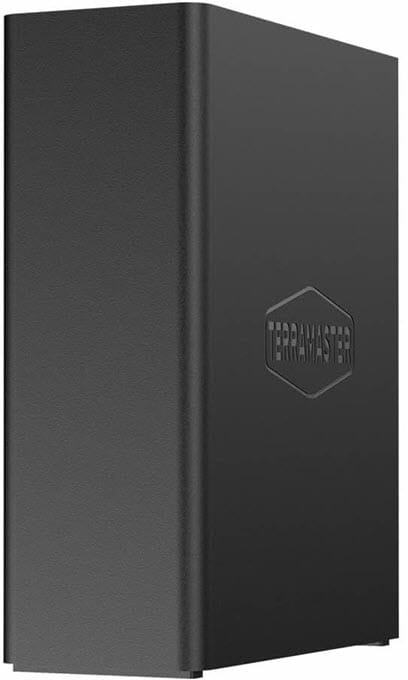
The NAS runs TerraMaster TOS 7 and supports Docker, virtualization, snapshots, backup, Plex, Emby, and other applications. It also provides flexible TRAID storage management. RAID support includes RAID 0, 1, 5, 6 and 10, along with TRAID. With eight SSDs, RAID 5 or RAID 6 is particularly attractive for users who need a combination of large capacity and redundancy. The enclosure is made of plastic and is pretty compact. It uses two 50mm fans for cooling and has a specified standby noise level below 19dB. The F8 SSD Plus is best suited for professional video editing, 4K post-production, virtualization, databases, Docker, high-speed file sharing, small studios, and users who need up to eight NVMe SSDs in a very compact NAS.
| TerraMaster F8 SSD Plus NAS Specifications | |
| CPU | Intel Core i3-N305, 8 Cores / 8 Threads |
| RAM | 16GB DDR5, expandable up to 32GB |
| SSD Support | M.2 2280 PCIe NVMe SSD |
| M.2 Drive Slots | 8 × M.2 2280 NVMe |
| Maximum Storage | 64TB (8 × 8TB) |
| Ethernet Port | 1 × 10GbE |
| USB Ports | 3 × USB 3.2 Gen 2 (10Gbps) |
| Thunderbolt Port | Not available |
| HDMI | HDMI 2.0b |
| Wi-Fi | Not built-in |
| RAID Support | RAID 0, 1, 5, 6, 10 and TRAID |
| Cooling Fan | 2 × 50mm cooling fans |
| NAS Operating System | TOS 7 |
| Supported OS | Windows, macOS, Linux |
| Other Features | Eight-drive all-flash design, Docker, virtualization, TRAID, compact enclosure, low-noise cooling |
Buy TerraMaster F8 SSD Plus NAS
Best Budget All-SSD NAS
Budget all-flash NAS systems generally use lower-power Intel processors and provide fewer premium connectivity features. They are particularly suitable for media storage, backups, file sharing and home use.
Aiffro K100 All-SSD Mini NAS
[Budget DIY NAS with Intel N100, Aluminum Body, Tiny Mini NAS, Bring Your Own OS]
The Aiffro K100 is one of the smallest and most interesting DIY All-SSD NAS systems. It uses an Intel Alder Lake-N100 processor with four cores and four threads and a maximum clock speed of 3.4GHz. Intel UHD Graphics is included for media and graphics-related workloads. The K100 has 8GB LPDDR5 4800MHz onboard memory. The RAM is not user-replaceable. It provides four M.2 2280 NVMe slots. The manufacturer currently lists support for PCIe 4.0 drives, while the original configuration information specifies four M.2 SSD positions using PCIe Gen3 connectivity.
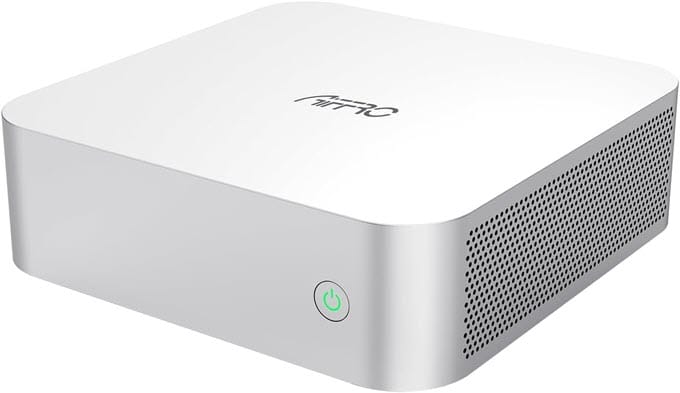
Networking is handled by a Realtek RTL8125 controller providing 2.5GbE connectivity. The system has two USB 2.0 ports, two USB-C USB 3.2 Gen 2 data ports, a USB-C power input, and HDMI 1.4. There is no Thunderbolt port, and Wi-Fi is also not present. Unlike commercial NAS products, the K100 does not come with a pre-installed NAS operating system. Users can install Windows, Linux, TrueNAS, FreeNAS, Ubuntu, CentOS, or Euler. This makes it more flexible but also means setup requires more technical knowledge. The NAS supports RAID, and the exact RAID configuration will depend on the operating system and storage software you install. The K100 is extremely compact, and the enclosure is made of aluminum alloy. An optional VESA mount is also available. The Aiffro K100 is best suited for home labs, DIY NAS projects, TrueNAS users, media servers, backup servers, lightweight virtualization, low-power storage, and enthusiasts who want maximum flexibility in a tiny enclosure.
| Aiffro K100 All-SSD NAS Specifications | |
| CPU | Intel Alder Lake-N100, 4 Cores / 4 Threads, up to 3.40 GHz |
| RAM | 8GB LPDDR5 4800MHz |
| SSD Support | M.2 2280 NVMe SSD |
| M.2 Drive Slots | 4 × M.2 2280 PCIe Gen3 ×2 |
| Maximum Storage | 16TB (4 × 4TB) |
| Ethernet Port | 1 × 2.5GbE RJ45 |
| USB Ports | 2 × USB 2.0 + 2 × USB-C 3.2 Gen 2 |
| Thunderbolt Port | Not available |
| HDMI | HDMI 1.4 |
| Wi-Fi | Not built-in |
| RAID Support | RAID support depends on installed NAS operating system |
| Cooling Fan | Active cooling |
| NAS Operating System | No pre-installed NAS OS; Supports CentOS, Euler, Ubuntu, Windows 11, FreeNAS, TrueNAS |
| Supported OS | Windows, macOS, Linux |
| Other Features | Aluminum construction, VESA mount option, 65W USB-C power, Intel UHD Graphics, extremely compact design |
TerraMaster F4 SSD NAS
[4-Bay All-Flash NAS for Home & Creative Studios]
The TerraMaster F4 SSD is a compact four-bay all-flash NAS designed primarily for home users and creative studios. It is a more affordable alternative to the company’s F8 SSD Plus while retaining the advantages of NVMe storage. The F4 SSD uses an Intel N95 processor with four cores and a maximum burst speed of 3.4GHz. It comes with 8GB DDR5 non-ECC SODIMM memory and can be upgraded to a maximum of 32GB. The NAS has four M.2 2280 NVMe slots. Two slots use PCIe 3.0 x2 and two use PCIe 3.0 x1. It supports PCIe 3.0, 4.0, and 5.0 NVMe SSDs, with a maximum raw internal capacity of 32TB using four 8TB SSDs. Connectivity options include one 5GbE Ethernet port, three USB 3.2 10Gbps ports (two Type-A and one Type-C), and HDMI output. There is no Thunderbolt port or built-in Wi-Fi.
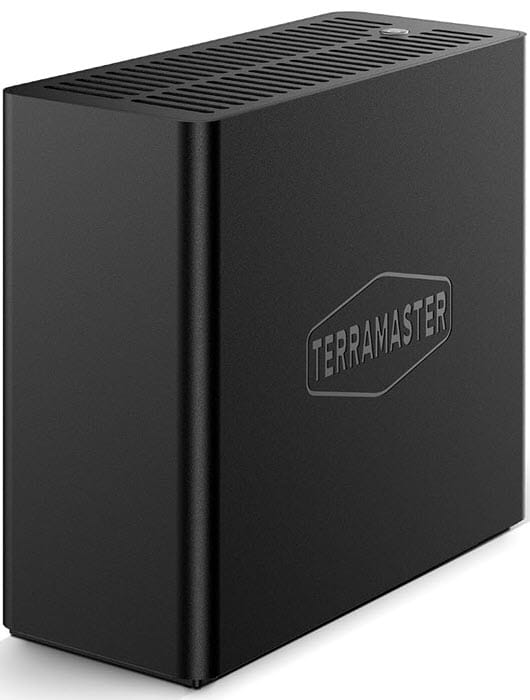
The F4 SSD uses TerraMaster’s TOS 7 operating system. It supports backup, snapshots, cloud synchronization, Docker, Plex, Jellyfin, and other NAS applications. Its AI photo gallery and automatic mobile photo backup features also make it suitable for family photo storage. RAID configurations include the common RAID modes offered by TOS 7, while TerraMaster’s TRAID technology provides flexible storage management and redundancy. For four SSDs, RAID 5 is a practical choice when capacity and protection are both important. The NAS enclosure uses two 50mm fans for cooling and has a specified noise level of about 19dB under the manufacturer’s test conditions. The F4 SSD is best suited for home users, family photo storage, backups, Plex and Jellyfin media servers, creative studios, and users who want a small and quiet 5GbE all-flash NAS.
| TerraMaster F4 SSD NAS Specifications | |
| CPU | Intel N95, 4 Cores / 4 Threads, up to 3.4 GHz |
| RAM | 8GB DDR5, expandable up to 32GB |
| SSD Support | PCIe 3.0/4.0/5.0 NVMe M.2 2280 SSD |
| M.2 Drive Slots | 4 × M.2 2280 (2 × PCIe 3.0 x2 + 2 × PCIe 3.0 x1) |
| Maximum Storage | 32TB (4 × 8TB) |
| Ethernet Port | 1 × 5GbE RJ45 |
| USB Ports | 3 × USB 3.2 Gen 2 10Gbps (2 × Type-A + 1 × Type-C) |
| Thunderbolt Port | Not available |
| HDMI | 1 × HDMI 2.1 |
| Wi-Fi | Not built-in |
| RAID Support | RAID 0, 1, 5, 6, 10 and TRAID |
| Cooling Fan | 2 × 50mm smart cooling fans |
| NAS Operating System | TOS 7 |
| Supported OS | Windows, macOS, Linux |
| Other Features | Compact palm-sized design, AI-powered photo management, CloudSync, Docker, Plex/Jellyfin support, low-noise operation |
Other All-SSD NAS Options
There are several other all-flash NAS systems worth considering if the models above do not meet your requirements.
ASUSTOR Flashstor 6 FS6706T All-SSD NAS
The ASUSTOR Flashstor 6 FS6706T is a six-slot NVMe NAS that uses an Intel Celeron N5105 quad-core processor. It comes with 4GB DDR4 memory and supports expansion up to 16GB. The six M.2 2280 NVMe slots provide considerably more storage flexibility than four-slot NAS systems.
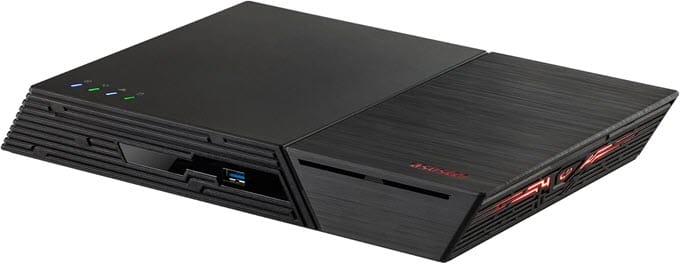
Connectivity options include two 2.5GbE ports, two USB 3.2 Gen 2 ports, two USB 2.0 ports, HDMI 2.0b and S/PDIF audio output. There is no Thunderbolt port or built-in Wi-Fi. RAID options include RAID 0, 1, 5, 6 and 10, as well as JBOD and hot-spare configurations. The NAS uses ASUSTOR’s ADM operating system. The NAS is best suited for home media storage, backups, photographers, content creators, and users who want six NVMe slots without moving to a larger traditional NAS enclosure.
Buy Asustor Flashstor 6 FS6706T All-Flash NAS
QNAP TBS-464 All-flash NASbook
The QNAP TBS-464 is a thin NASbook designed for mobile workers, small offices and remote content creators. It uses an Intel Celeron N5105 quad-core processor with 8GB DDR4 memory. The memory is not expandable. Storage is provided by four M.2 2280 NVMe Gen3 x2 slots, with the system shipped without SSDs. With four 8TB drives, 32TB of raw storage is theoretically possible, although the actual usable capacity depends on RAID configuration.
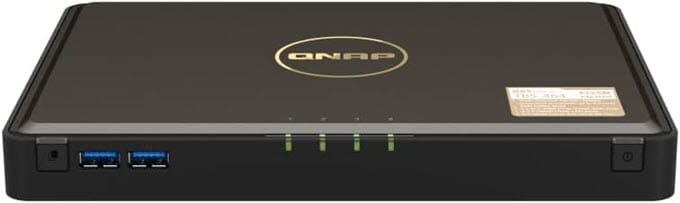
The TBS-464 has two 2.5GbE ports, three USB 2.0 ports, two USB 3.2 Gen 1 ports, and two HDMI 2.0 outputs supporting up to 4K at 60Hz. There is no Thunderbolt port or integrated Wi-Fi. It originally uses QTS and can also be switched to QuTS hero. QuTS hero adds ZFS-based features such as data integrity and WORM support. RAID options include RAID 0, 1, 5, and 10, along with other configurations supported by the QNAP platform. It has a compact B5-style design, and the NAS is best suited for mobile workers, small businesses, offices, remote content creators, multimedia storage, and users who want a very thin four-drive NVMe NAS.
Buy QNAP TBS-464 All-flash NASbook
Which M.2 SSD to Use in an All-SSD NAS?
Most compact all-flash NAS devices use M.2 2280 NVMe SSDs. For home, office, media, and entertainment applications, a good consumer NVMe SSD with a strong endurance rating can be suitable. For professional workloads involving continuous writes, databases, virtualization, or important business data, NAS-oriented or enterprise SSDs can be a better choice because endurance, reliability, and power-loss protection may be more important than peak benchmark performance.
It is also important to check the NAS manufacturer’s compatibility list before buying SSDs. The supported PCIe generation, SSD capacity, firmware compatibility, and heatsink dimensions can vary between models. Another important consideration is cooling. M.2 NVMe SSDs can become hot during sustained high-speed transfers. A suitable heatsink and adequate airflow can help maintain stable performance and prevent thermal throttling.
Important: M.2 NVMe SSDs are generally not included with the NAS. You normally need to purchase and install them separately.
Recommended M.2 NVMe SSDs for All-Flash NAS
The SSD is just as important as the NAS itself. A cheap desktop NVMe drive may provide excellent benchmark performance, but sustained NAS workloads can expose differences in endurance, thermal behavior, and sustained write performance.
For a home or general-purpose all-flash NAS, the Samsung 990 PRO is a strong high-performance option. It is especially suitable for users who want excellent PCIe 4.0 performance and already have a NAS with adequate cooling.
The WD_BLACK SN7100 is another option worth considering for users looking for a modern high-performance NVMe drive for general-purpose storage, gaming libraries and content creation.
For users who want very high PCIe 5.0 performance, the Crucial T710 can be considered where the NAS supports the required PCIe generation. However, the extra performance of a PCIe 5.0 SSD may not provide a meaningful benefit if the NAS slot, network connection, or processor is the bottleneck.
For NAS workloads, it is generally better to prioritize endurance, reliability, sustained performance, and thermal characteristics instead of choosing an SSD purely because it has the highest sequential read/write numbers.
Check out:
NAS Operating System
The NAS operating system is another important consideration. Commercial all-flash NAS devices generally come with their manufacturer’s own NAS operating system. UGREEN uses UGOS Pro, QNAP uses QTS or QuTS hero depending on the model, TerraMaster uses TOS 7, and ASUSTOR uses ADM. DIY all-SSD NAS systems such as the Aiffro K100 allow users to install an operating system such as TrueNAS, FreeNAS, Ubuntu, Windows, or Linux. This provides considerably more flexibility, although it also requires more configuration and maintenance.
All-SSD NAS: Which One Should You Buy?
The UGREEN NASync DXP480T Plus is one of the best overall choices for users who want a compact, powerful and feature-rich all-flash NAS. Its Core i5 processor, expandable memory, four PCIe NVMe slots, 10GbE, Thunderbolt 4 and Wi-Fi 6 make it particularly versatile.
The QNAP TBS-h574TX-i5U-16G is a better choice for professional video production and users who specifically need Thunderbolt 4, 10GbE and a ZFS-based QuTS hero environment. Its five-drive architecture and hot-swappable SSD support are particularly useful for professional workflows.
The TerraMaster F8 SSD Plus is the model to consider when you want maximum NVMe storage in a compact enclosure. Eight M.2 slots and up to 64TB of raw flash storage give it a major capacity advantage over four-drive systems.
For a more affordable system, the Aiffro K100 is an excellent choice for enthusiasts and DIY NAS users. Its tiny aluminum chassis, Intel N100 processor, four NVMe slots, and 2.5GbE networking make it particularly attractive for home labs and lightweight servers. The main compromise is that you have to install and configure the operating system yourself.
The TerraMaster F4 SSD is a better option for users who want a ready-to-use commercial NAS with four NVMe slots, 5GbE networking, and TOS 7 without spending as much as the high-end models.
See also:
- Top PC Cases with Lots of Hard Drive Bays for NAS & Server
- Best DAS Enclosures for Video Editing, Creators & Professionals
Final Words
All-SSD NAS servers are relatively expensive compared to their HDD-based counterparts, but for enthusiasts, content creators, and professionals who value speed, silence, and portability over raw capacity, they are absolutely worth the price. Whether you go for the Thunderbolt-equipped UGREEN DXP480T Plus, the hot-swappable QNAP TBS-h574TX, or a more affordable option like the TerraMaster F4 SSD or Aiffro K100, remember to factor in the cost of M.2 NVMe SSDs separately, since none of these NAS units ship with storage included, and consider adding heatsinks to your drives if your chosen NAS doesn’t already include them, since NVMe SSDs can throttle under sustained heavy load.
(*This post may contain affiliate links, which means I may receive a small commission if you choose to purchase through the links I provide (at no extra cost to you). Thank you for supporting the work I put into this site!)
![Best High Airflow Fan for PC Case [High CFM Fan 120mm / 140mm]](https://graphicscardhub.com/wp-content/uploads/2018/09/high-cfm-airflow-fan-211x150.jpg "Best High Airflow Fan for PC Case [High CFM Fan 120mm / 140mm]")
![Best Single Frame Fan Units for PC Case [with ARGB Lighting]](https://graphicscardhub.com/wp-content/uploads/2025/08/single-frame-fan-unit-pc-case-211x150.jpg "Best Single Frame Fan Units for PC Case [with ARGB Lighting]")
