Coil whine is a high-pitched sound emitted by electronic components, especially inductors or chokes (also called coils). The coil whine, or electromagnetic noise, can also be produced by transformers and ferroelectric capacitors. The main cause of this annoying sound is the vibration of the coils or wires at high frequencies when current passes through them. The coil whine generally resembles a continuous whistling or buzzing noise, and its intensity can increase or decrease depending on the load or current passing through the inductors or coils. Moreover, Coil whine noise can occur when the coil is poorly secured to the circuit board, poorly damped, or when its resonant frequency is close to that of the electric circuit. The effect becomes more pronounced as the signal passing through the coil increases in strength and approaches the coil’s resonant frequency, or the circuit’s resonant frequency.
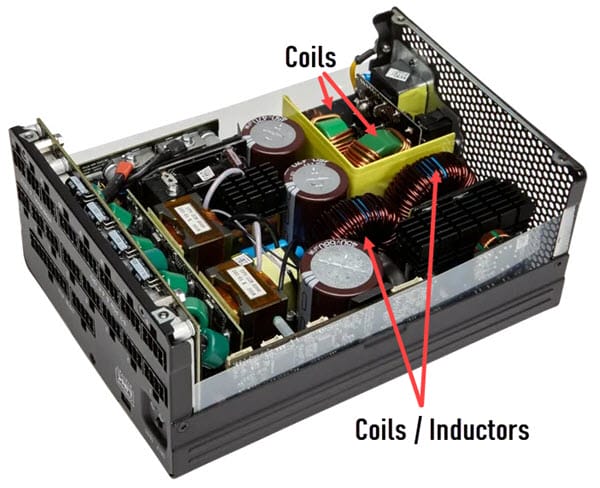
When it comes to PCs, the components that can produce noticeable coil whine are graphics cards and power supply units (PSUs). Coil whine generally occurs when the components are under heavy load or operate at maximum capacity. However, in some cases, coil whine can occur at idle or low load. Coil whine is present in almost all electronic components with inductors and transformers, but its audible intensity can vary from one component to another and even within similar components. Coil whine is an electrical phenomenon and is not a defect in itself, except when the component itself is faulty or beginning to fail. Even Tier 1 Power Supplies can exhibit coil whine, and it is not limited to budget or mid-tier PSUs.
It is also important to note that not everyone is sensitive to high frequencies; most people are not bothered by them, but for some, this can be very irritating and drive them crazy. So, if you are one of those individuals who cannot tolerate coil whine even at minimal levels or if your PSU has louder coil whine, I am going to list all the factors that can contribute to coil whine or annoying whistling buzzing noise, along with the solutions and workarounds to minimize, eliminate, or mitigate coil whine.
Factors Affecting PSU Coil Whine
Here are the top factors that can cause, enhance, or introduce coil whine in PSUs or electronic components.
Electricity / Wiring Issues in the House
One of the most common causes of coil whine or electrical noise from the PSU is AC power issues in your home. The issues may be due to old or poor wiring in your house, frequent voltage fluctuations, poor grounding, electromagnetic interference from nearby devices, loose connections at power outlets, corroded connectors, etc. These issues can be fixed by a qualified electrician, and once fixed, your PSU and computer will run more quietly and more efficiently, with a longer lifespan.
Loose Connections or Bad Power Cable
Make sure the PSU power cable is firmly connected to the PSU and the AC power outlet. Also, check that the cable has no cuts and that its connectors are free of corrosion. It would be better to clean the cable contacts with a contact cleaner spray to eliminate the possibility of an issue arising from the cable end. It should be noted that sound arising from a loose cable or a cable with corroded connectors is generally a sharp, buzzing, or sparking type of noise.
PSU Overheating
If your PSU is overheating, it can put a lot of stress on components, including the coils, making them work harder and causing annoying noises like buzzing or whistling.
Top Causes of PSU Overheating
Dust Buildup – Dust buildup inside the PSU can reduce airflow, cause electrical interference, and lead to fan bearings to fail or performing poorly. Too much dust can also cause your PSU to fail by interfering with electronic components and PCB circuits. Dust from the PSU can be easily removed by blowing compressed air onto it with a good compressed air duster.
Faulty PSU Fan – A failing PSU fan can cause the PSU to overheat. A faulty fan should be replaced immediately with a new one to prevent the PSU from overheating.
High Load – If your PC is running at high load, e.g., playing games or running CPU/GPU-intensive software, it puts a lot of stress on your PSU, especially if your PSU isn’t powerful enough. Heavy load on the PSU can cause coil whine and make the fan louder.
Underpowered PSU
An underpowered PSU will be under stress most of the time, especially under heavy CPU/GPU load, which can stress components. This can lead to coil whine and other annoying PSU noises. So, if your PSU wattage is not in line with your PC’s power consumption, you may experience the coil whine problem more often.
Cheap Non-branded PSU
A cheap, non-branded PSU can exhibit more coil whine than a branded PSU. It is because cheap, non-branded PSUs use lower-quality components, have inferior build quality, and lower quality control compared to branded, top-quality power supplies. A cheap, non-branded power supply also offers lower performance and may damage the expensive components of your PC, including the graphics card, CPU, and motherboard.
Check out: Fix PSU Overheating [Causes, Symptoms & Solutions]
Failing PSU
A failing PSU can also make a loud coil whine that was not present before. Failing components in the PSU can cause unstable current and ripples, leading to coil whine and other unpleasant noises. Below is a useful article on the signs and symptoms of a failing power supply.
Check out: Failing Power Supply Symptoms
Faulty PSU components
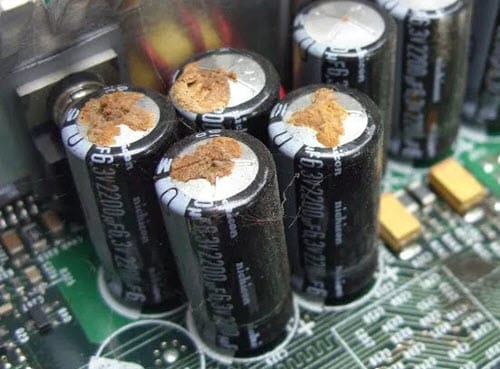
If one or more components of the PSU have failed, mainly capacitors, then the ripples can lead to noise and higher coil whine. You may get a burning smell when the electrolytic capacitor explodes, leaks, bulges, or bursts. Replacing the faulty components can be done by a computer repair technician, or, if the PSU is under warranty, you can get a replacement. The faulty components can be replaced by a qualified computer repair technician.
Manufacturing Defect
Although rare, a manufacturing defect can sometimes cause increased coil whine or other issues with the power supply. You may also experience restarts at high loads and unstable power delivery with a faulty PSU. Here you can RMA the PSU and get a replacement from the PSU manufacturer.
Must Read: How to Check or Test a Power Supply Unit (PSU)
Other Factors causing Noise [Not from PSU]
Here are some other factors that can cause a whistling, buzzing, or rattling sound, which should not be confused with coil whine originating from the PSU.
GPU coil whine
The coil whine may be coming from the discrete graphics card (if you have installed one) rather than the PSU. GPU coil whine is more common, especially with mid- to high-end graphics cards. So, to make sure the coil whine is from the PSU and not the graphics card, you have to isolate them or use the latest version of OCCT.
The latest version of the OCCT includes a GPU coil whine detection test that plays a melody or tune when it detects GPU coil whine. So, if the OCCT does not detect coil whine, then the coil whine is probably coming from the PSU. You can also remove the graphics card, then put the system under load to check for PSU coil whine. If the coil whine is still audible after removing the graphics card, then it should be from the PSU.
Check out: GPU Coil Whine [Top Causes, Fixes and Solutions]
Faulty PSU / Computer Fan
Generally, a faulty PSU or computer fan makes a rattling or grinding noise, but in some cases, it can make a buzzing noise. So, make sure the noise isn’t coming from the computer’s fans (PSU fan, Case fans, CPU fan, radiator fans, graphics card fans, etc.). The main cause of noise from the PC Case fan is a worn-out or failing bearing due to dust accumulation, constant use, or a manufacturing defect. In some cases, the fan motor can also be faulty and make a buzzing or whistling noise.
Check out: Fix PSU Fan not Spinning [Causes and Solutions]
Solutions, Fixes, and Workarounds for PSU Coil Whine
Here are some fixes, solutions, hacks, or workarounds to reduce, mitigate, or eliminate PSU coil whine. Some of these fixes require opening the PSU cover, which not everyone can do, and requires special skills in the electronics or hardware field.
Keep the PC Case at a Distance
If you keep the PC Case in front of you, just beside the monitor, you will hear more noise due to its proximity. Keeping the PC Case under the table will significantly reduce coil whine or other noise from the internal components.
Soundproofing the PC Case
Soundproofing your PC Case is a good way to reduce the coil whine from the electronic components. You can stick sound-dampening foam to the metal panels of the PC Case and around the gaps to make your PC quieter. Sound-dampening foam can suppress high-frequency sounds associated with coil whine. Sound dampening may not be possible in all PC Cases, especially those with front and side tempered glass panels, because these PC Cases don’t have enough space to accommodate sound-damping foam. You can also get a silent PC Case that comes with noise-suppressing sound-dampening foam already installed. Below are some of the best silent PC Cases that you can check out:
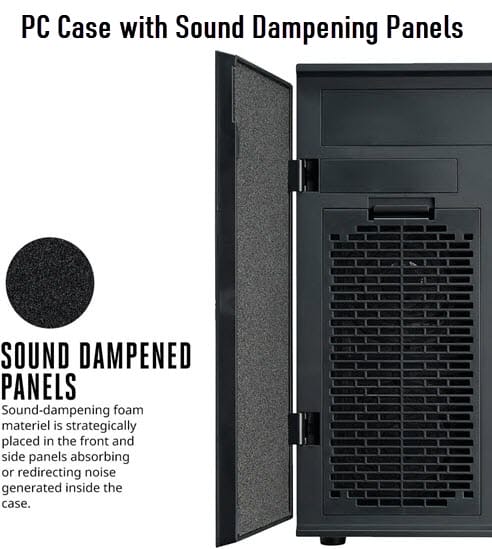
Check out: Best Silent PC Cases with Sound Dampening
Below is the sound-dampening foam from SilverStone you can buy to soundproof your PC Case.
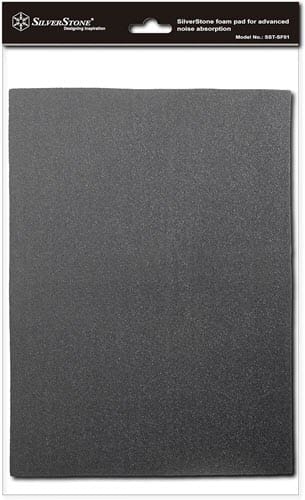
Buy SilverStone Sound Dampening Foam for PC
Stress Test PC using OCCT
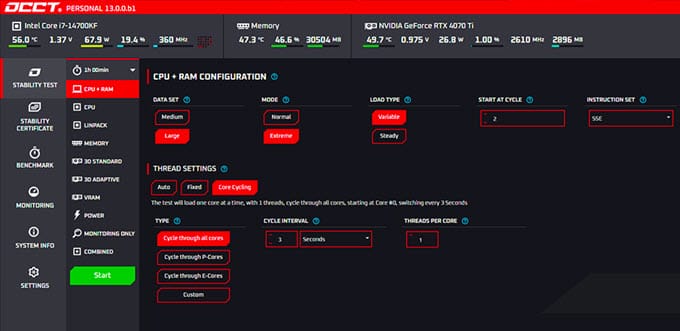
Try running the OCCT stress-testing software on your PC for 10–15 minutes (or longer). The software stresses your components and runs them at maximum load. After that, allow the PC to cool down, then check for coil whine. Some users have reported success with this method, as stress testing can reset or reseat the coils, or slightly loosen or relax the winding, causing the coil whine to stop or be minimized to unhearable levels. The idea here is that stressing the coils for an extended period can cause a slight shift, helping reseat them. This trick may or may not work and should be performed at your own risk.
Invest in Wireless Headphones
If the PSU coil whine is only audible during gaming, you can invest in good wireless headphones and use them while playing. When using headphones, you may not hear external noise as easily, and you do not have to listen to the annoying coil whine as often.
Additional Tip: You can also crank up the speaker volume to mask the coil whine noise from the PSU and graphics card.
Get a UPS (Uninterruptible Power Supply)
If you have electrical issues in your home or office, such as frequent voltage fluctuations, low voltage, power surges, or electrical noise (due to bad wiring/connectors/interference), then getting a Uninterruptible Power Supply (UPS) can help reduce or eliminate coil whine from your PSU.
Have Patience
It has also been observed that, in some cases, coil whine goes away on its own after some time as the PSU gets older or its components run in. So, if you have patience and can tolerate the coil whine, you can wait a while and see whether it goes away on its own. If the coil whine worsens over time rather than going away, then you can try other solutions mentioned in this post.
Gluing down the Coils
This hack should not be attempted by novice users because it is risky for the component and for you as well. If you don’t know what you are doing, you may end up damaging your PSU or getting a serious electrical shock from the big capacitors. If you are well-versed in electronics and computer hardware, then only you may consider doing it. This method requires opening the PSU metal cover and gluing down the inductor coils using high-temperature hot glue gun sticks, electronic-grade silicone sealant, or high-temperature super glue. The idea here is to dampen the coils’ vibrations with glue or silicone. It is quite risky and may or may not work for all users.
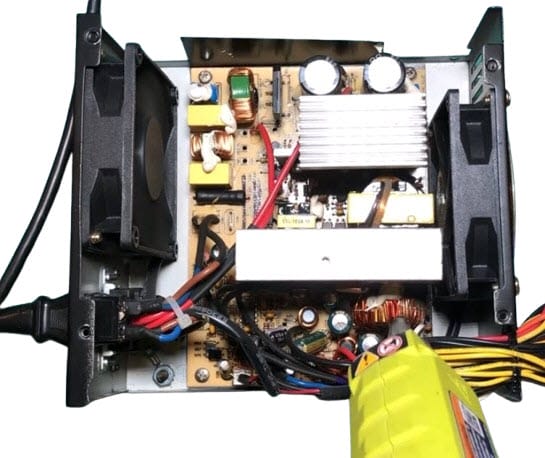
Note: Do not use ordinary silicone sealants, as they release acetic acid during curing, which is corrosive to electronic components and is why they smell like vinegar. For electronics, you should use a “neutral cure” also known as “oxime” or “alcohol cure” silicone.
Coil Whine when Idle [BIOS Tweak]
If you are getting PSU coil whine when idle or under load, this can be due to the c3/c6 suspend-state power load, which is known to produce a noise audible to only about 1/3 of the population. If this is the cause, then disabling sleep states in BIOS should make the noise go away.
RMA / Replacement
If your PSU is under warranty and the coil whine is bothering you too much, you can RMA it to the manufacturer and get a replacement. You should note that some manufacturers don’t issue a replacement for coil whine when the PSU is working fine. It is because coil whine is not a defect when the PSU has no other issues.
Change the PSU / Buy a Better PSU
You can buy a better and higher efficiency PSU from reputed brands like Corsair, Super Flower, be quiet!, Seasonic, EVGA, Antec, etc., if you have a cheaper, unbranded PSU that is producing too much coil whine and fan noise. However, there is no guarantee that a new PSU from a top brand is free of coil whine, as coil whine is a natural electromagnetic phenomenon found in electronic devices with inductors.
Final Words
In the end, I would like to say that PSU Coil Whine is not a defect or fault most of the time, especially if you are not facing other issues with the PSU. Coil whine is also quite tolerable for most users, but some are more sensitive to higher frequencies and cannot tolerate them. Above, I have listed the main causes and possible solutions for coil whine that can help you mitigate the issue to a substantial degree. However, if you still have any doubts or queries, let me know in the comments below.
(*This post may contain affiliate links, which means I may receive a small commission if you choose to purchase through the links I provide (at no extra cost to you). Thank you for supporting the work I put into this site!)