
If wall mounting your PC case is not an option, whether because you are renting, do not want to drill into a wall, or do not have a clear stretch of wall near your desk, an under-desk PC mount is the next best solution. It hangs your PC Case directly beneath your desk, keeping it off the floor and out of the way while still leaving it fully accessible for cable changes and upgrades. An under-desk CPU mount offers a practical solution by securely suspending the computer underneath your desk, keeping it protected while freeing up valuable workspace.
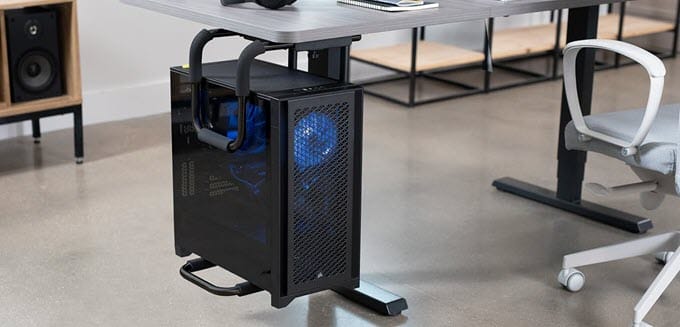
Also known as an under-desk computer mount, under-desk CPU mount, or under-desk PC holder, these mounting solutions are becoming increasingly popular in home offices, gaming setups, studios, classrooms, and commercial workspaces. They not only improve desk organization but also make it easier to clean the floor and access the computer’s rear ports. Modern under-desk CPU mounts are available in two primary styles: drill-based mounts, which provide the highest stability by fastening directly to the underside of the desk, and clamp-on mounts, which require no drilling and are ideal for users who cannot permanently modify their desks or want to avoid ruining their expensive wooden desks by drilling holes into them. Whether you own a compact office PC or a heavy gaming tower equipped with the latest graphics card and multiple storage drives, there is an under-desk mount designed to safely support your system. In this article, I have listed some of the best under-desk PC mounts, selected based on their build quality, stability, adjustability, compatibility, ease of installation, and overall value.
Benefits of Using an Under-Desk PC Mount
Although an under-desk PC mount may seem like a simple accessory, it offers several practical advantages for both office users and PC enthusiasts.
Saves Floor and Desk Space – One of the biggest benefits of an under-desk mount is improved space utilization. By suspending the computer beneath the desk, you free up floor space while keeping the desktop uncluttered. This creates a cleaner and more organized workspace.
Keeps the Computer Away from Dust – Desktop computers placed directly on the floor may collect significantly more dust. Carpet fibers, pet hair, and dirt can quickly accumulate inside the case, reducing cooling efficiency. An under-desk PC mount elevates the computer above the floor, helping reduce dust buildup and making maintenance less frequent.
Better Airflow – Unlike enclosed CPU cabinets, an under-desk mount leaves most of the computer exposed to open air. This allows intake and exhaust fans to operate more efficiently, reducing heat buildup.
Protects Against Accidental Damage – Keeping the computer under the desk protects it from accidental kicks, Pets, Vacuum cleaners, and Liquid spills. This is especially useful for expensive gaming PCs and workstations.
Easier Cable Management – An under-desk mount keeps the computer closer to monitors and peripherals, allowing shorter cable runs and cleaner cable routing and management.
Easier Cleaning – Without a computer sitting on the floor, vacuuming and mopping become much easier.
Improved Accessibility – Most mounts position the PC so the front panel remains easily accessible for USB devices, External SSDs, Headphones, and the power button.
Types of Under-Desk CPU Mounts
There are two main types of under-desk computer mounts available today.
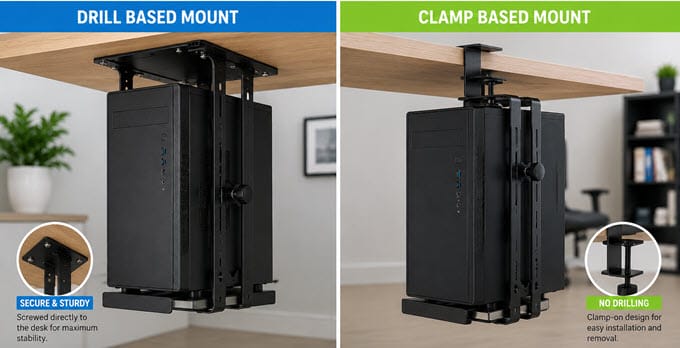
Drill-Based Under-Desk CPU Mount
These mounts are permanently attached to the underside of the desk using screws.
Advantages
- Excellent stability
- Higher weight capacity
- Supports larger gaming PCs
- No movement after installation
- Better long-term durability
Disadvantages
- Requires drilling holes
- Best suited for wooden desks, not suitable for glass, metal, or some standing desks
- Difficult to relocate
- Installation takes effort and expertise
These mounts are recommended for users with heavy-gaming PCs or professional workstation systems.
Clamp-On Under-Desk CPU Mount
Clamp-on mounts require no drilling and attach using a clamping mechanism.
There are two common designs:
- C-clamp style, which attaches to the edge of the desk.
- Desk-leg clamp, which fastens around a metal desk leg.
Advantages
- No drilling required
- Easy installation
- Portable
- Ideal for rented offices or apartments
Disadvantages
- Lower weight capacity
- May shift slightly or sag over time depending on desk construction
- Not recommended for extremely heavy PCs
Clamp-on mounts are ideal for office computers, compact gaming systems, and users who frequently move their workstation. Although some clamp-based under-desk PC mounts claim to support high load capacity, in the long run they may not offer much reliability or durability compared to drill-based mounts.
Best Drill-Based Under Desk PC Mounts
These mounts screw into the underside of your desk for maximum stability and are the better choice if your desk is solid wood (recommended) or Medium-density fiberboard (MDF) and you do not plan to move it often.
VIVO Adjustable Under Desk and Wall PC Mount
[Compact Design, Dual Mounting: Wall/Under-Desk, Excellent Value, 135° Swivel]
VIVO is one of the most popular manufacturers of monitor arms, TV mounts, standing desks, and ergonomic workspace accessories. Their mounting products are known for combining solid build quality with competitive pricing, making them a popular choice among both home users and professionals. The VIVO Under Desk and Wall PC Mount [MOUNT-PC01] is a versatile mounting solution that can be installed either underneath a desk or directly on a wall. This dual-purpose design makes it ideal for users who may want to reorganize their workspace later without having to purchase another bracket.
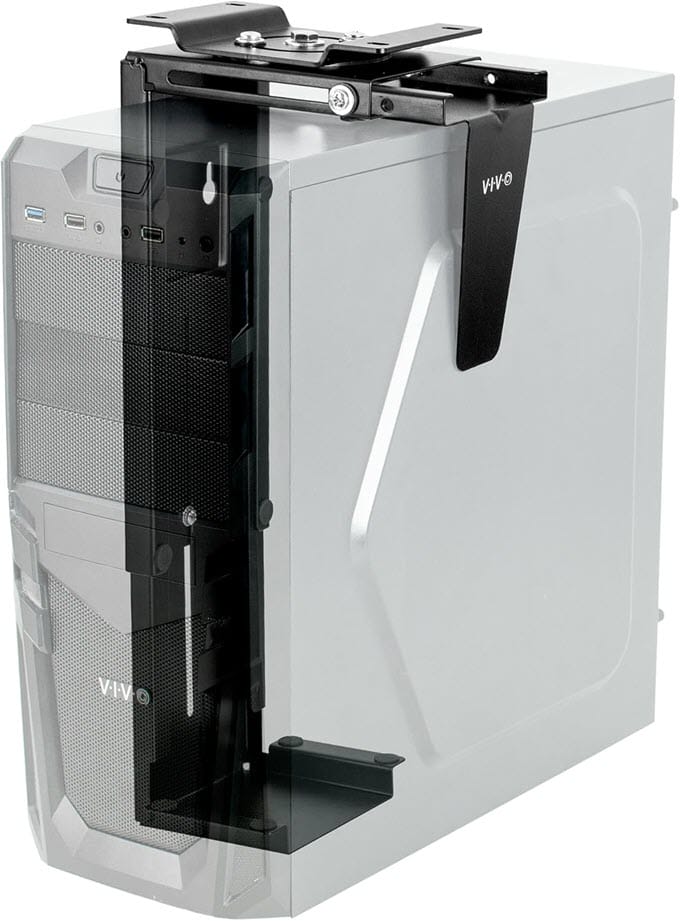
The mount features an adjustable steel frame that accommodates a wide range of Mini Tower and Mid Tower computer cases. One standout feature is its 360-degree swivel mechanism, allowing the computer to rotate freely after installation. This makes it much easier to access rear motherboard ports, display outputs, networking cables, and USB devices. Although the mount is primarily intended for office computers and compact gaming systems, its sturdy steel construction provides excellent stability when installed correctly. For users seeking an affordable, well-built, and highly versatile under-desk CPU mount, the VIVO Under Desk and Wall PC Mount remains one of the best choices available.
| VIVO Under Desk & Wall PC Mount Specifications | |
| Mounting | Under Desk / Wall (Drill-based) |
| Supported Height | 300 – 521 mm (11.5 – 20.5 in.) |
| Supported Width | 88 – 203 mm (3.5 – 7.8 in.) |
| Load Capacity | 10 kg (22 lbs) |
| Construction | High-grade Steel (Powder-coated) |
| Features | Dual Mounting, Adjustable Frame, Foam Padding, 135 Degree Swivel |
| Applications | Office PCs, Mini Towers, Mid Towers |
Buy VIVO Under Desk & Wall PC Mount
VIVO Heavy-Duty Adjustable Under-Desk PC Mount
[Heavy-Duty Steel Frame, Large & X-Large Versions, Ideal for Gaming PCs, Protective Padding]
Designed specifically for larger and heavier desktop computers, the VIVO Heavy-Duty Adjustable Under-Desk PC Mount is one of the strongest under-desk mounting solutions available. Unlike conventional CPU holders, this model uses a reinforced steel pipe frame that provides exceptional rigidity and supports a maximum weight capacity of 30 kg (66 lbs). The mount is available in Large and Extra Large variants, accommodating everything from standard Mid-Tower systems to oversized Full-Tower gaming PCs and professional workstation cases. Five height settings and an adjustable width let it fit most cases on the market, and a mounting template is included to make marking the drill holes straightforward. Thick protective padding keeps the chassis secure while preventing scratches.
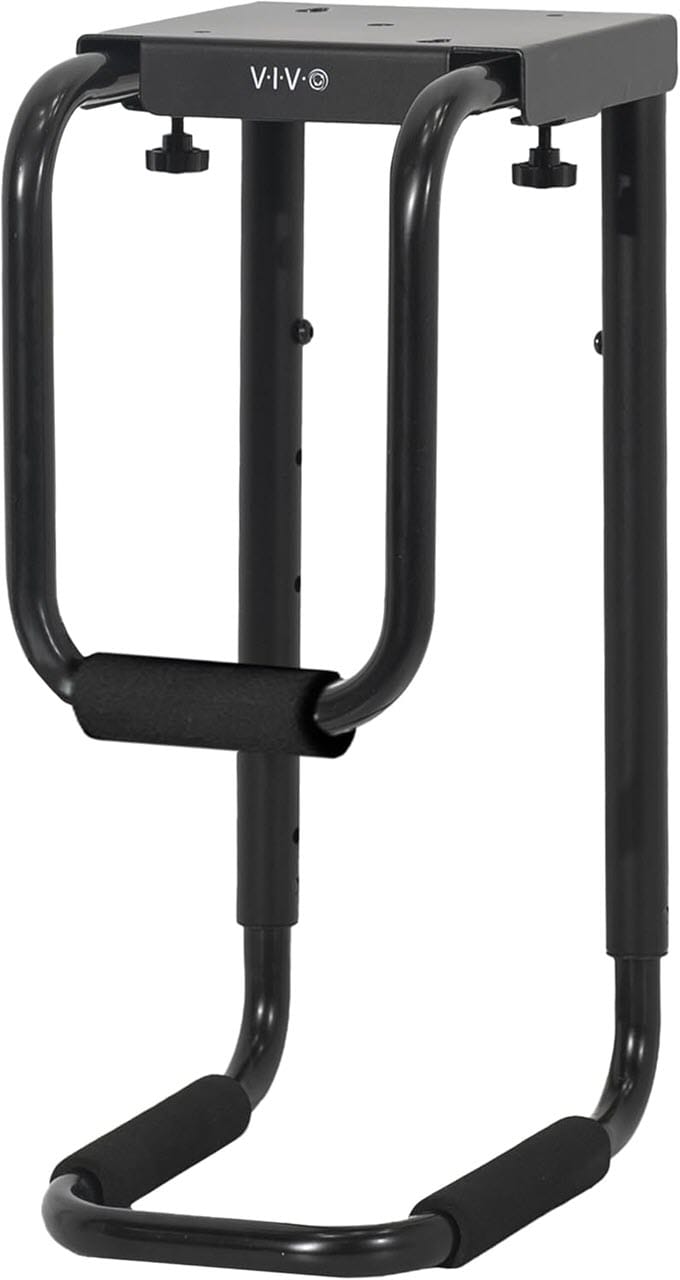
Its adjustable frame and high load capacity make it compatible with many modern gaming cases equipped with large graphics cards, 360 mm liquid coolers, and multiple storage drives. Because of its robust construction and higher weight capacity, this mount is particularly well suited for enthusiasts who own powerful gaming systems or workstation PCs that are too heavy for standard under-desk mounts. Installation requires fastening the bracket to the underside of a sturdy wooden desk to ensure maximum stability and long-term reliability.
| VIVO Heavy-Duty Adjustable Under-Desk PC Mount Specifications | |
| Mounting | Under Desk (Drill-based) |
| Supported Height | Large (5″ to 10″) / X-Large (17″ to 25″) |
| Supported Width | Large (16″ to 24″) / X-Large (9″ to 14″) |
| Load Capacity | Up to 30 kg (66 lbs) |
| Construction | Heavy-duty Steel Pipe Frame |
| Features | Large Adjustment Range, Reinforced Steel Frame, Heavy-Duty Design, Padding for Protection |
| Applications | Gaming PCs, Full Towers, Workstations |
Buy VIVO Heavy-Duty Under-Desk PC Mount
PUTORSEN Heavy Duty Under Desk PC Mount
[Excellent Stability, Extended Wooden Base (Black/Brown), Premium Build Quality, High-load Capacity]
PUTORSEN has established itself as a reputable brand in ergonomic workspace accessories, offering monitor mounts, TV brackets, standing desk solutions, and computer mounting products. Its Heavy Duty Under Desk PC Mount is designed for users who require exceptional stability without compromising adjustability.
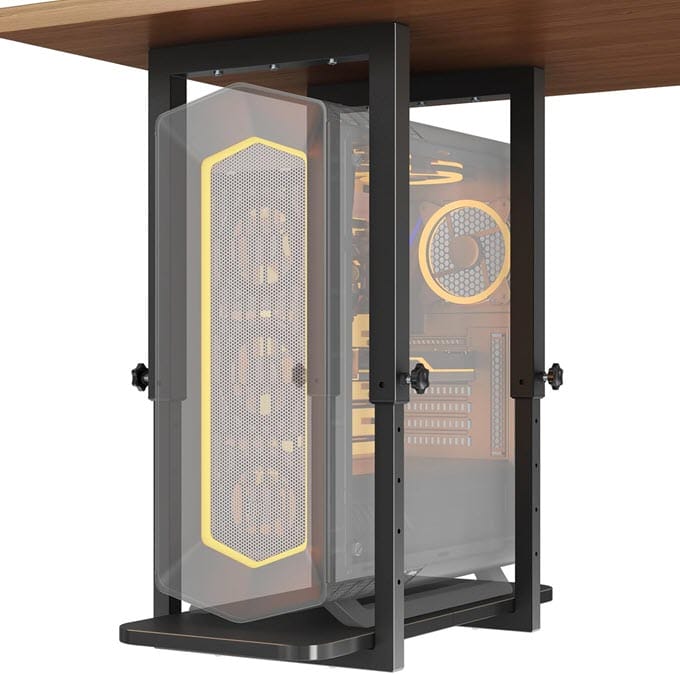
Unlike conventional under-desk mounts that rely on a relatively small base, the PUTORSEN model features an extended rectangular wooden mounting base that distributes the computer’s weight more evenly across the underside of the desk. This results in greater stability, particularly when supporting heavier gaming PCs and workstation towers. It supports up to 66 lbs and adjusts from 17.3″ to 25.1″ in height to fit most tower sizes, with a maximum case width of 9.6″. It is available in black or a rustic brown finish, making it easier to match to a wood desk than the all-black steel options above. Due to its impressive build quality and excellent stability, the PUTORSEN Heavy Duty Under Desk PC Mount is one of the best choices for users with larger desktop systems who want a clean, professional workstation.
| PUTORSEN Heavy Duty Under Desk PC Mount Specifications | |
| Mounting | Under Desk (Drill-based) |
| Supported Height | 17.3″ to 25.1″ |
| Supported Width | Up to 9.6″ |
| Load Capacity | Up to 30 kg (66 lbs) |
| Construction | Heavy-duty Steel with Rectangular Wooden Base |
| Color Options | Black, Rustic Brown |
| Features | Extra-Wide Mounting Base, Adjustable Height, Protective Padding |
| Applications | Heavy Gaming PCs & Professional Workstations |
Buy PUTORSEN Heavy Duty Under Desk PC Mount
Best Clamp-Based Under Desk PC Mounts
No drilling required. These mounts clamp onto the desktop edge or the desk leg, which makes them a better fit for rented furniture, standing desks, or anyone who does not want to put screws into their desk.
monTEK Heavy Duty Under Desk PC Mount
[No-Drill Installation, Heavy-Duty Construction, Available in Black and White]
monTEK has earned a good reputation for manufacturing ergonomic workspace accessories, monitor mounts, and computer mounting solutions that combine solid construction with user-friendly designs. The monTEK Heavy Duty Under Desk PC Mount is one of the best clamp-on under-desk CPU mounts available today, offering excellent stability without requiring any drilling. Unlike conventional screw-mounted under-desk brackets, this model attaches securely with a heavy-duty C-clamp, making it ideal for users who rent their home or office or simply do not want to drill holes in their desk. Installation takes only a few minutes and requires no permanent modifications.
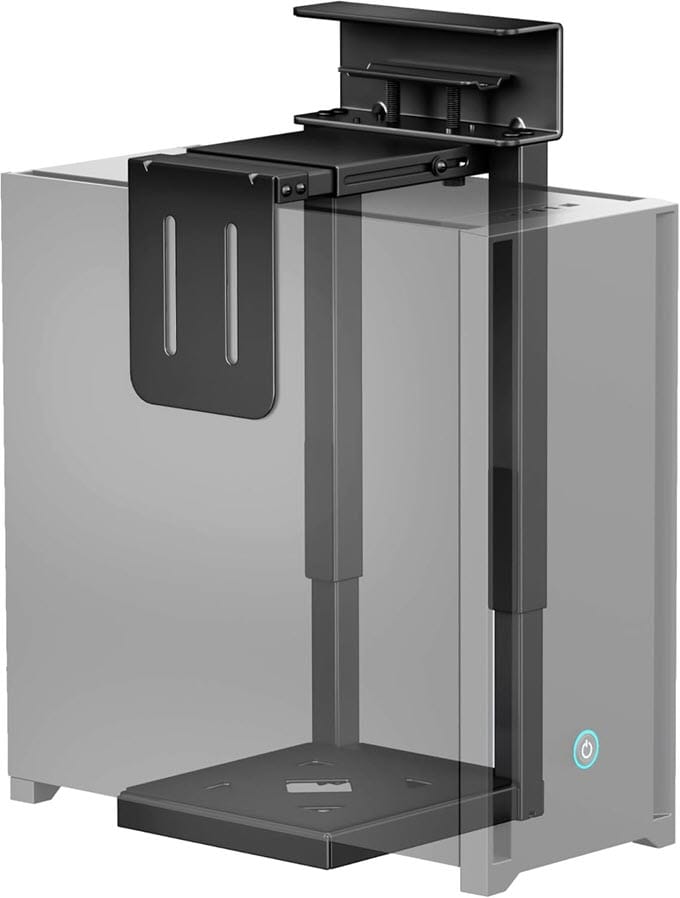
The mount features a reinforced steel frame with adjustable width and height, allowing it to accommodate a wide range of Mini Tower, Mid Tower, and many Full Tower computer cases. Thick EVA foam padding protects the computer from scratches and prevents unwanted movement during everyday use. One of the standout features of this mount is its impressive load capacity of 20 Kg (44 lbs), which allows it to support relatively heavy gaming PCs despite using a clamp-based design. It is available in Black and White, making it easy to match modern gaming desks and workstation setups. For users seeking a premium, no-drill solution with excellent build quality and easy installation, the monTEK Heavy Duty Under Desk PC Mount is among the best options available.
| monTEK Heavy Duty Under Desk PC Mount Specifications | |
| Mounting | Clamp-on Under Desk |
| Supported Height | 16.1″ to 25.6″ (7 height levels) |
| Supported Width | 7.1″ to 11.8″ |
| Load Capacity | Up to 20 kg (44 lbs) |
| Construction | Heavy-duty Steel (Powder-coated) |
| Color Options | Black, White |
| Features | No Drilling Required, Protective EVA Padding, Adjustable Frame |
| Applications | Home / Office PCs, Light |
Buy monTEK Heavy Duty Under Desk PC Mount
Clamp-on Desk Leg PC Mount
[Simple Installation, Strong Clamp Design, Excellent Value]
If you want an under-desk CPU mount that requires absolutely no drilling, this Clamp-on Desk Leg Under Desk PC Mount is an excellent option. Designed around a sturdy clamp mechanism, it attaches securely to compatible desks while keeping your computer safely suspended underneath. Unlike traditional C-clamp mounts that grip the desk edge, this mount uses a U-bracket that clamps directly to a standing desk leg. It is only available in three fixed leg dimensions, 65×45mm, 75×45mm, or 80×50mm, so measuring your desk leg before ordering is essential; it is not compatible with round legs.
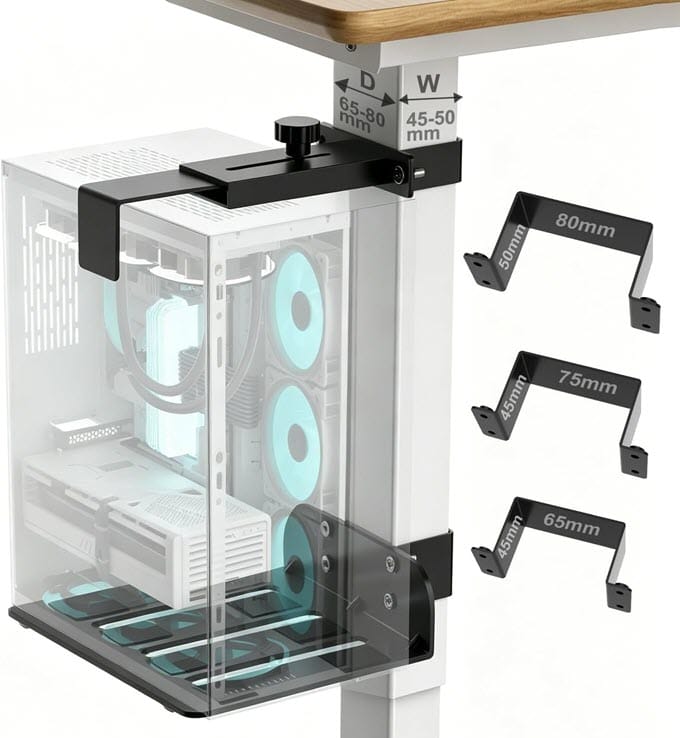
The steel frame supports a variety of Mini Tower and Mid Tower computer cases and includes protective padding to prevent scratches and minimize vibrations. Installation is quick and straightforward, making it particularly attractive for offices, schools, classrooms, and rental apartments where drilling into furniture is not permitted. Although its maximum weight capacity is lower than heavy-duty screw-mounted alternatives, it easily supports most office PCs and many compact gaming systems.
| Clamp-on Desk Leg PC Mount Specifications | |
| Mounting | Clamp-on Desk Leg (U-Clamp) |
| Supported Height | Adjustable |
| Supported Width | Adjustable |
| Load Capacity | 18 kg (40 lbs) |
| Construction | Steel |
| Features | Tool-Free Installation, U-clamp desk-leg mounting, works best on inverted/rectangular legs, not compatible with round legs, Adjustable Holder, Protective Padding. |
| Applications | Office PCs, Compact Gaming PCs |
Buy Clamp-on Desk Leg PC Mount
VIVO Adjustable Clamp-on Desk Leg PC Mount
[Tool-Free Installation, Works with Standing Desks, Dual Side-Clamp Design]
Another innovative solution from VIVO is the Adjustable Clamp-on Desk Leg PC Mount, designed specifically for desks with metal legs. Unlike conventional under-desk mounts, this model clamps directly onto the desk leg rather than underneath the desktop, making installation considerably easier.
VIVO’s clamp-on mount uses a patent-pending dual-side clamp that grips both sides of the desk leg. It is specifically designed for height-adjustable standing desks: the clamps travel up and down with the leg as the desk moves, keeping the PC securely in place through every adjustment. It supports towers up to 22 lbs, which is enough for a light office PC or console but not a heavier gaming build, and it includes all the hardware needed for a tool-free, no-drill installation.
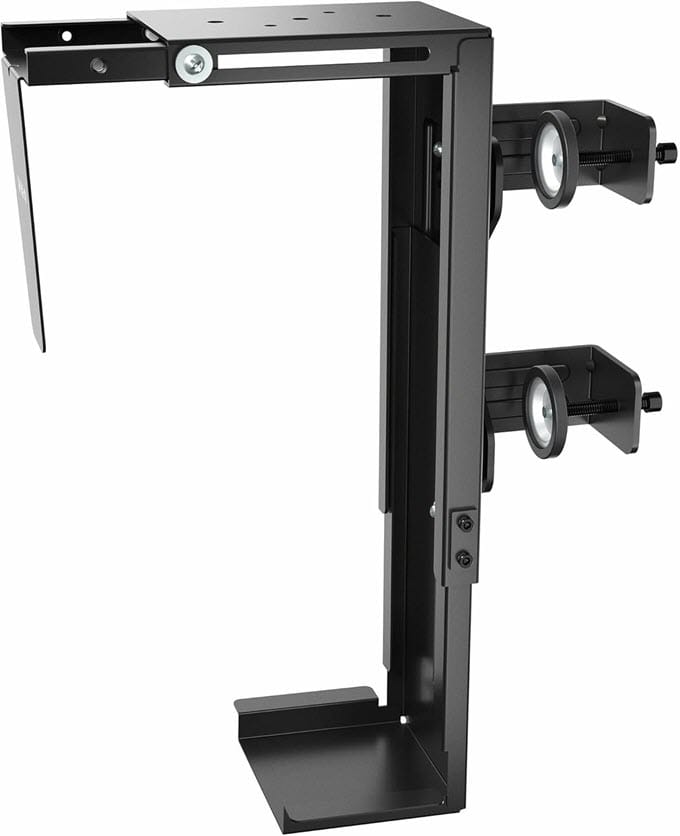
Installation requires no drilling or permanent modifications, making it ideal for rented offices or frequently reconfigured workspaces. For users with standing desks, this is one of the most practical PC mounting solutions available. It is also available in a large size, with an adjustable width of 7.8″ to 12.8″ and an adjustable height of 14.6″ to 25.2″.
| VIVO Adjustable Clamp-on Desk Leg PC Mount Specifications | |
| Mounting | Clamp-on Desk Leg |
| Supported Height | 11.5″ to 20.5″(Adjustable) |
| Supported Width | 3.5″ to 7.8″ (Adjustable) |
| Load Capacity | 10 kg (22 lbs) |
| Construction | Powder-coated Steel |
| Features | Tool-Free Installation, Scratch-Free Rubber Padding |
| Best For | Standing Desks, Office PCs |
Buy VIVO Adjustable Clamp-on Desk Leg PC Mount
Things to Consider Before Buying an Under-Desk CPU Mount
Before purchasing an under-desk mount, consider the following factors.
Weight Capacity – Always choose a mount that supports more than your computer’s actual weight. For gaming PCs weighing 15–20 kg, a mount rated for 25–30 kg provides a comfortable safety margin.
Adjustable Height and Width – Universal mounts allow adjustment to fit different case sizes. Measure your PC’s Height and Width before purchasing.
Build Quality – Heavy-duty steel construction provides superior strength compared to alloy or thin aluminum alternatives.
Padding – Foam or EVA rubber padding prevents scratches while reducing vibrations.
Installation Method – Choose between Permanent screw installation or No-drill clamp installation depending on your desk and workspace.
Rotation – Some mounts allow the PC to rotate, making it much easier to access rear ports without removing the computer.
Installation Tips
Proper installation is essential for both safety and long-term durability.
- Install screw-mounted brackets only on solid wooden desktops of adequate thickness.
- If the bundled screws are of poor quality, use appropriate size 304 stainless steel screws for excellent strength and corrosion resistance.
- Tighten all mounting screws or clamps securely before placing the computer into the holder.
- Leave at least 10–15 cm of clearance around ventilation openings for proper airflow.
- Avoid placing cables where they may become pinched when adjusting the computer.
- Periodically inspect all mounting hardware for looseness, especially after transporting or upgrading the PC.
Final Words
An under-desk PC mount is one of the simplest yet most effective upgrades for creating a cleaner, more organized workspace. By lifting the computer off the floor, it not only saves valuable space but also improves airflow, reduces dust accumulation, and protects the system from accidental damage. Whether you have a compact office PC, a powerful gaming PC, or a workstation, the right mount can significantly enhance both functionality and aesthetics. If you have any questions about under-desk PC mounts, desk compatibility, or PC building in general, let me know in the comments section below.
(*This post may contain affiliate links, which means I may receive a small commission if you choose to purchase through the links I provide (at no extra cost to you). Thank you for supporting the work I put into this site!)
![Display Converter Cables & Adapters [DisplayPort to HDMI, DVI, VGA etc.]](https://graphicscardhub.com/wp-content/uploads/2020/08/display-converter-adapters-and-cables-211x150.jpg "Display Converter Cables & Adapters [DisplayPort to HDMI, DVI, VGA etc.]")
![Best RGB RAM for Gaming PC in 2026 [DDR4 RGB Memory]](https://graphicscardhub.com/wp-content/uploads/2018/01/rgb-ram-led-memory-211x150.jpg "Best RGB RAM for Gaming PC in 2026 [DDR4 RGB Memory]")
