
If you are an enthusiast and want to showcase your fancy, high-end graphics card, mounting it vertically in your PC Case enhances your PC’s aesthetics. Moreover, many mini-ITX PC Cases only support vertical mounting of graphics cards due to space constraints. To mount the graphics card vertically, you need a PC Case that supports vertical GPU mounting and has enough space to accommodate it. You also need a vertical GPU mounting kit and a good PCIe Riser cable to connect your graphics card to the PCIe x16 slot on your motherboard. For the latest high-end graphics that are PCIe 4.0/PCIe 5.0-ready, you need a high-quality PCIe 4.0/5.0 Riser Cable from a reputable brand. Latest graphics cards from Nvidia and AMD, including the GeForce RTX 50 series (RTX 5090, RTX 5080, RTX 5070 Ti, RTX 5070, etc.) and the Radeon RX 9000 series (RX 9070 XT, RX 9070, etc.), support PCIe 5.0. Theoretically, PCIe 5.0 offers twice the bandwidth of PCIe 4.0. The transfer rate and bandwidth for PCIe 4.0 and PCIe 5.0 interfaces are shown below.
| PCI Express 4.0 (x16) | PCI Express 5.0 (x16) | |
| Transfer Rate (Per Lane) | 16 GT/s | 32 GT/s |
| Bandwidth x16 (single direction) | 32 GB/s | 64 GB/s |
| *GT/s -> Gigatransfers per second, *GB/s -> Gigabytes per second | ||
In gaming, the performance difference between PCIe 4.0 x16 and PCIe 5.0 x16 interfaces is not that significant using the latest PCIe 5.0 graphics cards. However, if you are an enthusiast and do not want to compromise on the slightest bit of performance, you should get a high-quality PCIe 5.0 Riser Cable to unlock the full performance of your PCIe 5.0-ready graphics card. It should be noted that PCIe 5.0 is backward-compatible with older PCIe standards, and vice versa. Right now, there are only a few good PCIe 5.0 Riser Cables available, and here I am listing them below.
Note: To get the full bandwidth of the PCIe 5.0 x16 interface, you need a motherboard and graphics card that support the PCIe Gen5 x16.
Top PCIe Gen5 x16 Riser Cables
Below are some of the best PCIe 5.0 Riser Cables from top brands for vertical graphics card mounting.
LINKUP AVA5 PCIE 5.0 Riser Cable
[True PCIE 5.0 Performance, Multiple Sizes & Orientation Types Available, High-build quality, Wide Compatibility, Flexible]
LINKUP was established in 1996 and is a reliable brand. It is quite well known for its PCIe Riser Cables and GPU/PSU Power Cables. They also offer USB Cables, Video Cables, USB/Video Adapters, SAS Cables, MiniSAS Cables, SLI Bridge Cables, and Network Cables. LINKUP has a good reputation among the PC community for its high-quality products and strong performance. Here we have the LINKUP AVA5 PCIe 5.0 Riser Cable, one of the best PCIe 5.0 riser cables available for vertical GPU mounting.
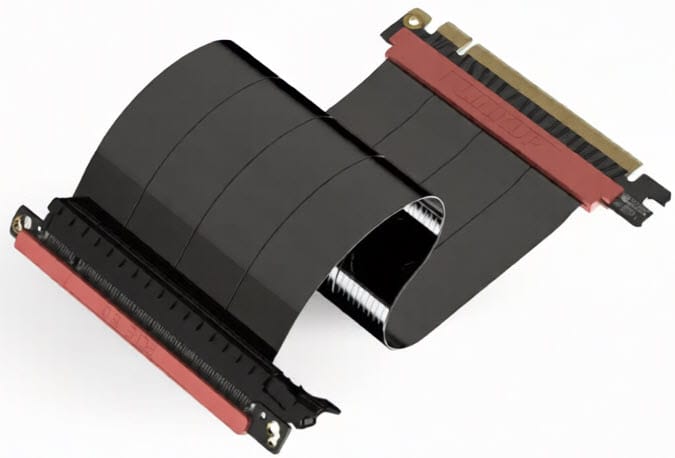
The cable is available in lengths from 10cm to 94mm and in four orientations for seamless installation in any PC Case or build. The four orientation types include:
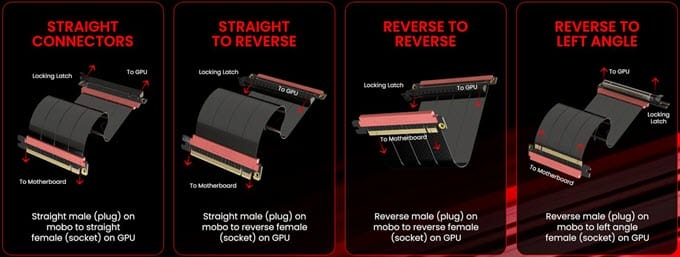
- Straight male (plug) on motherboard to straight female (socket) on GPU
- Straight male (plug) on the motherboard to reverse female (socket) on the GPU
- Reverse male (plug) on the motherboard to reverse female (socket) on the GPU
- Reverse male (plug) on the motherboard to the left angle female (socket) on the GPU
The PCIe 5.0 Riser cable uses Gen5/6-rated gold-plated connectors, Single-Layer Wiring for flexibility, and extreme EMI/RFI shielding for protection against external interference. The cable delivers true PCIe Gen5 performance and is a genuine PCIe Gen5 cable. LINKUP PCIe 5.0 cable is available in two colors, black and white.
Note: If you encounter installation issues with the cable in the PC Case due to the long plastic part (with LINKUP branding), cutting or trimming it will resolve the issue.
| LINKUP AVA5 PCIE 5.0 Riser Cable Specifications | |
| PCI-E Interface | PCIe Gen 5.0 x 16 |
| Transfer Rate | 32 GT/s (per lane) |
| Bandwidth (x16) | 64 GB/s (single direction) /128 GB/s (bi-directional) |
| Cable Length | 100mm to 940mm |
| Colors Available | Black, White |
| Features | Gen5/6 Rated Connector, Single-Layer Wiring, Extreme EMI/EFI Shields, 50-Micron Gold Fingers/Connectors |
Buy LINKUP AVA5 PCIE 5.0 Riser Cable
Corsair Premium PCIe 5.0 x16 Riser Cable
[High-quality PCIe 5.0 Riser Cable, Flexible]
A premium high-quality PCIe 5.0 x16 Riser Cable from Corsair, a brand that needs no introduction. The cable complies with the PCIe 5.0 specification, delivering a 32 GT/s signal rate and up to 128 GB/s of bidirectional bandwidth. It is compatible with the latest Nvidia graphics cards (RTX 50 series) and AMD graphics cards. The cable is flexible and 175mm long, which is sufficient for most vertical GPU installations. The Cable is available in black color.
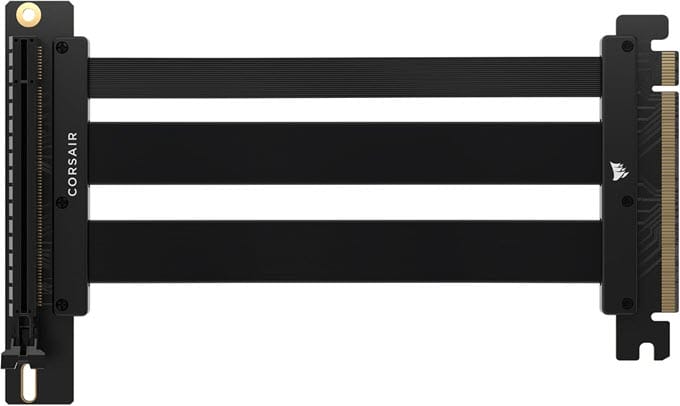
| Corsair Premium PCIe 5.0 x16 Riser Cable Specifications | |
| PCI-E Interface | PCIe Gen 5.0 x 16 |
| Transfer Rate | 32 GT/s (per lane) |
| Bandwidth (x16) | 64 GB/s (single direction) /128 GB/s (bi-directional) |
| Cable Length | 175mm |
| Colors Available | Black |
| Features | Flexible and durable PCIe ribbon cable, Compatible with the latest NVIDIA and AMD GPUs |
Buy Corsair Premium PCIe 5.0 x16 Riser Cable
HYTE PCIe 5.0 Hyper Riser Cable
[Secure Installation, Solid Build, Attractive Color Options, True to Specs, Secure PCI Slot Bracket]
A high-quality PCI-E 5.0 Riser cable from HYTE, a reputed PC hardware brand that is known for its stylish, feature-rich, and high-quality PC Cases. Here is a high-performance PCIe 5.0 Hyper Riser Cable from HYTE, rigorously tested to comply with the PCI Express 5.0 standard. The cable features a PCI metal slot bracket for a secure connection to the motherboard and uses 30 AWG EMI-shielded cables for optimal packet transmission.
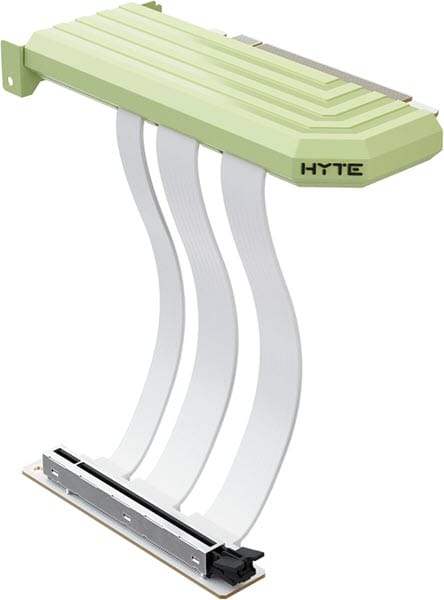
The cable has a flexible TPE coating and ABS connectors for durability and reliability. The cable length is 200mm, suitable for most PC Cases on the market. For installation, 5 M3*6 Self-tapping Screws are bundled with the cable. The PCIe 5.0 cable comes in four attractive colors: Snow White, Pitch Black, Black Cherry, Taro Milk, Strawberry Milk, and Matcha Milk.
| HYTE PCIe 5.0 Hyper Riser Cable Specifications | |
| PCI-E Interface | PCIe Gen 5.0 x 16 |
| Transfer Rate | 32 GT/s (per lane) |
| Bandwidth (x16) | 64 GB/s (single direction) /128 GB/s (bi-directional) |
| Cable Length | 200mm |
| Colors Available | Snow White, Pitch Black, Black Cherry, Taro Milk, Strawberry Milk, Matcha Milk |
| Features | 30 AWG cables with protective EMI shielding, Reinforced Metal Slot, Flexible TPE coating, and ABS connectors |
Buy HYTE PCIe 5.0 Hyper Riser Cable
LIAN LI PCI-e 5.0 x16 Riser Cable
[Good Performance, Solid Build, Slimmer Design]
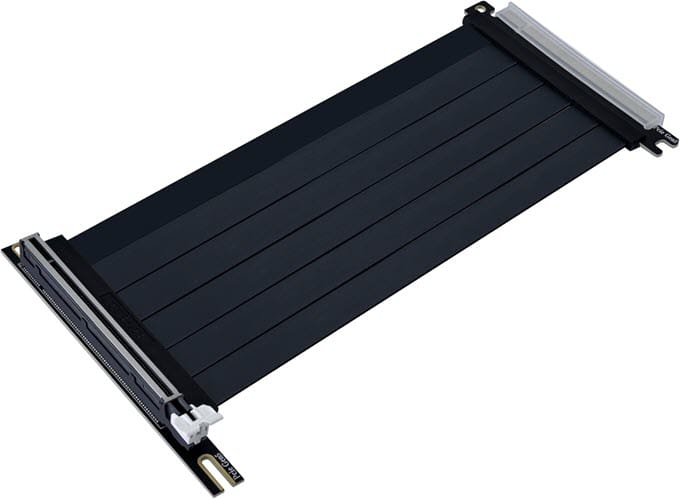
LIAN LI is one of the biggest names in the PC hardware industry, known for its high-quality PC Cases, Case Fans, Power Supplies, and AIO CPU Coolers. Here we have the LIAN LI PCI-e 5.0 x16 Riser Cable, available in a premium black finish and 200mm long. The cable features a 180° to 90° connector. The PCIe 5 cable is high-quality but a little stiffer. It delivers PCIE 5.0 performance and has a relatively slim form factor. It is compatible with Lian Li O11 and LANCOOL series chassis, and is also designed to fit seamlessly across a wide range of chassis.
| LIAN LI PCI-e 5.0 x16 Riser Cable Specifications | |
| PCI-E Interface | PCIe Gen 5.0 x 16 |
| Transfer Rate | 32 GT/s (per lane) |
| Bandwidth (x16) | 64 GB/s (single direction) /128 GB/s (bi-directional) |
| Cable Length | 200mm |
| Colors Available | Black |
| Features | Premium black finish, Compatible with O11 series, LANCOOL series, and other PC Cases. |
Buy LIAN LI PCI-e 5.0 x16 Riser Cable
Cooler Master Riser Cable PCIE 5.0 X16
[Minimalist Design, Flexible, True PCIE 5.0 x16 performance]
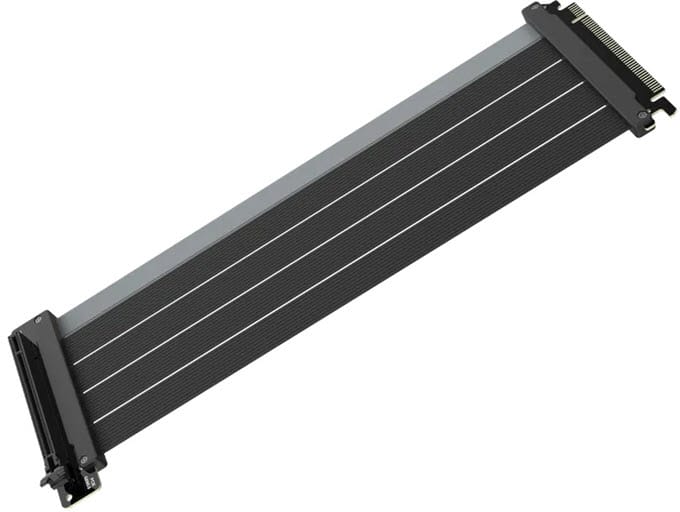
A high-performance PCIE 5.0 riser cable from Cooler Master. The Cooler Master Riser Cable PCIe 5.0 X16 features gold-plated connectors, 30 AWG copper wires, heavy EMI Shielding, and a protective ABS casing. The cable is flexible and 300mm long. The cable has a minimalist design and can fit most PC Cases. The cable delivers true PCIe 5.0 x16 performance for PCIe 5.0-ready graphics cards. The cable’s build quality is top-notch and available in black or white.
| Cooler Master Riser Cable PCIE 5.0 X16 Specifications | |
| PCI-E Interface | PCIe Gen 5.0 x 16 |
| Transfer Rate | 32 GT/s (per lane) |
| Bandwidth (x16) | 64 GB/s (single direction) /128 GB/s (bi-directional) |
| Cable Length | 300mm |
| Colors Available | Black, White |
| Features | EMI-shielded, 30 AWG copper wires, Gold-plated PCIe Connector Pins, Protective ABS Casing, Ultra-flexible Cable Sleeves (TPE cable sleeves) |
Buy Cooler Master Riser Cable PCIE 5.0 X16
How to check if a PCIe 5.0 Riser Cable is Real/Genuine PCIe Gen5 x16?
PCIe 5.0 Riser Cables are quite expensive, and many fake and counterfeit PCIe Riser Cables are available in the market that advertise themselves as PCIe Gen5-ready but are actually PCIe Gen4 or even Gen3 Riser Cables. Moreover, an unbranded, low-quality PCI-E 5.0 Riser Cable can cause reduced performance, freezing, instability, a black screen, or a BSOD.
So, if you want to verify that your PCIe 5.0 Riser cable is genuine and working at full PCIe 5.0 x16 bandwidth, you can do so using the methods below.
Using BIOS – Set the PCIe x16 Link Speed to Gen5 from Auto in the UEFI BIOS. Restart the PC, and if it boots fine, you have a genuine PCIe 5 Riser Cable. However, if your PC gets stuck after the BIOS screen and fails to boot, then you have a PCIe Riser Cable that is not Gen5.
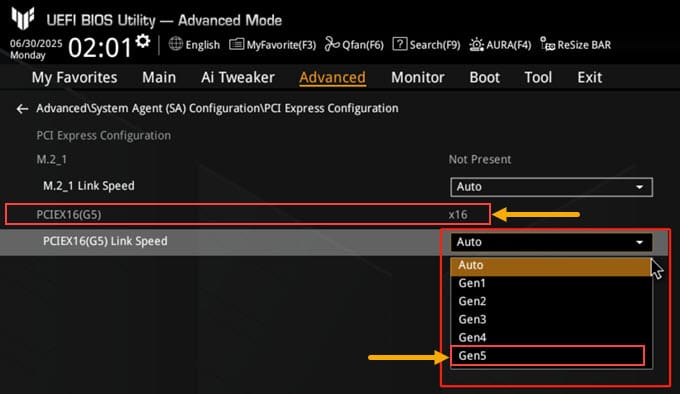
*The PCIE Link Speed / Interface / Lane menu setting in the BIOS can vary from one motherboard to another, depending on the motherboard manufacturer or model.
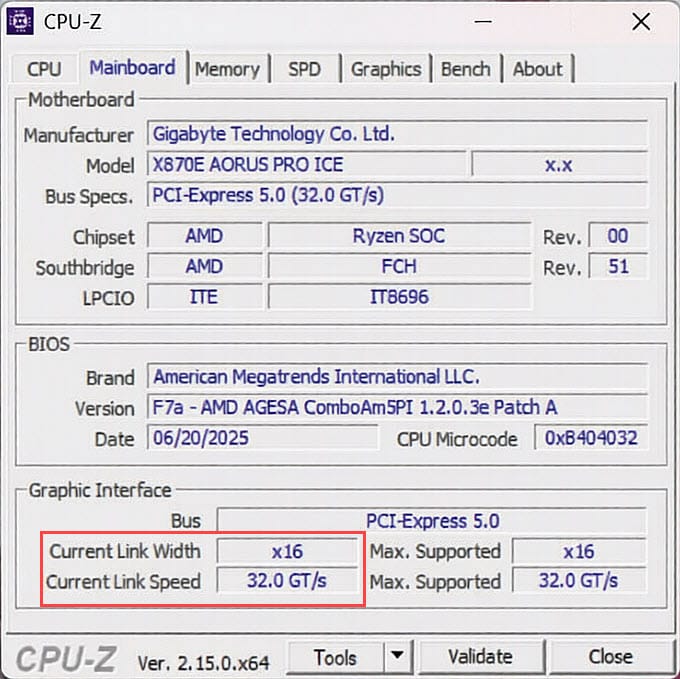
Using CPU-Z – Launch the CPU-Z software and go to the Mainboard tab. Here, you will see the Graphics Interface section at the bottom. Here you can see the Bus as PCI-Express 5.0. Below it, there are sections for Current Link Width and Current Link Speed. The Max. Supported should be x16 and 32.0 GT/s. Now, run some heavy load on the GPU using a GPU benchmarking tool. Now, check the Current Link Width and Current Link Speed values. For a true PCIe 5.0 x16 Riser Cable, it should be x16 and 32.0 GT/s, same as the maximum supported values.
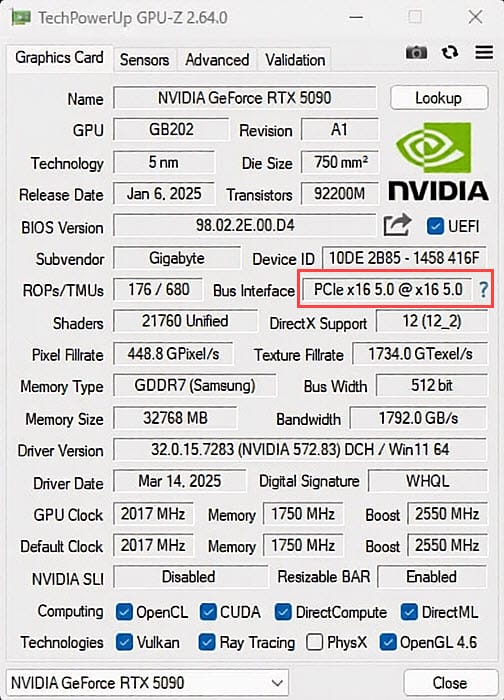
Using GPU-Z – Launch the GPU-Z software and run some load on the GPU either through GPU benchmark software or by launching a game. Now look at the Bus Interface section, it should read as PCIe x16 5.0 @ PCIe x16 5.0 if it is the true PCIe 5.0 Riser Cable. If, after the @ sign, you see PCIe x16 4.0, then the Riser Cable is PCIe 4.0 only.
Tip: You can use online GPU stress-testing tools like https://mprep.info/gpu/ to run heavy loads on the GPU for testing.
What Cable Length and Connectors Orientation to Get?
For most mid-tower and full-tower PC Cases, a 200mm PCIe Riser Cable is sufficient. For mini-ITX Cases, the length can vary depending on the placement of the graphics card and motherboard. For some SFF Cases, you may require a longer cable of around 300mm (or longer), and for others, a shorter cable, i.e., 150mm or shorter, is needed. Also, for custom PC builds and larger PC Cases, the PCIe Riser Cable length requirement can be 300mm or longer.
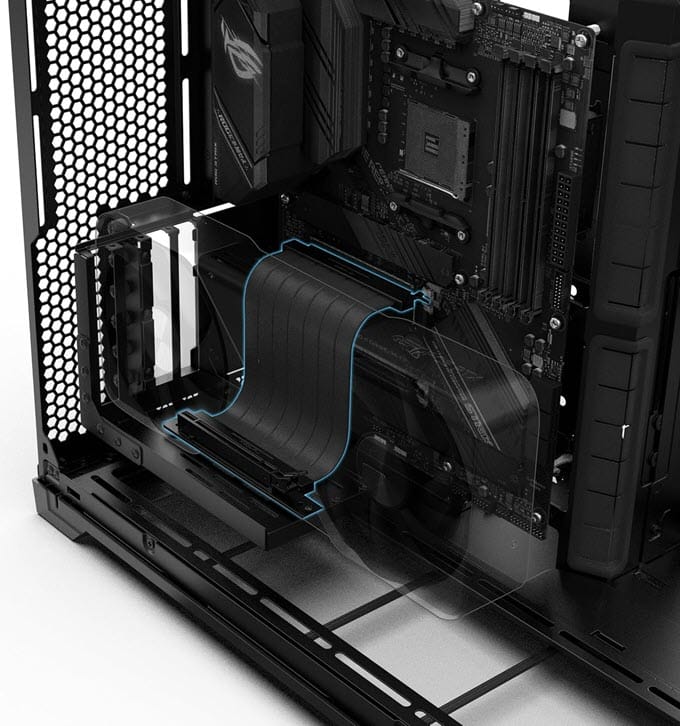
For almost all standard ATX PC Cases (mid-tower, full-tower, etc., with left-side panel opening), straight connectors (180° to 90°) are required at both ends. For special mini-ITX Cases, inverted PC Cases, or custom builds, you would need straight-to-reverse, reverse-to-reverse, or reverse-to-left-angle connectors, depending on the PC Case.
See also:
- Best PCIe 5 SSD for PC and Laptop [M.2 NVMe Drives]
- Best Computer Wall Mount Brackets for Tower Cases
Queries?
If you have any queries regarding PCIe 5.0 Riser Cable, graphics cards, or PC in general, then do let me know in the comment section below.
(*This post may contain affiliate links, which means I may receive a small commission if you choose to purchase through the links I provide (at no extra cost to you). Thank you for supporting the work I put into this site!)
![Best Gaming Hard Drive for Gaming PC [3.5 inch Internal HDD]](https://graphicscardhub.com/wp-content/uploads/2017/11/gaming-hard-drive-211x150.jpg "Best Gaming Hard Drive for Gaming PC [3.5 inch Internal HDD]")

![Best Slim PC Case for HTPC and SFF PC [Low Profile Computer Cases]](https://graphicscardhub.com/wp-content/uploads/2017/07/slim-pc-case-211x150.jpg "Best Slim PC Case for HTPC and SFF PC [Low Profile Computer Cases]")
