
If you need to extend your computer storage externally and locally without compromising on performance, a Direct-Attached Storage (DAS) enclosure is one of the best options. A DAS enclosure houses multiple storage drives and connects directly to a computer through USB or another high-speed interface. A DAS Enclosure is also known as an external storage enclosure or a multiple-bay hard drive enclosure.
DAS enclosures are particularly useful for video editors, photographers, content creators, designers, engineers, and other professionals who regularly work with large files. High-resolution photos, 4K/6K/8K video footage, project files, game libraries, and backups can quickly fill a PC or Mac’s internal storage. A multi-bay DAS provides a convenient way to add large amounts of storage while keeping the drives together in a single enclosure.
DAS enclosures are available in 2, 4, 5, 6 and 8-bay configurations. Four-bay models are especially popular because they offer a good balance of storage capacity, performance, size, and cost. However, professionals handling very large media libraries may benefit from 5-bay or 8-bay models, while users who prioritize performance may prefer an all-SSD or NVMe-based DAS. This guide covers SATA, hybrid, and all-SSD DAS enclosures.
Direct-Attached Storage (DAS) Types
Three main types of DAS devices exist, based on the storage drives they support.
SATA DAS supports 2.5-inch or 3.5-inch SATA hard drives and 2.5-inch SATA SSDs. These are generally the most affordable DAS enclosures and suit large-capacity storage, backups, and media libraries.
Hybrid DAS supports both SATA drives and M.2 NVMe SSDs. This offers a strong mix of capacity and performance. Large SATA hard drives can store cold data, archives, and backups, while NVMe SSDs can hold active projects and frequently accessed files.
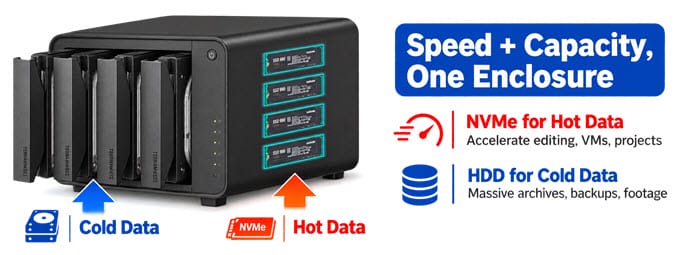
All-SSD DAS uses M.2 NVMe SSDs instead of mechanical hard drives, providing substantially higher performance than traditional hard-drive-based DAS enclosures. They are compact, lightweight, and power-efficient, but the cost per terabyte is considerably higher. They’re still a fairly niche category with only a handful of models on the market.
Factors to Consider When Buying a DAS
The number of drive bays is one of the first things to consider. A 2-bay DAS is compact and suitable for basic storage expansion, while a 4-bay enclosure offers considerably more flexibility. Five- and eight-bay models suit professionals with large media libraries.
The drive type is equally important. HDD-based DAS enclosures provide the highest capacity for the money, whereas SATA SSDs offer lower latency and better performance. NVMe SSD-based DAS enclosures are the best choice when fast file transfers and video editing performance are the priority.
The host interface determines how quickly data can move between the computer and the DAS. USB 3.2 Gen 1 provides up to 5Gbps, USB 3.2 Gen 2 provides up to 10Gbps, while USB4 and Thunderbolt-class connections can provide up to 40Gbps depending on the device and host.
RAID support is another important consideration. The enclosure handles hardware RAID, while the operating system or a storage management application configures software RAID. RAID 0 can improve performance, RAID 1 provides redundancy, and RAID 5 combines capacity, performance, and protection against a single drive failure. However, not every DAS supports RAID, and some hybrid or NVMe models operate each drive independently.
Cooling is particularly important for professional workloads. Video editing can keep drives busy for long periods, so a built-in cooling fan helps maintain drive temperatures and sustained performance.
Finally, check operating-system compatibility. Most modern DAS enclosures work with Windows and macOS, while several models also support Linux and can be used as external storage expansion for NAS, TrueNAS, Unraid, and other systems.
DAS Applications and Uses
DAS enclosures are useful for home, office, and professional environments. Common applications include video editing, file backup, media storage, media libraries, photography, project storage, and NAS expansion.
Video editors can use a DAS to store raw footage, project files, proxies, and completed projects. Photographers can use a multi-bay DAS to keep RAW photos and Lightroom or other catalog data in one location. Content creators can also use a DAS for video archives, YouTube footage, recordings, and large project libraries.
DAS enclosures are particularly useful with smaller computers such as mini PCs, Mac mini systems, laptops, and small-form-factor PCs with limited internal storage expansion.
Advantages of DAS Enclosures
Below are the main advantages of DAS over NAS or External Hard Drives.
High Speed and Low Latency – A DAS connects directly to the computer, eliminating the network bottleneck associated with many NAS setups. Modern USB 3.2, USB4, and Thunderbolt-compatible DAS enclosures can provide high transfer speeds for large files.
Large Storage Capacity – A multi-bay DAS can accommodate several high-capacity HDDs or SSDs. Eight-bay and hybrid models can provide hundreds of terabytes of raw capacity depending on the drives installed.
RAID Support – Some DAS enclosures include hardware RAID and support RAID 0, RAID 1, and RAID 5. RAID can improve performance or protect against drive failure, depending on the configuration you choose.
Plug-and-Play Operation – Unlike a NAS, a DAS generally does not require IP configuration, network setup, or a dedicated operating system. Connect the enclosure to the computer, install the drives, and configure the storage.
Easy Drive Upgrades – Many DAS enclosures support hot-swapping or tool-free drive installation, making it easier to replace or upgrade drives.
Active Cooling – Most multi-bay DAS enclosures include a cooling fan. Active cooling is especially useful when several HDDs or SSDs run simultaneously for long periods.
Easier Storage Management – Keeping multiple drives inside one enclosure is more convenient than managing several individual external hard drives. A DAS also reduces cable clutter and makes it easier to maintain a centralized storage system.
No Network Exposure – Because a DAS connects directly to a computer instead of exposing its storage directly to a network, it does not have the same network-facing attack surface as a network storage device. However, the connected computer and its files can still be affected by malware, ransomware, or other security problems.
Types of Working Modes or Drive Configuration
Below are the most common drive configurations or working modes for DAS. Not all DAS supports all modes; it depends on the DAS model.
Individual Mode – Treats each disk as separate storage, allowing you to access each one independently.
JBOD Mode – All the disks are recognized as a single drive. This allows maximal storage utilization but provides no data protection. JBOD stands for “Just a Bunch of Disks”.
RAID 0 Mode – Data is split amongst the drives. RAID provides the fastest performance but does not protect data from drive failure.
RAID 1 Mode – Copies identical data onto two or more drives. If one drive fails, your data remains safe, but you only get half the total storage capacity.
RAID 5 Mode – RAID 5 requires at least three drives, and it distributes parity information across the drives, providing optimized storage capacity and protection against one disk failure.
RAID 1/10 Mode – Half of the total storage capacity is used to store data, and the other half keeps a copy of this data. This provides strong data protection, but you can use only half the installed storage space.
Software RAID – Controls the RAID configuration from your NAS or computer.
Best Direct-Attached Storage (DAS) Enclosures
Below are some of the best DAS enclosures for video editing, content creation, photography, and professional storage workloads.
QNAP TR-004 4-Bay DAS Enclosure
[Hardware & Software RAID 0/1/5/6/10, Hot-Swappable Bays, NAS Expansion Ready]
The QNAP TR-004 is a four-bay DAS designed for users who want a conventional SATA-based enclosure with hardware RAID. It supports four 3.5-inch SATA drives and 2.5-inch SATA HDDs and SSDs. The enclosure connects to a computer via USB 3.2 Gen 1 Type-C at 5Gbps. The biggest advantage of the TR-004 is its hardware RAID support. Its physical disk-mode controls allow Individual, JBOD, RAID 0, RAID 1/10, and RAID 5 configurations through rear DIP switches. You can also manage RAID settings through QNAP software when the enclosure is used in software-control mode.
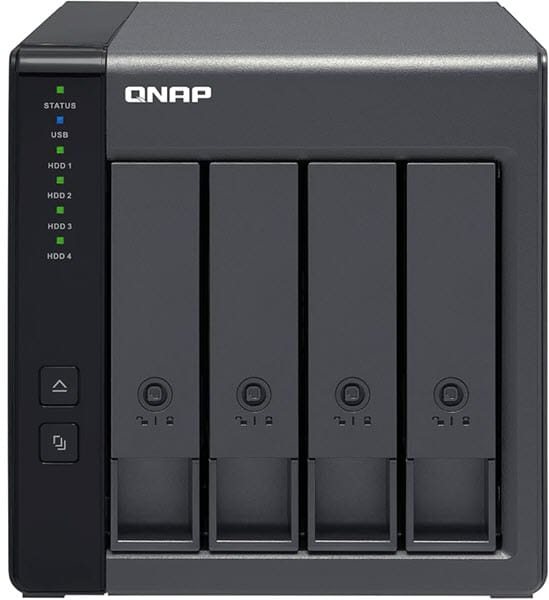
For video editors, RAID 0 can be useful when performance is more important than redundancy. RAID 1 is better suited to important working data where drive redundancy is required, while RAID 5 provides a useful balance of usable capacity and protection when you install three or more drives. The four bays support hot-swapping, but hot-swap is not available when the enclosure is operating in Individual Mode. The lockable drive trays also help prevent accidental drive removal. The TR-004 uses active cooling with a 120 mm fan. For power, the DAS uses a 60W (minimum) external 12V DC power adapter. It supports Windows, macOS, Linux, and QNAP NAS systems.
| QNAP TR-004 DAS Enclosure Specifications | |
| Drive Bays | 4 |
| Drive Support | 3.5-inch SATA HDD; 2.5-inch SATA HDD/SSD |
| Storage Capacity | Depends on installed drives |
| Interface & Ports | USB 3.2 Gen 1 Type-C, 5Gbps |
| RAID Support | Hardware RAID + software-controlled mode |
| Hardware RAID | Yes |
| RAID Modes | RAID 0, RAID 1/10, RAID 5 |
| Other Modes | Individual, JBOD |
| Hot-swappable | Yes (Hot-swap is not supported in Individual Mode) |
| Cooling Fan | Active cooling fan |
| Power Supply | External 60W minimum, 12V DC adapter |
| OS Support | Windows, macOS, Linux, QNAP QTS |
| Features | Hardware RAID (via rear DIP switches), lockable trays, USB Type-C, NAS expansion |
Buy QNAP TR-004 4-Bay DAS Enclosure
TerraMaster D8 Hybrid 2 8-Bay Enclosure
[8-Bay Hybrid Storage: 4 SATA + 4 NVMe, up to 152TB, Hot & Cold Data Tiering, TPM Power Management]
The TerraMaster D8 Hybrid 2 is one of the most interesting DAS enclosures for professionals because it combines high-capacity SATA storage with high-speed NVMe storage in one enclosure. It offers four SATA drive bays and four M.2 NVMe slots, letting users build a storage system around both HDDs and SSDs. The four SATA bays support 3.5-inch SATA HDDs as well as 2.5-inch SATA HDDs and SSDs. The four M.2 slots support PCIe NVMe M.2 2280 SSDs. With four 30TB HDDs and four 8TB NVMe SSDs, the maximum raw capacity is 152TB.
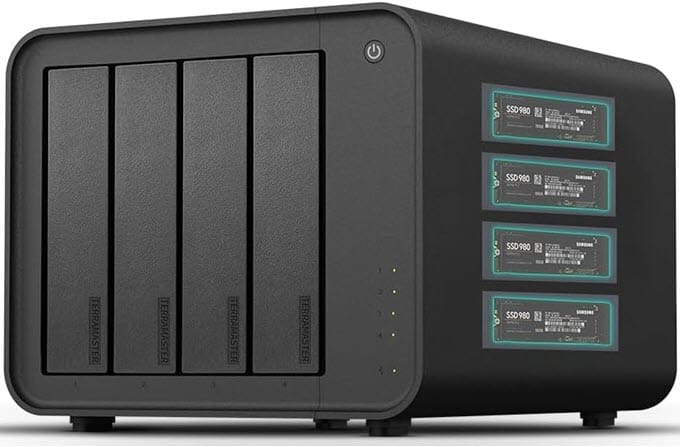
The hybrid design makes the D8 Hybrid 2 particularly suitable for creators. Active projects can be stored on NVMe SSDs for fast access, while large video archives, completed projects, and backups can reside on high-capacity HDDs. D8 Hybrid 2 does not provide hardware RAID and uses single-disk architecture. This means the enclosure does not support RAID 0, RAID 1, or RAID 5. If RAID is required, you can configure it at the host or supported NAS/software level.
The enclosure uses USB 3.2 Gen 2 Type-C at 10Gbps and is compatible with USB 3.x, USB4, and Thunderbolt 3/4/5 hosts. It can achieve up to 1,020MB/s read performance with a single M.2 SSD and up to around 1,016MB/s with four SSDs under its stated test conditions. Cooling is handled by a 120mm intelligent temperature-controlled FDB fan. The D8 Hybrid 2 also uses TerraMaster’s TPM power-management technology, tool-free drive installation, and Push-Lock drive retention. It includes an external 90W power supply and supports Windows, macOS, and Linux.
| TerraMaster D8 Hybrid 2 DAS Enclosure Specifications | |
| Drive Bays | 4 SATA + 4 M.2 NVMe |
| Drive Support | 3.5-inch SATA HDD, 2.5-inch SATA HDD/SSD, M.2 2280 NVMe |
| Storage Capacity | Up to 152TB raw |
| Interface & Ports | USB 3.2 Gen 2 Type-C, 10Gbps |
| Thunderbolt | Yes, Compatible with Thunderbolt 3/4/5 hosts |
| RAID Support | No hardware RAID; single-disk architecture |
| Hardware RAID | No |
| RAID Modes | Not supported by enclosure |
| Other Modes | Individual/single disk |
| Hot-swappable | Not supported |
| Cooling Fan | 120mm intelligent FDB fan |
| Power Supply | External 90W power adapter |
| OS Support | Windows, macOS, Linux |
| Features | 4 HDD + 4 NVMe hybrid design, 152TB raw capacity, TPM power management, tool-free installation, TOS 5/6 NAS expansion |
Buy TerraMaster D8 Hybrid 2 8-Bay Enclosure
TerraMaster D5-Hybrid 5-Bay Enclosure
[5-Bay Hybrid DAS: 2 SATA + 3 NVMe, Exclusive 2+3 RAID Array Mode]
The TerraMaster D5-Hybrid is designed for users who want both large-capacity SATA storage and fast NVMe storage without buying separate enclosures. It combines two SATA drive bays with three M.2 NVMe slots. The two SATA bays support 3.5-inch SATA HDDs, 2.5-inch SATA HDDs, and 2.5-inch SATA SSDs. The three M.2 slots support PCIe 3.0, 4.0, and 5.0 NVMe SSDs. With two 32TB HDDs and three 8TB NVMe SSDs, the maximum raw capacity is 88TB.
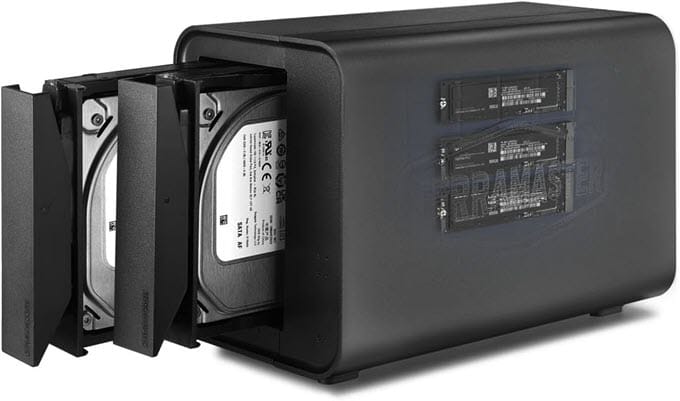
The D5-Hybrid supports hardware RAID, but there is an important limitation: only the two SATA HDD/SSD bays can participate in RAID arrays. The three M.2 NVMe drives operate independently in single-disk mode. Supported RAID options for the two SATA drives are RAID 0 and RAID 1, while JBOD and Single Disk modes are also available. This two-drive hardware RAID implementation does not support RAID 5.
This arrangement makes the D5-Hybrid useful for creators who want a pair of SATA drives configured as RAID 0 or RAID 1 while using the NVMe drives separately for high-speed project files, cache, or scratch storage. The enclosure uses USB 3.2 Gen 2 Type-C at 10Gbps. TerraMaster lists maximum read speeds of up to 980MB/s for a single NVMe SSD and up to 960MB/s for two SATA SSDs in RAID 0. It includes an 80mm smart cooling fan and a 40W power supply. It supports Windows, macOS, and Linux.
| TerraMaster D5-Hybrid DAS Enclosure Specifications | |
| Drive Bays | 2 SATA + 3 M.2 NVMe |
| Drive Support | 3.5-inch SATA HDD, 2.5-inch SATA HDD/SSD, M.2 2280 NVMe |
| Storage Capacity | Up to 88TB raw |
| Interface & Ports | USB 3.2 Gen 2 Type-C, 10Gbps (compatible with USB4 & Thunderbolt 3/4) |
| Thunderbolt | No dedicated Thunderbolt port |
| RAID Support | Hardware RAID |
| Hardware RAID | Yes, SATA bays only |
| RAID Modes | RAID 0, RAID 1 |
| Other Modes | JBOD, Single Disk |
| Hot-swappable | Not supported |
| Cooling Fan | 80mm smart fan |
| Power Supply | External 40W power adapter |
| OS Support | Windows, macOS, Linux |
| Features | Hybrid HDD/SSD/NVMe design, 88TB capacity, hot/cold data separation, TPC Backupper Backup Software |
Buy TerraMaster D5-Hybrid 5-Bay Enclosure
ORICO 98 Series 4-Bay External Storage DAS
[4-Bay Hardware RAID, 8 RAID Modes, Built-In 150W Power Supply]
The ORICO 98 Series is a conventional multi-bay SATA DAS aimed at users who need high-capacity local storage rather than extreme SSD performance. The series is available in 2-, 4-,s and 5-bay versions, with the 4-bay model offering a good balance for creators and professionals. The enclosure supports 3.5-inch SATA hard drives and is rated for up to 22TB per bay. The 4-bay version can therefore accommodate up to 88TB of raw capacity using four 22TB drives. It uses USB 3.0 Type-B interface with a 5Gbps transfer rate.
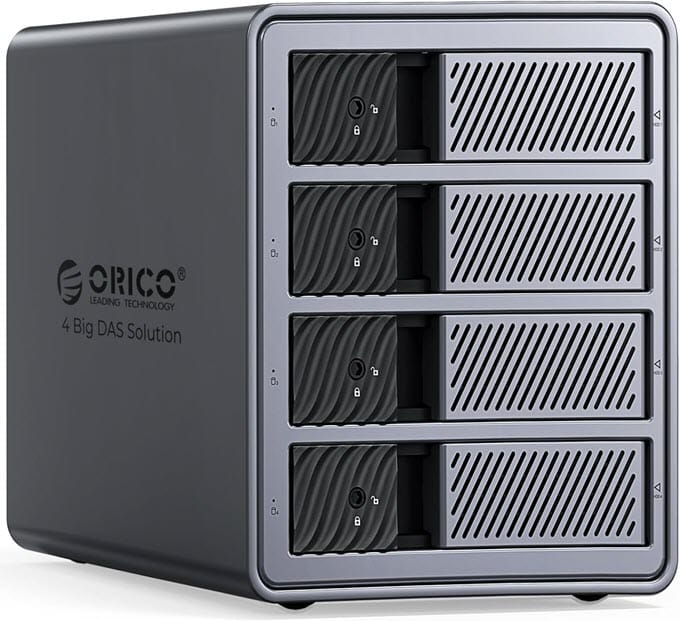
The 98 Series uses an aluminum-alloy body with ventilation openings and a cooling fan. The 4- and 5-bay models use a built-in 150W power supply, eliminating the need for a large external power brick. The enclosure is available in two models, with or without RAID. RAID modes include RAID 0, 1, 3, 5, and 10, plus JBOD, CLONE, and CLEAR (no RAID), all configured through rear-panel DIP switches, with no software required. For users who primarily need centralized high-capacity storage for video archives, backups, and media libraries, the ORICO 98 Series can be a practical option. Its 5Gbps interface is less suitable for demanding multi-stream editing directly from HDDs than faster 10Gbps or 40Gbps DAS solutions.
| ORICO 98 Series 4-Bay DAS Enclosure Specifications | |
| Drive Bays | 4 |
| Drive Support | 3.5-inch SATA HDD |
| Storage Capacity | Up to 88TB with four 22TB drives |
| Interface & Ports | USB 3.0 Type-B, 5Gbps |
| Thunderbolt | No |
| RAID Support | Available with or without RAID |
| Hardware RAID | Yes for RAID Model |
| RAID Modes | RAID 0, 1, 3, 5, and 10 |
| Other Modes | JBOD, CLONE, and CLEAR (no RAID) |
| Hot-swappable | NA |
| Cooling Fan | Silent cooling fan |
| Power Supply | Built-in 150W PSU |
| OS Support | Windows, macOS, Linux |
| Features | Aluminum-alloy construction, 4-bay design, integrated 150W PSU |
Buy ORICO 98 Series 4-Bay Enclosure
Best All-SSD DAS Enclosures
If bulk capacity matters less to you than raw speed, these all-flash DAS enclosures ditch spinning drives entirely in favor of M.2 NVMe SSDs, making them ideal for scratch disks, active project drives, or on-location editing rigs.
TerraMaster D4 SSD 4-Bay All-SSD DAS
[4-Bay All-NVMe DAS, USB4 / Thunderbolt 5 Compatible, Up to 3257 MB/s]
The TerraMaster D4 SSD targets users who prioritize performance over maximum HDD capacity. It uses four M.2 NVMe SSD slots and supports PCIe 3.0, PCIe 4.0, and PCIe 5.0 M.2 2280 SSDs. Each slot can accommodate an SSD up to 8TB, giving the D4 SSD a maximum raw capacity of 32TB. The enclosure uses USB4 with up to 40Gbps bandwidth and is compatible with Thunderbolt 3, Thunderbolt 4, and Thunderbolt 5 hosts.
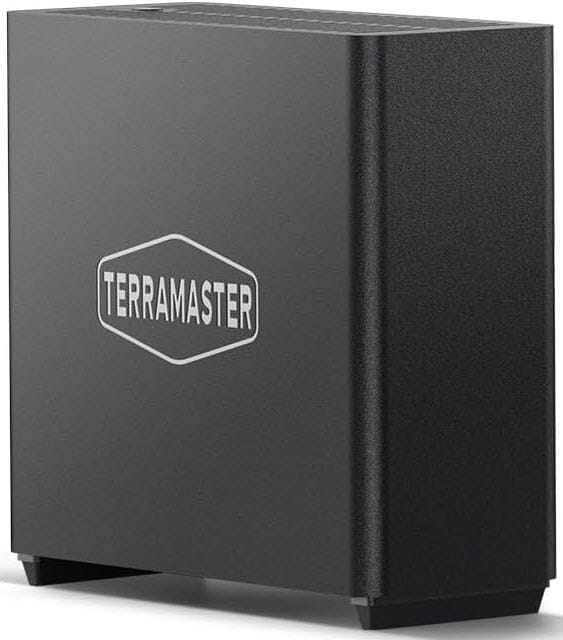 The D4 SSD is particularly attractive for video editors working with large high-resolution files. In tests, the enclosure achieved up to 3,257MB/s read and 3,192MB/s write using four Samsung 990 PRO 4TB SSDs in RAID 0. It doesn’t include a hardware RAID controller; it operates in single-disk mode by default, and you must build any RAID array through your OS’s disk-management tools or third-party software. The D4 SSD uses two 50mm intelligent fans and temperature sensors for cooling. It has a 24W power supply and supports macOS and Windows 11 24H2 or later. Its compact size and low weight make it particularly suitable for a workstation or Mac mini setup.
| TerraMaster D4 SSD Enclosure Specifications | |
| Drive Bays | 4 |
| Drive Support | M.2 2280 PCIe 3.0/4.0/5.0 NVMe SSD |
| Storage Capacity | Up to 32TB raw |
| Interface & Ports | USB4 Type-C, 40Gbps |
| Thunderbolt | Compatible with Thunderbolt 3/4/5 |
| RAID Support | Single-disk enclosure; software RAID possible at host level |
| Hardware RAID | No |
| RAID Modes | Not supported by enclosure |
| Other Modes | Single Disk |
| Hot-swappable | Not specified |
| Cooling Fan | 2 x 50mm intelligent fans |
| Power Supply | External 24W power supply |
| OS Support | macOS, Windows 11 24H2 or later |
| Features | All-NVMe design, USB4 40Gbps, up to 32TB, very high sequential performance |
Buy TerraMaster D4 SSD 4-Bay NVMe Enclosure
ORICO 88 Series 4-Bay USB4 NVMe SSD Enclosure
[4-Bay NVMe-Only DAS, Native USB4 40Gbps, No RAID Overhead]
The ORICO 88 Series is another all-flash option for creators who want high-speed NVMe storage in a compact multi-drive enclosure. The 8848U4 version uses four M.2 NVMe SSDs and a USB4 connection, making it better suited to high-speed creative workloads than conventional 5Gbps SATA DAS enclosures. The 88 Series is available in several configurations, including SATA drive models and the 8848U4 NVMe version. The NVMe model supports up to 8TB per bay for a total of up to 32TB. A USB-C to USB-C cable provides up to 40Gbps connectivity on the USB4 version. The 8848U4 model is rated for up to 1,024MB/s read and 950MB/s write performance.
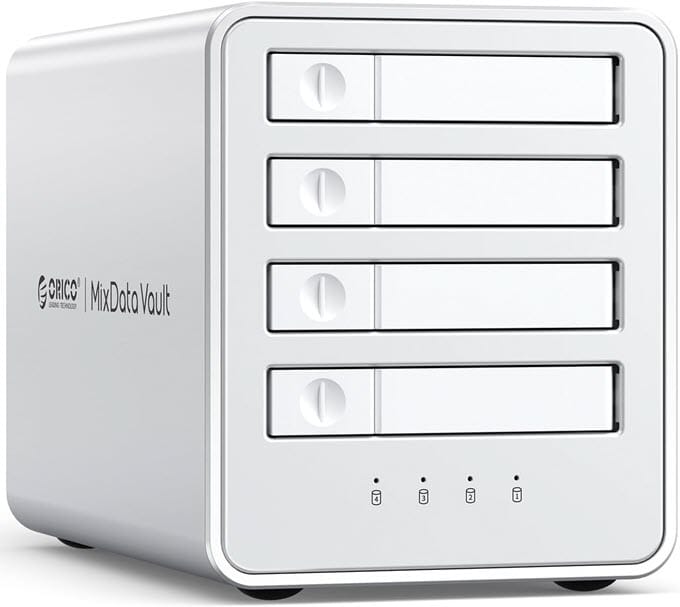
The all-flash configuration suits video editors, photographers, and other professionals who need fast access to active projects. NVMe SSDs also provide much lower access latency than mechanical hard drives. The enclosure has no built-in RAID or Hardware RAID for the NVMe drives. Real-world testing shows sequential speeds in the 700 MB/s per-bay range on Linux, with faster results expected on Windows and macOS. The enclosure has an aluminum body with a built-in cooling fan and is powered by a 12V/3A adapter. It supports Windows, Linux, and macOS.
| ORICO 88 Series 4-Bay USB4 DAS Enclosure Specifications | |
| Drive Bays | 4 |
| Drive Support | M.2 NVMe SSD |
| Storage Capacity | Up to 32TB |
| Interface & Ports | USB4 Type-C, up to 40Gbps |
| Thunderbolt | Depends on host compatibility |
| RAID Support | Not supported; each drive works independently |
| Hardware RAID | NA |
| RAID Modes | Software RAID |
| Other Modes | Individual/independent disks only |
| Hot-swappable | Not specified |
| Cooling Fan | Active cooling |
| Power Supply | External 12V adapter |
| OS Support | Windows, Linux, macOS |
| Features | Four-bay all-flash design, USB4, up to 32TB |
Buy ORICO 88 Series 4-Bay NVMe SSD Enclosure
Other DAS Enclosures
The following models are also worth considering depending on the number of drives and storage capacity you need:
2-Bay DAS Enclosure
QNAP TR-002 — A compact 2-bay hardware RAID enclosure supporting SATA drives and USB 3.2 Gen 2 Type-C connectivity. It supports Individual, JBOD, and RAID configurations and suits users who don’t need four or more drive bays.
8-Bay DAS Enclosures
QNAP TL-D800C — An eight-bay SATA storage enclosure designed for high-capacity expansion. It supports 3.5-inch SATA HDDs and 2.5-inch SSDs and uses a USB Type-C connection.
OWC ThunderBay 8 — An eight-bay Thunderbolt DAS aimed at professional users who require high-performance multi-drive storage and a large number of drive bays.
See also:
Final Words
A DAS enclosure is an excellent way to expand computer storage without setting up a network storage system. It is particularly useful for video editors, photographers, content creators, and professionals who work with large files and need fast local storage. Before buying, make sure to check the exact RAID implementation, supported drive capacities, host interface, and operating-system compatibility. Also remember that RAID is not a backup. Even if you configure RAID 1 or RAID 5, back up important video projects and other irreplaceable data to another storage device or location. If you have any questions, please leave a comment below.
(*This post may contain affiliate links, which means I may receive a small commission if you choose to purchase through the links I provide (at no extra cost to you). Thank you for supporting the work I put into this site!)
![Best Gaming Monitor under 100 Dollars [1080p FHD]](https://graphicscardhub.com/wp-content/uploads/2018/06/HP-22cwa-IPS-LED-Monitor-211x150.jpg "Best Gaming Monitor under 100 Dollars [1080p FHD]")
![Best Intel X99 Motherboard for Gaming & Work [LGA 2011-v3 Socket]](https://graphicscardhub.com/wp-content/uploads/2017/06/MSI-X99A-GODLIKE-GAMING-Motherboard-211x150.jpg "Best Intel X99 Motherboard for Gaming & Work [LGA 2011-v3 Socket]")
