
If you are into building PCs or are a DIY PC user, knowing about computer fan screws is essential for installing fans of various sizes in your PC Case or on a water-cooling radiator. Generally, fan screws come along with PC Case fans from most reputable brands. However, sometimes the included screws do not fit any of the fan holes or the PC Case due to design issues, or the mounting holes are not compatible with standard fan screw sizes. For thicker fans, you need extra-long screws to mount them on the radiator. Also, for a push-pull radiator fan configuration, you need extra screws for the additional fans. On some smaller PC fans, the mounting hole size can be a little smaller, so a standard Case fan screw won’t fit, and you need smaller-diameter screws to install them in your PC Case. So, to help you choose the right computer fan screws for your requirements, here I am going to provide all the important information regarding computer fan screws sizes and their types.
Computer Fan Mount Hole Size
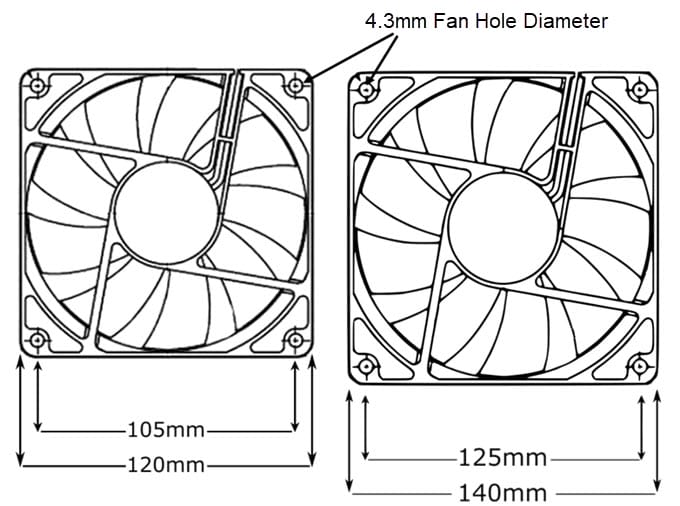
The diameter of a standard computer fan hole is 4.3mm. The most popular standard computer fan sizes are 80mm, 92mm, 120mm, and 140mm. Bigger fan sizes, including 160mm, 180mm, and 200mm fans, also have a fan mounting hole diameter of 4.3mm. Some smaller fan sizes, including 40mm and 60mm fans, have a standard fan-mount hole size of 4.3mm, while others have a smaller hole size of around 3.2mm.
Standard Computer Fan Screws
Standard computer fan screws can be broadly classified into two major types based on their size or length. The two types are short screws and long screws.
Short Fan Screws [Computer Case Fan Screws]
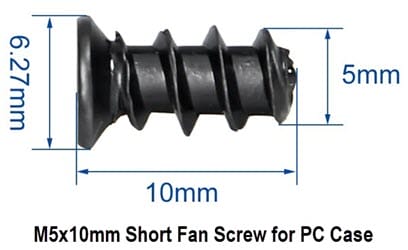
Short fan screws are computer case fan screws used to mount PC fans to the Chassis or PC Case. The standard short screw for connecting fans to the PC Case is the self-tapping M5x10 fan screw.
M5x10 Fan Screw (Self-Tapping) – A self-tapping M5x10 fan screw is the standard fan screw for mounting PC fans to the PC Case. The M5x10 fan screw has a thread diameter of 5mm, and the length of the screw is 10mm. Self-tapping means the screw creates its own threads in the computer fan mounting hole by cutting through it. The M5x10 Fan Screw has a Philips head (+ type), and you need a Philips #2 or plus type (+) screwdriver for it. Generally, M5x10 Fan Screws have a flat bottom, but some pointed versions are also available. These fan screws are used for 40mm (with standard fan hole size), 60mm, 80mm, 92mm, 120mm, 140mm, 160mm, 180mm, and 200mm fan sizes.
M5x10 Fan Screws Recommendations
- 100pcs Computer Cooling Fan Mount Screws, M5x10 Black
- 100PCS M5x10 Computer Case Fan Screws Self-Tapping Screws (Nickel Plated)
Long Fan Screws [Radiator Fan Screws]
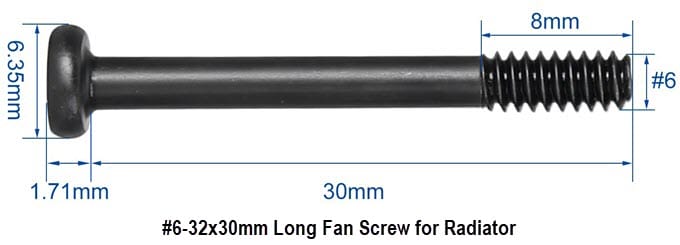
Long fan screws, also called radiator fan screws or long water-cooling screws, are used to mount 120mm/140mm computer fans on an AIO or custom water-cooling radiator. These are #6-32xL long screws with a thread diameter of 3.51mm (approx.) and have 32 threads per inch. L is the length of the screw that can be 30mm, 34mm, 35mm, 37mm, or longer. The screw has a flat bottom and a Phillips (+) head. The most commonly used standard-size long fan screw is the #6-32×30, suitable for a fan with a standard thickness of 25mm.
#6-32x30mm Screws – The most widely used long fan screws for mounting fans to the radiator. These screws are 30 mm long and are used to mount 120 mm/140 mm fans with a standard thickness of 25mm to the radiator.
M5x10mm and #6-32x30mm Fan Screws Recommendations
- 34 Sets (68Pcs) Computer Cooling Fan Screws Kit, #6-32 x 30mm Fan Screw + M5 x 10mm PC Case Fan Screws
- 80pcs PC Fan Screw Kit – Black Carbon Steel Screws with Blue Nylon Patch (30x UNC 6-32 30mm + 50x 10mm)
- M5x10mm Short Fan Screws and #6-32x30mm Long Fan Screws (40 Pcs)
- 70pcs Fan Mounting Screw Radiator Water-Cooled Exhaust Fixing Black Long Screw(#6-32x30mm)
- PC Fan Screws and AIO Cooler Fan Screws (30mm UNC 6-32 30PCS / M5x10mm 50PCS)
#6-32x34mm and #6-32x35mm Screws – These are longer #6-32 screws, 34mm and 35mm long. They are used to mount 27mm-thick and even 30mm-thick fans on the liquid-cooling AIO radiator.
- CRJ 6-32 UNC Extra Long 1-3/8″ (34mm) Computer Radiator Fans Screws Set for 25mm and 30mm Fans – 20 Screws and 20 Washers
- 60pcs #6-32 Fan Mounting Screw (35mm), Radiator Water-Cooled Exhaust Fixing Black Long Screw(#6-32x35mm)
#6-32x37mm – These are 37mm-long #6-32 screws used to mount 30mm-thick fans to the water-cooling radiator.
#6-32 Hex Nuts – You can use #6-32x30mm fan screws with #6-32 Hex nuts for mounting standard-size fans (60mm to 140mm) without creating threads in the fan-mount holes, thereby avoiding the risk of damaging the fan holes or frame.
- 100Pcs SAE 6-32 Hex Nuts, 304 Stainless Steel Hardware Nuts
- 6#32 Hex Nuts,220 Pack 304 (A2-70) Stainless Steel Hardware Nuts
Note: #6-32 screw size can also be denoted as 6#32. If you feel the screws are a bit longer than you need, you can add washers or spacers to adjust the screw length to your liking. However, if you want to add fan accessories like a fan grill or a dust filter, you can opt for slightly longer screws. Also, some fan screws come with pre-applied blue threadlocker compound to prevent loosening due to vibration.
Long Fan Screws for Radiators Compatibility List
| Fan Thickness for 120mm / 140mm Fans | Fan Screw Size for Radiator (Recommendation) |
| 25mm | 6-32x30mm |
| 27mm | 6-32x34mm / 6-32x35mm |
| 30mm | 6-32x34mm / 6-32x35mm / 6-32x37mm |
Non-standard Fan Screws for PC Case
Below are non-standard screws for mounting computer fans of various sizes on a PC Case.
M3 and M4 Screws with Hex Nuts
Below are the M3 and M4 Screws with Nuts for installing PC Case Fans. These are not self-tapping screws.
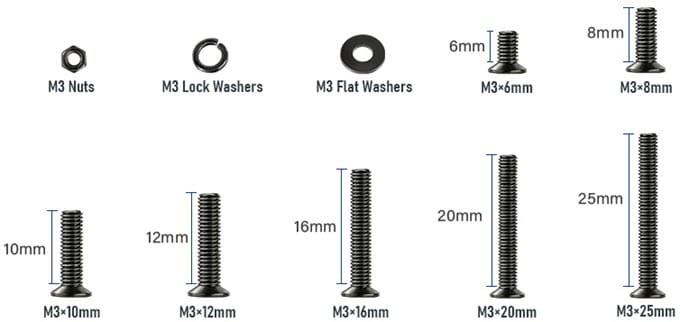
M3 Screw with Nut – M3 Screws with Nuts are used for mounting smaller 40mm fans with a fan hole diameter of less than 4mm to the PC or Server Chassis. These longer M3 screws with Nuts can also be used to mount larger fans, including 80mm, 120mm, and 140mm models. For standard 25mm-thick fans, you will need 30mm long M3x30 screws.
Recommendations:
- M3 Countersunk Screws Kit, M3 Flat Head Screws, Phillips Bolts Nuts, Washers Set (6mm – 25mm)
- M3 Phillips Pan Head Machine Screws with Nuts (M3 x 6mm / 8mm / 12mm / 16mm / 20mm / 25mm / 30mm)
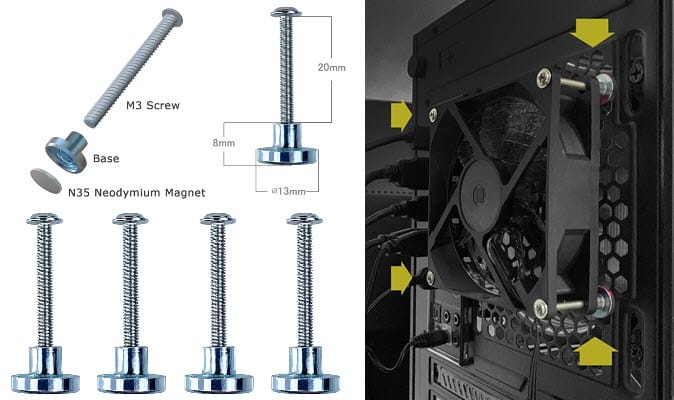
M3 Magnetic Screw Set – These M3 screws come with a magnetic screw base for attaching fans inside or outside the PC Case. The screws are 30mm long and suitable for fans with a 25mm standard thickness. The magnetic base has female threads, and it uses an N35 Neodymium magnet. These screws have multipurpose uses and can be used for cooling other electronic components or devices with ferromagnetic metal surfaces.
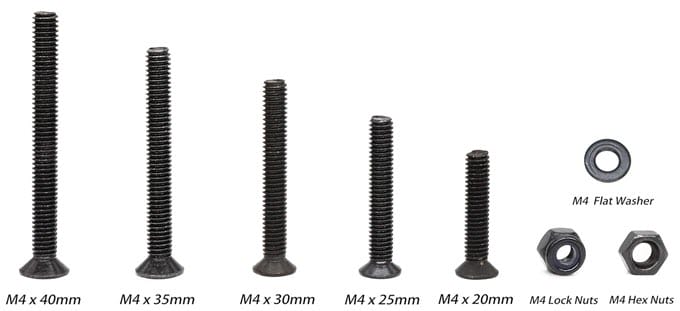
M4 Screw with Nut – For mounting fans with a standard hole size of 4.3mm, M3 screws are quite narrow and may cause vibrations due to the large gap between the hole and the screw threads. For snug fitting, M4 screws with nuts are a perfect choice for mounting standard fans with a 4.3mm hole diameter inside the PC Case. The length of the M4 screws can vary depending on the fan’s thickness. For 25mm standard-thickness fans, you can use M4 x 30 mm screws with nuts. The M4 screws with nuts can also be very useful when the fan mounting hole is damaged by cross-threading or becomes loose due to overtightening.
Recommendation:
Rubber / Silicone Fan Mount Screws
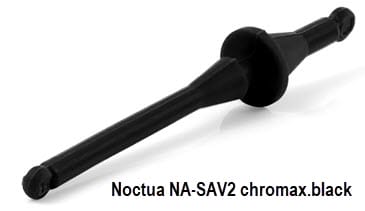
One of the easiest and quickest ways to mount fans in the PC Case is to use rubber or Silicone fan mounts or screws. They allow tool-free installation and help reduce vibrations and rattling, especially with fans that lack anti-vibration rubber pads at the corners. Technically, they are not screws, as they lack threads and don’t require a screwdriver for installation. They have a rivet-type mechanism: you insert them into the fan mounting hole and pull them through the PC Case hole from the other side.
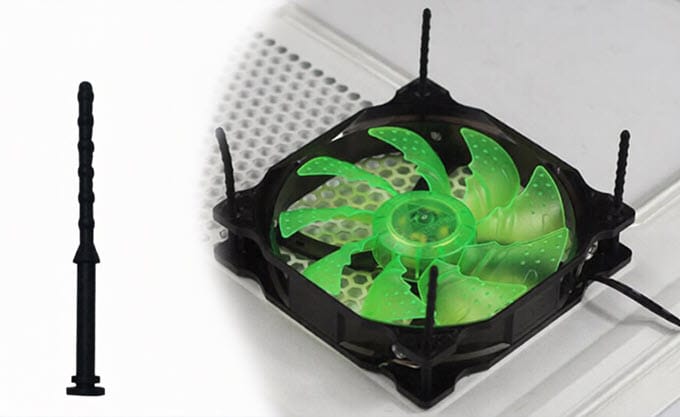
Generally, most silicone-rubber fan mounts are used for fans with a thickness of 25mm and a mounting hole diameter of 4.3mm. However, silicone rubber mounts with multiple pawls are also available to support thinner fans up to 10mm thick. These rubber fan mounts are available from both generic and top brands, such as Noctua. You should note that these silicone rubber fan mounts are not suitable for slimmer or smaller computer fans. The main disadvantages of silicone-rubber mounts are that they may break if pulled hard and are not as sturdy as the metal screws in the long run.
Recommendations:
Noctua Silicone Anti-Vibration Fan Mounts
High-quality silicone anti-vibration fan mounts from Noctua.
For Mounting 10mm, 14mm, 15mm, 20mm, or 25mm Thick Fans
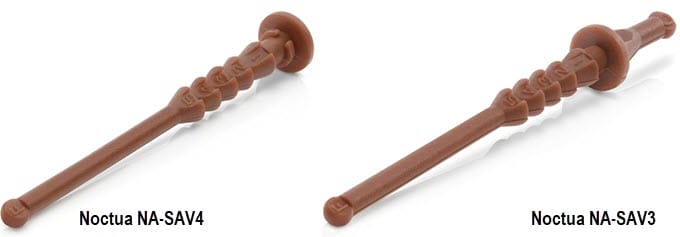
- NA-SAV4, Silicone Anti-Vibration Fan Mount Set (Single Sided)
- NA-SAV3, Silicone Anti-Vibration Fan Mount Set (Double Sided)
For Mounting Standard 25mm Thick Fans with 4.3mm Diameter
- NA-SAV2 Anti-Vibration Mounts (Brown)
- NA-SAV2 chromax.black Anti-Vibration Mounts
- NA-SAV2 chromax.white Anti-Vibration Mounts
- NA-SAV2 chromax.red Anti-Vibration Mounts
- NA-SAV2 chromax.blue Anti-Vibration Mounts
- NA-SAV2 chromax.green Anti-Vibration Mounts
PC Case Fan Screws Compatibility List
| Fan Size | Fan Thickness | Mounting Hole Diameter | M5x10mm Screws (Sel-Tapping) Compatibility | Silicone-Rubber Screws Compatibility | M3/M4 Screws with Nuts Compatibility |
| 40mm | 20mm | 3.2mm | No | No | M3 |
| 40mm | 20mm | 4.3mm | Yes | Yes | M3/M4 |
| 60mm | 25mm | 4.3mm | Yes | Yes | M3/M4 |
| 80mm | 15mm | 4.3mm | Yes | Yes | M3/M4 |
| 80mm | 25mm | 4.3mm | Yes | Yes | M3/M4 |
| 92mm | 15mm | 4.3mm | Yes | Yes | M3/M4 |
| 92mm | 25mm | 4.3mm | Yes | Yes | M3/M4 |
| 120mm | 15mm | 4.3mm | Yes | Yes | M3/M4 |
| 120mm | 25mm | 4.3mm | Yes | Yes | M3/M4 |
| 120mm | 30mm | 4.3mm | Yes | Yes | M3/M4 |
| 140mm | 15mm | 4.3mm | Yes | Yes | M3/M4 |
| 140mm | 25mm | 4.3mm | Yes | Yes | M3/M4 |
| 140mm | 30mm | 4.3mm | Yes | Yes | M3/M4 |
| 160mm | 27mm | 4.3mm | Yes | Yes | M3/M4 |
| 160mm | 30mm | 4.3mm | Yes | Yes | M3/M4 |
| 180mm | 32mm | 4.3mm | Yes | Yes | M3/M4 |
| 180mm | 40mm | 4.3mm | Yes | Yes | M3/M4 |
| 200mm | 30mm | 4.3mm | Yes | Yes | M3/M4 |
How to measure fan screw size and fan hole diameter?
If you want to measure the fan hole diameter or the fan screw size, you can use a digital vernier caliper. They are inexpensive, especially the plastic ones, and are pretty accurate. Below is a good one to check out.
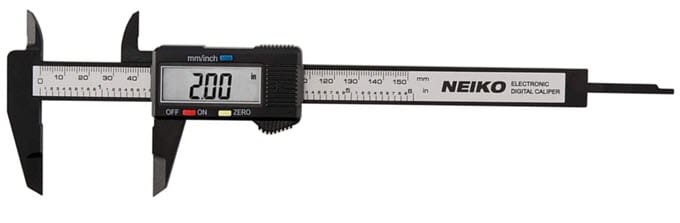 Buy NEIKO 6” Digital Caliper (0-150mm Range)
See also:
- PC Case Fans Airflow Guide for Best Cooling Performance
- Best Slim 120mm Fans for PC Cases and Radiators
- Best Slim 140mm Fans for PC Cases and Radiators
Final Words
Selecting the right size and type of fan screw is crucial for properly mounting computer fans in the PC Case or on the radiator. Improper selection can lead to poor installation, instability, vibrations, clearance issues, or damage to the computer’s fans, chassis, radiator, or other components. Moreover, the right-size/type fan screws should be of good quality, with smooth surfaces and evenly sized or uniform threads, free of burrs. Also, the screws should be made of high-quality carbon steel and painted or coated to prevent rust and corrosion. If you have any queries about the computer fan screw size/type for your PC, let me know in the comments below.
(*This post may contain affiliate links, which means I may receive a small commission if you choose to purchase through the links I provide (at no extra cost to you). Thank you for supporting the work I put into this site!)
![Best 1000 Watt PSU for High-end PC in 2026 [ATX 3.1 & PCIe 5.1]](https://graphicscardhub.com/wp-content/uploads/2026/09/best-1000W-PSU-211x150.jpg "Best 1000 Watt PSU for High-end PC in 2026 [ATX 3.1 & PCIe 5.1]")
![Best Intel Core-X Processors for Gaming & Work [LGA 2066 Socket]](https://graphicscardhub.com/wp-content/uploads/2017/07/intel-core-x-processors-211x150.jpg "Best Intel Core-X Processors for Gaming & Work [LGA 2066 Socket]")
![Best LGA 1700 CPU Coolers for Intel 12th Gen Processors [Bracket Included]](https://graphicscardhub.com/wp-content/uploads/2022/03/best-lga1700-cpu-coolers-211x150.jpg "Best LGA 1700 CPU Coolers for Intel 12th Gen Processors [Bracket Included]")
