
The right combination of CPU and GPU is very crucial for building a gaming PC. An incorrect CPU-GPU pairing can lead to performance loss and stuttering in games, making your PC gaming experience frustrating and unenjoyable. Gone are the days when a powerful graphics card alone would be sufficient for playing games at high graphics settings and frame rates (60 FPS+). However, nowadays this scenario is no longer entirely applicable, as modern AAA games have become much more advanced, with fancy graphics and lifelike special effects that require a perfect balance between CPU, Graphics Card (GPU), and RAM. The right CPU-GPU pairing shouldn’t be overlooked in modern times if you don’t want to compromise on gaming performance.
CPU GPU Compatibility
CPU and GPU compatibility refers to whether your CPU and GPU work together. The answer to this question is that there is almost no correlation between graphics card and processor compatibility. Almost all modern graphics cards work with modern CPUs without any issues. Compatibility issues between CPU and GPU generally arise from the motherboard’s BIOS; for example, certain newer graphics cards with UEFI VBIOS do not work with much older motherboards with legacy BIOS.
However, a much older graphics card can work with modern CPUs and a motherboard with UEFI BIOS in legacy BIOS compatibility mode. Also, graphics cards with older AGP connectors will not work on modern motherboards that have a PCIe x16 slot and no AGP slot. However, an older graphics card with PCI or PCIe connectors may work with modern motherboards and CPUs. So, it is always advisable to have a modern CPU with a modern GPU, or vice versa, to ensure 100 percent CPU and GPU compatibility. Talking about CPU/GPU manufacturer compatibility, Intel and AMD CPUs are compatible with Nvidia, AMD, and Intel Graphics cards, and vice versa.
Must Read: Guide on Finding Graphics Card Compatibility with your PC
CPU and GPU Pairing
An ideal CPU-GPU pairing strikes a perfect balance between CPU and GPU performance, delivering peak performance in games and other applications. It will also save you money, as you will get the best possible performance from your hardware without any serious bottlenecks from either the CPU or the GPU. There are generally two types of bottlenecks caused by improper pairing of CPU and GPU: GPU Bottleneck and CPU Bottleneck, as mentioned below.
GPU Bottleneck
A GPU bottleneck occurs when your GPU or graphics card is not powerful enough compared to the CPU in your PC. Here, the graphics card is the weakest link in your system, while the CPU is significantly more powerful. A GPU bottleneck occurs when you have a budget- or less-powerful graphics card, or when your graphics card is not running at full potential due to issues. A GPU Bottleneck will result in lower performance or frame rate (FPS) in games, and the extent of the performance loss depends on the severity of the bottleneck. Below is a post listing the top causes of GPU Bottleneck along with possible solutions.
- GPU Bottleneck Fix in Games [Top Causes and Solutions]
- Graphics Card Underperforming [Causes and Fixes]
CPU Bottleneck
A CPU bottleneck occurs when the GPU is much more powerful than the CPU, or when the CPU is significantly less powerful than the graphics card. If you pair a budget CPU with a high-end graphics card, you will experience a CPU Bottleneck in AAA games. For example, pairing an Intel Core i3 or AMD Ryzen 3 processor with a high-end graphics card like the Nvidia GeForce 4080 will result in a serious CPU bottleneck in high-end AAA games. In a CPU bottleneck, your graphics card’s performance will be limited by the CPU, and it will not be able to operate at its full capacity.
In a CPU bottleneck, CPU usage stays at 100%, while GPU utilization remains well below 100%. This results in lower performance and frame rates (FPS) in games, and you may also experience stuttering, which is very annoying and spoils the whole gaming experience.
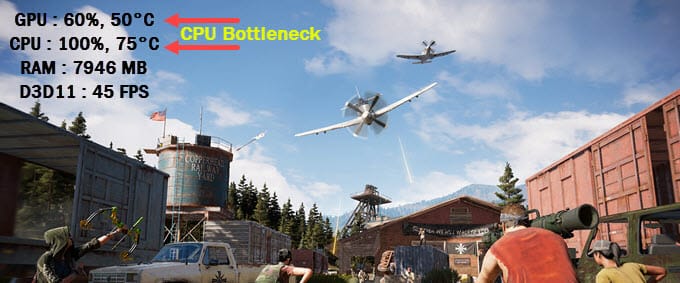
CPU Bottleneck can also be caused by software or hardware factors, even if you have a high-end CPU that matches the level of your graphics card. Below is an informative post explaining the major causes of CPU Bottleneck in games, along with solutions or fixes.
Note: An improper pairing of CPU and GPU does not mean your CPU or GPU won’t work together, or that you’ll face compatibility issues. It means that you won’t get the desired performance from your CPU and GPU combined in games, especially at high graphics settings.
Ideal CPU GPU Pairing
An ideal or proper selection of CPU and GPU should avoid or minimize bottlenecks in almost all games, whether they are more CPU- or GPU-dependent. An ideal CPU-GPU pairing should consist of components that are evenly matched or very closely matched. Pairing a mid-range CPU with a mid-range GPU is ideal, while pairing an entry-level CPU with a mid-range GPU is not ideal and will hurt performance in gaming and other tasks. Below are tables or charts listing the ideal CPU-GPU pairing and the likelihood of a bottleneck.
CPU GPU Pairing List with Bottleneck Possibility
| CPU | GPU | Bottleneck Possibility |
| Budget or Entry Level | Budget / Entry Level | Balanced |
| Budget or Entry Level | Mainstream | Balanced or Slight CPU/GPU Bottleneck |
| Budget or Entry Level | Mid-range | CPU bottleneck |
| Budget or Entry Level | High-end | Huge CPU bottleneck |
| Mainstream | Budget / Entry Level | GPU bottleneck |
| Mainstream | Mainstream | Balanced |
| Mainstream | Mid-range | Balanced or Slight CPU Bottleneck |
| Mainstream | High-end | CPU bottleneck |
| Mid-range | Budget / Entry Level | GPU bottleneck |
| Mid-range | Mainstream | Slight GPU bottleneck |
| Mid-range | Mid-range | Balanced |
| Mid-range | High-end | Slight CPU bottleneck |
| High-end / Flagship | Budget / Entry Level | GPU bottleneck |
| High-end / Flagship | Mainstream | GPU bottleneck |
| High-end / Flagship | Mid-range | Slight GPU bottleneck |
| High-end / Flagship | High-end | Balanced |
CPU GPU Pairing for Gaming PC
|
|
Budget Gaming PC | Mid-range Gaming PC | High-end Gaming PC |
| CPU | 4 Cores / 6 Cores | 6 Cores / 8 Cores | 8 Cores or Higher |
| GPU | Budget or Mainstream | Mid-range | High-end or Flagship |
| RAM | 8 GB | 16 GB to 32 GB | 32 GB or Higher |
*The CPU and GPU for the above selection should be of the modern generation and must not be from a very old generation or be discontinued / obsolete.
Should I upgrade my CPU or GPU First for Gaming?
Deciding whether to upgrade your CPU or GPU first for gaming is a dilemma many users face, especially on a tight budget. Upgrading the CPU is a bit harder, and you may be limited by options due to platform or motherboard socket support. On the other hand, upgrading the graphics card is relatively straightforward, as you are not limited by the platform or dependent on any other component. However, getting the right upgrade should be your priority; otherwise, you might end up wasting your money without any substantial improvement in gaming performance. Below is a detailed post that can help you decide whether to upgrade the CPU or GPU first, based on various factors.
CPU GPU Bottleneck Calculators
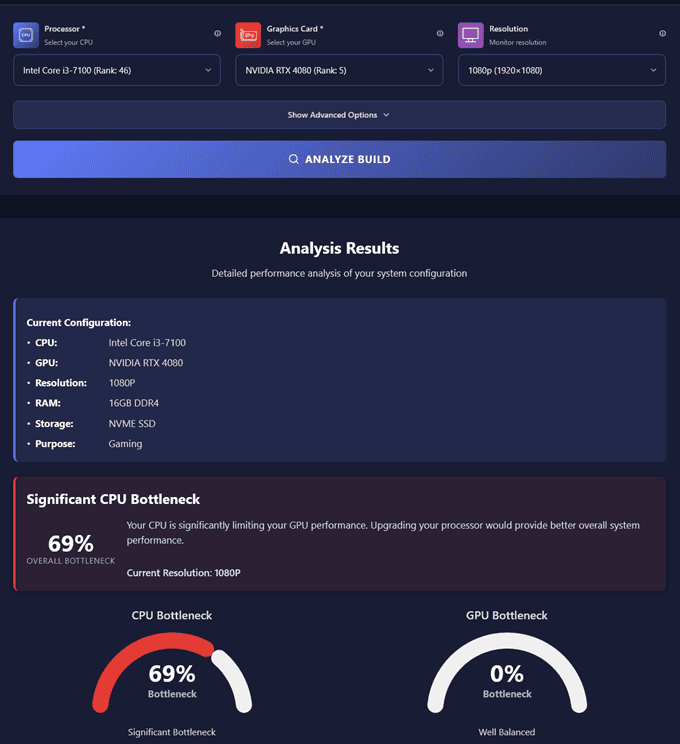
There are some CPU-GPU bottleneck online calculators available that claim to help you choose the right CPU and GPU combination to avoid any bottlenecks in games. These tools are also called Bottleneck calculator, CPU GPU compatibility calculator, PC bottleneck calculator, etc. The CPU GPU Bottleneck Calculators are simple to use and give us an idea about the bottleneck faced by either the CPU or the GPU. To use them, you have to select the CPU, GPU, RAM, and Gaming Resolution, and the tool will tell you whether your CPU or GPU is the bottleneck and by how much, as a percentage. These bottleneck calculators are not entirely correct, and different bottleneck calculators will give you different results. So, you never rely entirely on them when choosing the CPU and GPU combo for your gaming PC. Below, you can see the calculation performed by one of these bottleneck calculators for a CPU-GPU pairing.
Popular CPU GPU Bottleneck Calculators
Below are some of the most commonly used CPU-GPU Bottleneck Calculators for assessing the cause of the bottleneck between the CPU and GPU.
https://pc-builds.com/bottleneck-calculator/
https://bottleneckchecker.org/
https://www.willitbottleneck.com/
https://bottleneckcalculator.us/
https://pcbottleneckcalculator.io/
See also:
- How to Check Motherboard Graphics Card Compatibility [Guide]
- Graphics Card stopped working suddenly [Causes and Solutions]
- Graphics Card Troubleshooting Guide
Queries?
If you have any queries regarding CPU and GPU pairing, or need personal recommendations for CPU/GPU or CPU/GPU combos, do let me know in the comments below.
(*This post may contain affiliate links, which means I may receive a small commission if you choose to purchase through the links I provide (at no extra cost to you). Thank you for supporting the work I put into this site!)

Excellent explanation of CPU and GPU compatibility. I especially like the point that CPU-GPU pairing is about achieving balanced performance rather than just hardware compatibility. Many beginners assume any modern CPU and GPU combination will deliver the best gaming experience, but bottlenecks can still reduce FPS and increase stuttering if the components are poorly matched.
Before upgrading hardware, I also recommend checking your build with a
CPU Bottleneck Checker.
It provides a quick way to estimate whether your processor or graphics card is likely to limit gaming performance, making it easier to choose a more balanced upgrade path.
The article was surprisingly easy to follow, especially considering how technical some parts of the topic can become. The way the information was broken down made it easier to understand the reasoning behind each point instead of simply presenting conclusions. I also liked that the article didn’t rush through the details. I recently checked a https://bottleneckcalculator.site/ while looking into a related question, and it made me think about how useful it is to have calculations presented alongside a clear explanation of what they actually mean. Numbers can sometimes look convincing without much context. It would be interesting to see more examples showing how the same setup behaves under different workloads.